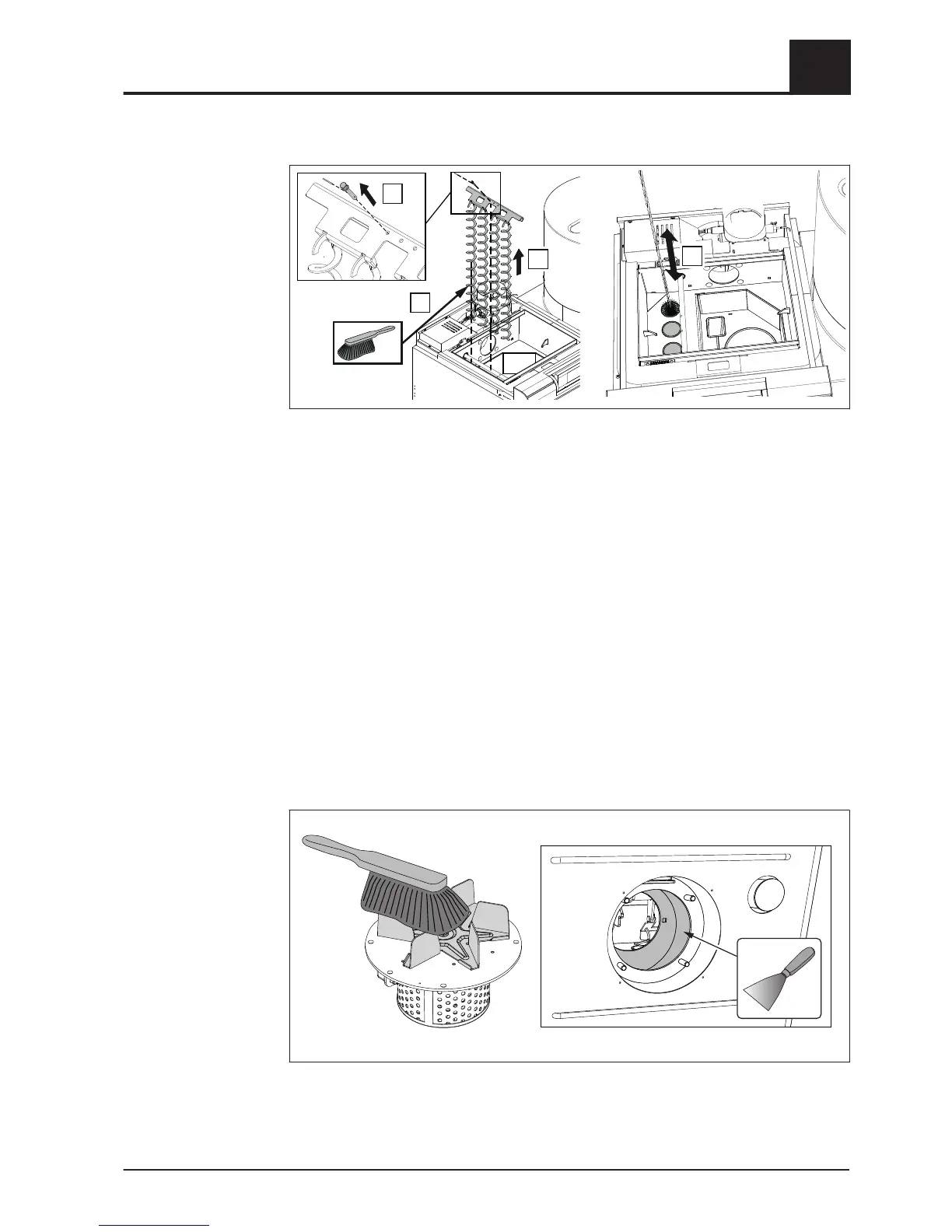
❒ Remove the insulating cover and cleaning cover
⇨ See "Cleaning the flue gas collection chamber and the heat exchanger" [page
30]
❒ Remove the retainer at the bottom at the lock bolt, push the lock bolt up and
remove
❒ Remove the WOS mount along with the springs
❒ Clean the heat exchanger pipes with cleaning brush provided
Cleaning the induced draught fan
Check the induced draught fan for dirt and deposits and clean if necessary
NOTICE! Deposits on the running wheel can cause an imbalance in the ID fan, which
can result in noise or, in the worst case, bearing damage.
Cleaning (if required)
❒ Unplug the connection cable of the induced draught fan
❒
Remove the induced draught fan from the back of the boiler
➥ Take care not to damage the seal
❒ Check running wheel for damage
Boiler Servicing
4
Inspection and cleaning
Operating Instructions P4 Pellet | B0870417_en 31


 To Next Page