stops at the correct position.
Followe 41 stops at the correct position.
c. If the problem has not been eliminated, please repeat the "Step One" until the Cam
b. Reset the machine and allow it to cycle again to ensure that the Cam Follower 41
M6 screws.
a. Loosen the two M6 screws and turn the Cam Roller slightly clockwise, then tighten the
If Cam Follower 41 stops the correct position:
before
Adjustment
the following instructions.
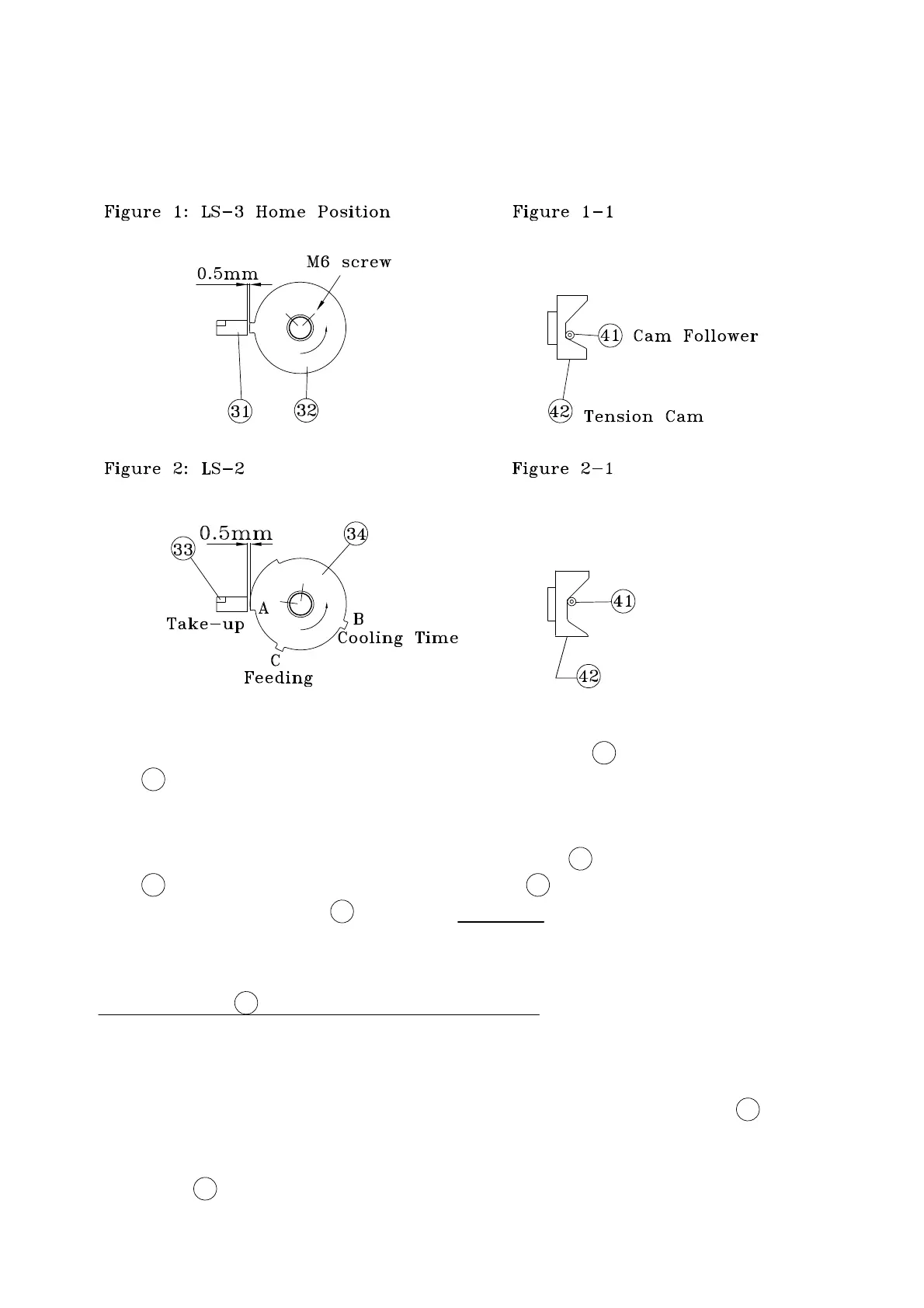
position on the Tension Cam 42 as shown in If not, please adjust according to
Cam 32 is activated. At this time, the Cam Follower 41 must stop at the corner
The machine will stop as soon as the LS3 Proximity Sensor 31 detects that Limit Switch
figure 1-1.
Cam 32 while the machine is in home position.
shows the correct position for LS3 Proximity Sensor 31 and the Limit Switch
Figure 1
(3) How to adjust LS3, LS2
-14-


 To Next Page