Quick guide PV Point & PV Point Comfort 1215
Name: FRONIUS_Pilot serial number
Password for devices with production date before 08/2023: 12345678
Password for devices with production date from 08/2023: visible on the nameplate
Opening a web browser (Fronius recommendation: Google Chrome) and entering the IP address
192.168.250.181 opens the installation wizard. In a LAN connection, the required IP address is
169.254.0.180.
3.1 Activation of the PV Point [Comfort] during initial commissioning
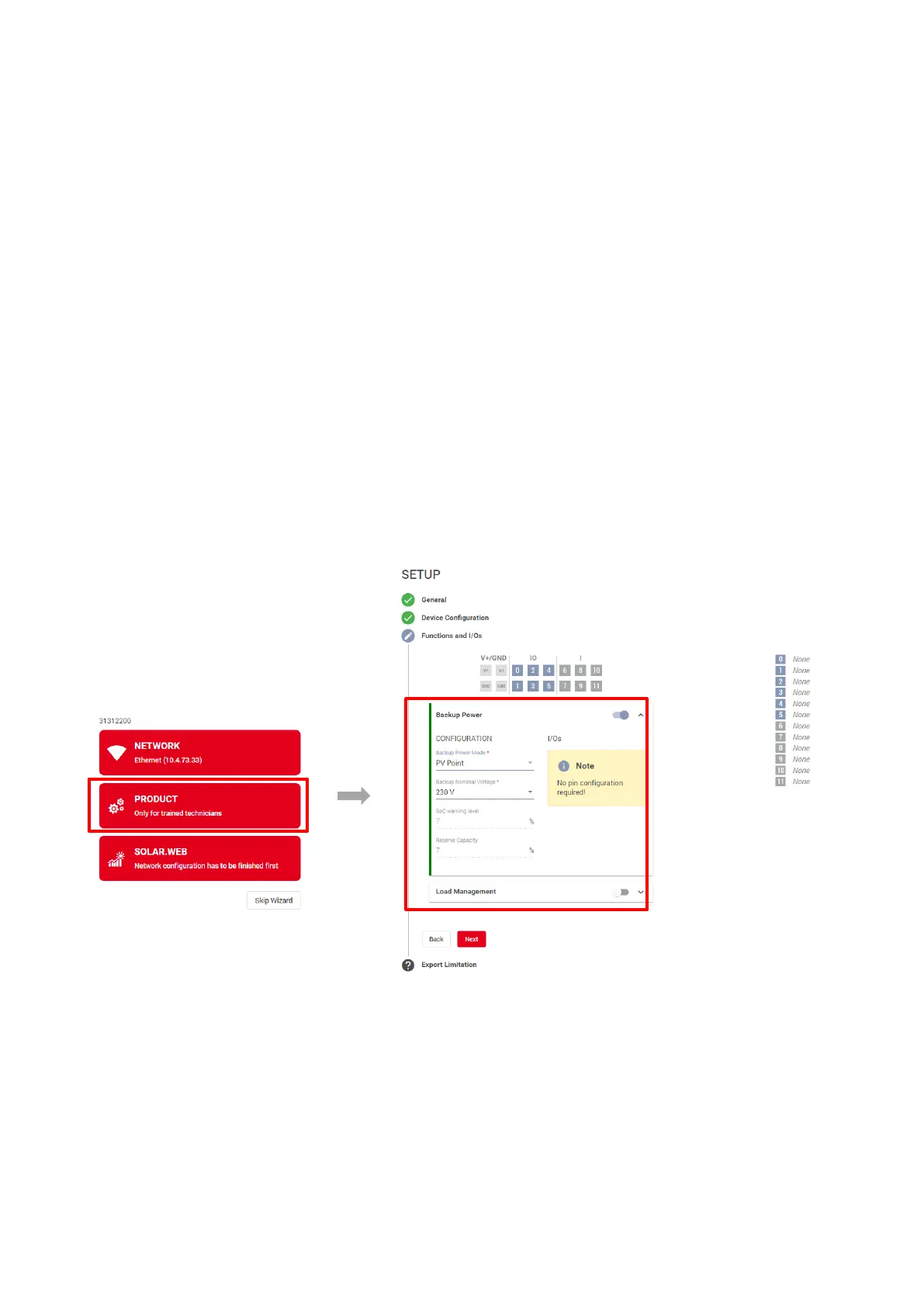
The PV Point [Comfort] can already be activated during initial commissioning in the commissioning
wizard under the "Product Wizard" in the "Functions and I/Os" menu item. Here it is important to
activate the basic backup power function and the "PV Point" mode. This selection applies to both PV
Point and PV Point Comfort. Figure 10 shows the photo gallery of the most important steps and settings:
Figure 10: Activation of the PV Point [Comfort] in the commissioning wizard during initial commissioning
of the GEN24 & GEN24 Plus inverter



 To Next Page