Quick guide PV Point & PV Point Comfort 1115
3 Commissioning
The PV Point [Comfort] is commissioned via the web interface of the inverter and can be activated both
during initial commissioning and at a later stage. Fronius recommends carrying out commissioning with
the "Fronius Solar.start" app, which is available free of charge in the Google Play Store and for iOS. The
Fronius Solar.start app is identied by the following icon (Figure 8):
Figure 8: Icon of the Fronius Solar.start app
The basic requirement for both of the following variants is access to the web interface of the Fronius
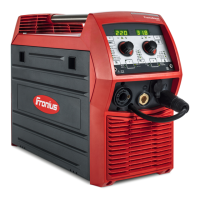
GEN24/GEN24 Plus device. By quickly pressing the button on the front of the device once, the inverter
automatically opens its local network, to which you can then connect with any mobile device (laptop,
smartphone, etc...). Figure 9 shows the LED communication interface with its functions:
Figure 9: Opening the local network (Wi access point) of the Fronius GEN24 or GEN24 Plus inverter
series and description of the functions of the LED patterns
The feedback from the inverter is indicated by the communication light ashing blue and the connection
to the inverter (via app or WLAN/LAN) can be established. The network can be recognized (with a WLAN
connection) by the following parameters:



 To Next Page