Section 4 Service, Configuration & Test
48 FT722 & FT742 (RS485) – FF & PM Sensors – User Manual
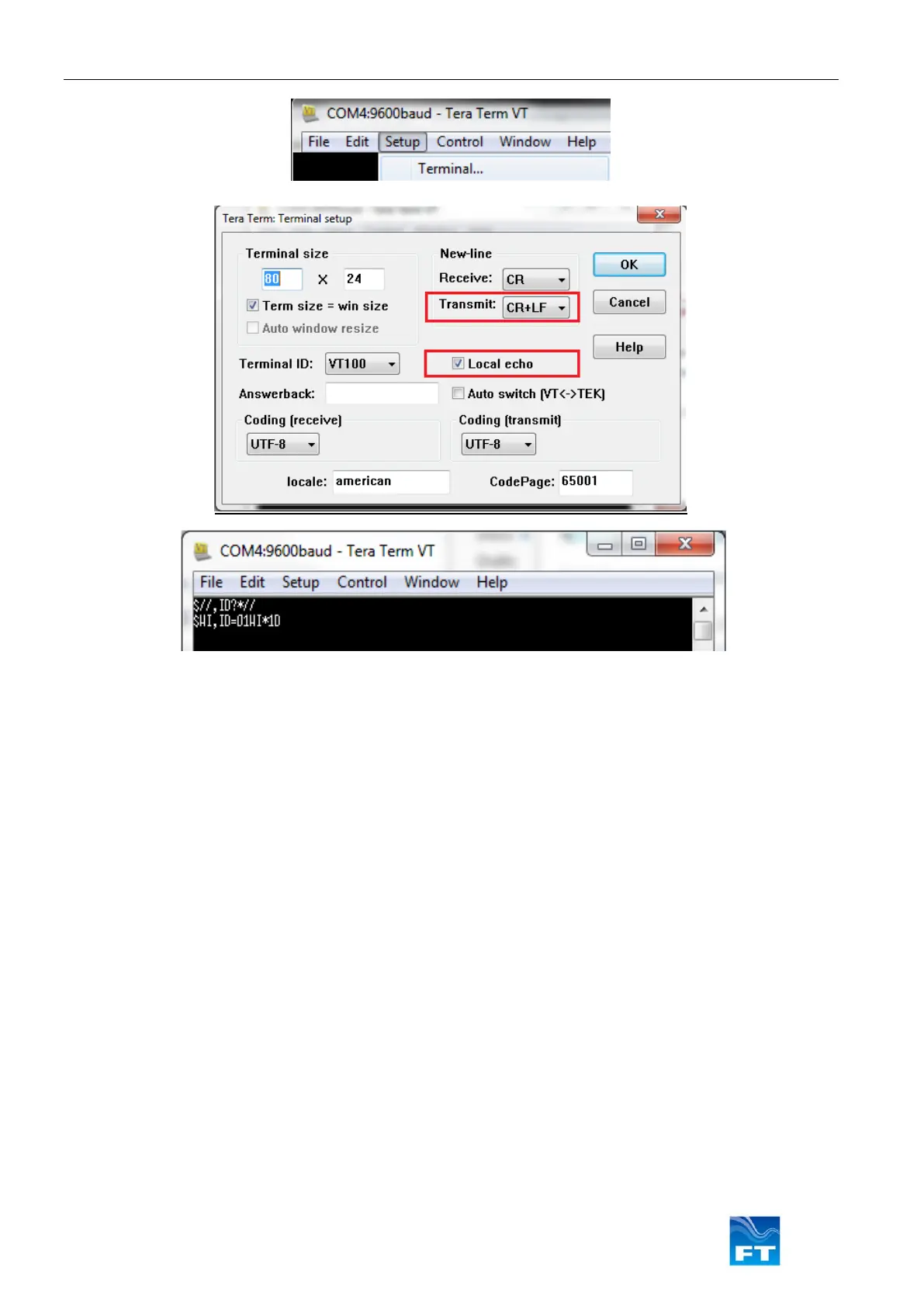
Figure 45: Modifying Terminal Settings in Tera Term
Tera Term defaults to a baud rate of 9600, it may be necessary to configure this setting via the Setup menu →
Serial Port… settings window.
With connection enabled with the settings configured as described above, send commands to the sensor to
confirm successful connection. Please note that in half-duplex communication protocols the sensor cannot receive
commands while simultaneously transmitting information, therefore it may be necessary to repeat the command
and confirm it was accepted using a QUERY command. This can be an issue when using CU mode at high
frequencies.
Below are some useful commands:
$01,ID?*// Query the sensor ID setting
$01,CU?*// Query the CU mode setting
$01,CUD*// Disable CU mode
$01,CUE00010*// Enable CU mode at 1 second intervals (1Hz). Note: Command is for FT742 sensors only.
The // line bypasses the checksum validation. Checksum validation is recommended for production datalogging
to improve data integrity. See Section 5 and 6 for further details regarding command structures and replies.
Note: If a sensor is set to an ID setting other than 01, replace $01 with the alternative ID. Starting a command
with $// will perform the relevant command on all connected sensors.



 To Next Page