700-Bubbler-Man Rev 12 13 Feb 2020
Page 27/51
Temperature Units: Select either C (Celsius) or F (Fahrenheit).
4.5 PURGE TAB
The Datalogger can initiate purges on a regular schedule to clear the hose outlet of silt or debris
which may be blocking it. The frequency of the purges and the psi used to conduct them are
dependent on the environment and conditions of the site. ,
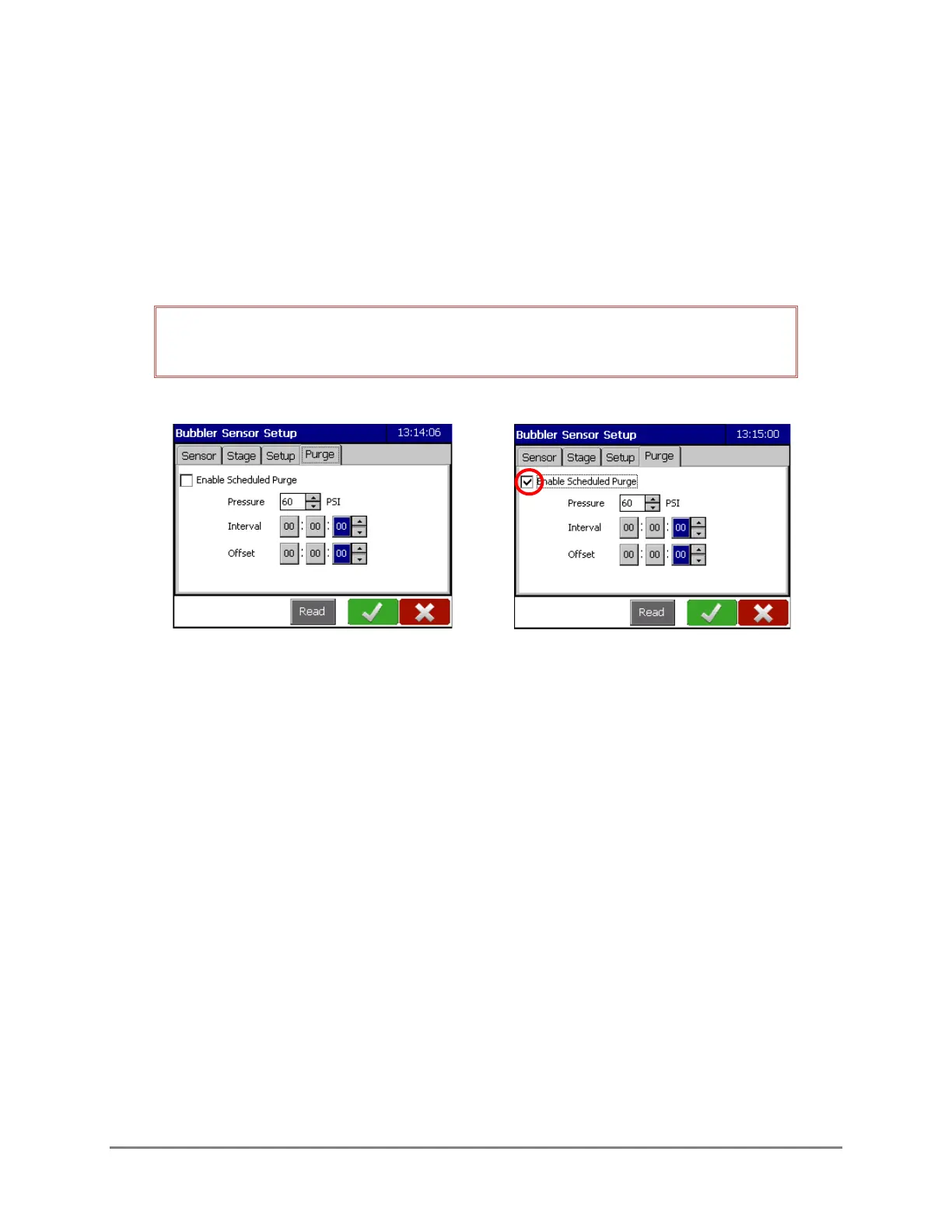
IMPORTANT! The Enable Scheduled Purge box must be selected for scheduled
purges to take place. The default is to have scheduled purges disabled.
Purge Tab showing Scheduled
Purge selected
Figure 4-1: Purge tab options
Scheduled Purge
For a scheduled purge, select the Enable Scheduled Purge checkbox.
Select the desired pressure at which to conduct the purge. The pressure range is from 20-90 psi.
The default value is 60 psi.
Interval: The interval is how often the purge will occur and is in HH:mm:ss format. The
minimum purge interval is 10 minutes (00:10:00).
Offset: Optional. This determines the starting time the purge will commence based on time
after midnight.
For example: An interval of 24:00:00 and an offset of 10:15:00 means the purge will take
place daily (every 24 hours) at 10:15 a.m.



 To Next Page