Registration in the memory
29
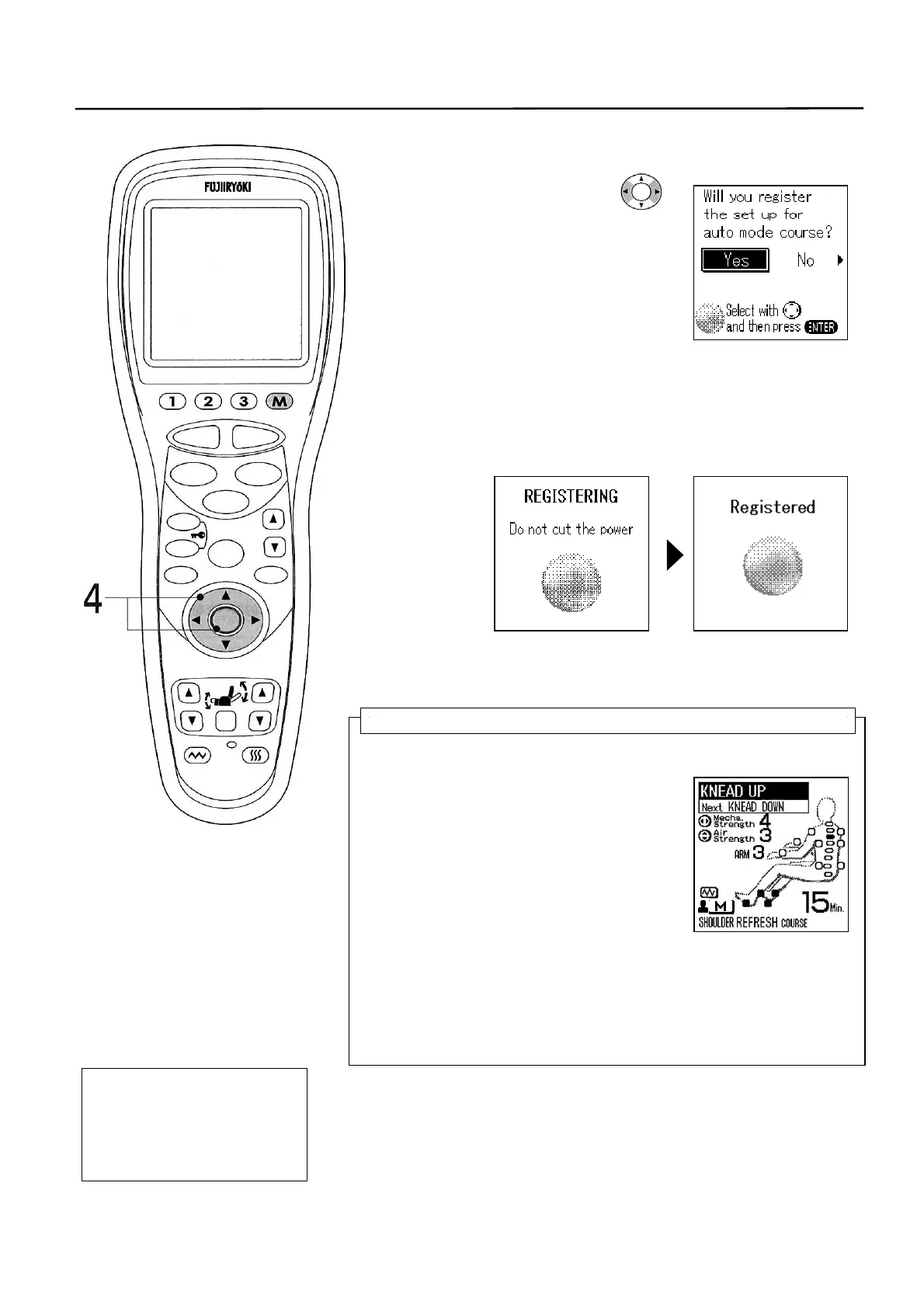
4. As the AUTO COURSE terminates, the memory
registration confirmation screen is displayed.
Select “Yes/No” with the
switch and press the
[ENTER] button.
5. As the memory registration is over, the
REGISTERING screen is displayed followed by the
Registered screen, which means that the
registration has been completed.
* Do not turn off the power when the memory registration is
going on. Otherwise, the memory registration will be
disabled.
• If you start the massage by pressing the QUICK MODE (M)
button (See P19) after the completion of registration, the
chair operates according to the registered program.
In case of the example of use
Following movements will start based on the
information of your body shape.
• “REFLESH” course of “SHOULDER”
• Mechanical strength “4”
• Air strength “3”
• Shoulder massage strength “STOP”
• Arm massage strength “3”
• Foot Stretch “OFF”
• Pulse “OFF”
• Vibration “ON”
• Heater “ON”
• Skips “3D TAPPIN” at 5 minutes after the massage start.
• Repeats the “WAVELET” at 9 minutes after the massage start.
* Mechanical (knead balls) massage intensity and air
intensity are not registered in the memory.
* Heater stops automatically one hour later regardless the
massage timer.
6. As the memory registration is over, the knead balls
return to the stored position automatically.
• To change the content of registered memory (overwrite),
start from the beginning on P27.
• To erase the registered memory, refer to another function
(When erasing the registered memory) (P51).
One Point!
You can select other AUTO
COURSEs based on the
registered body shape
information and air option
information.
STOP
STAR
RESE
AUTO
FUNCTION
AIR
REPEAT
SKIP
SHDR
MENU
ARM
ENTER
FOOTREST RECLINER
RESET
VIBRATION HEATER
HEIGH
ADJUSTMEN



 To Next Page