Preparation before use
7
Installation of the Remote Controller Stand
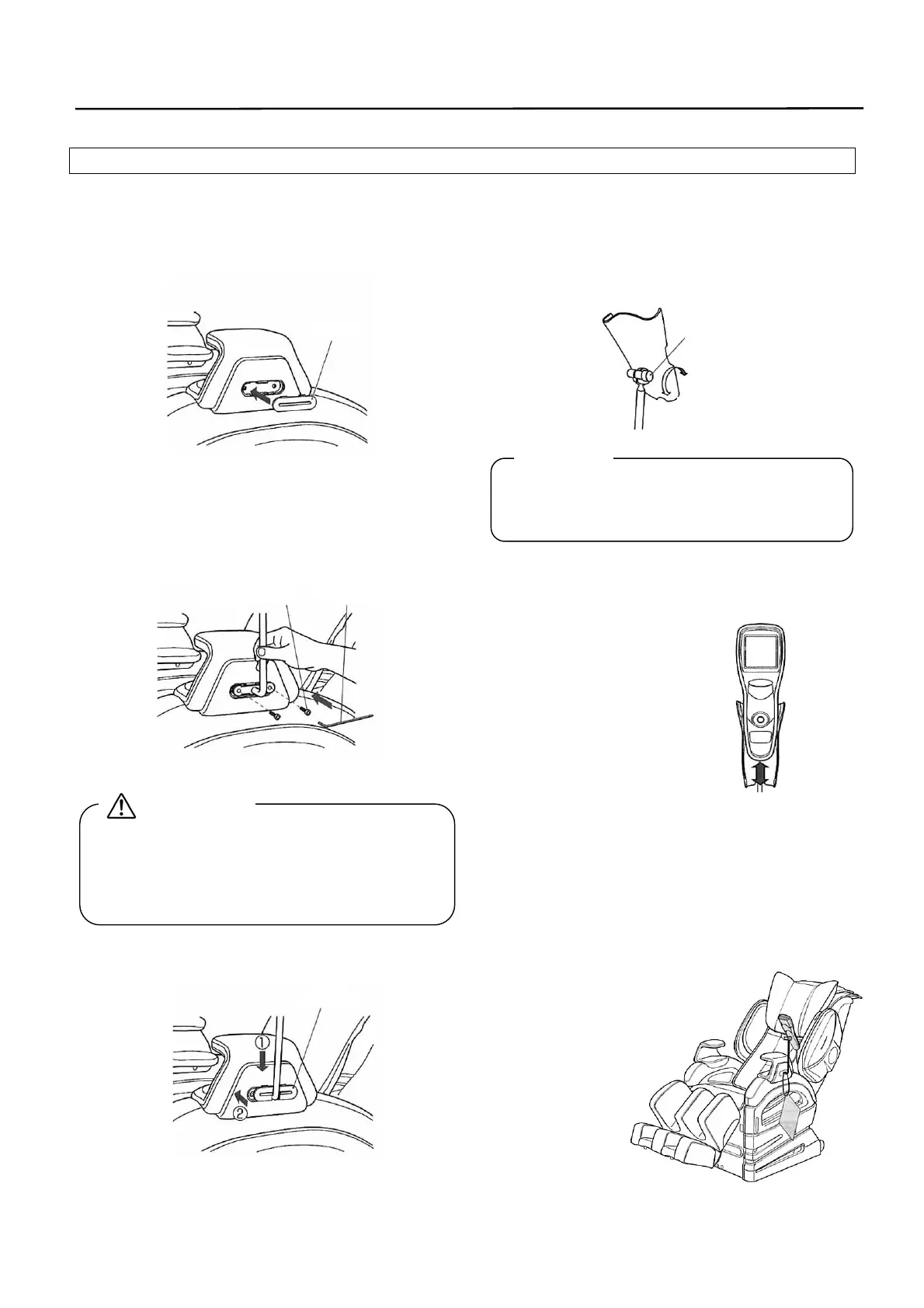
1. Install the cap on the arm unit at the
right side of main unit.
* Do not install the Remote Controller stand at the
right side of main unit. Remote Controller cord
is not long enough to install at the other side.
[Adjustment of Remote Controller holder]
Loosen the fixing screw to adjust at a
desirable position and then tighten the
screw securely.
2. Install the Remote Controller stand on
the arm unit at the left side of main
unit and fix securely at two places
with mounting screws.
To remove the Remote Controller stand, reverse
the order of installation.
[Installation/removal of Remote Controller]
Installation:
Install in a manner to
insert from the top.
Removal:
Pull it upward.
Make sure to install the Remote Controller
stand securely. Otherwise, it could cause
injury or mechanical trouble if the stand has
dropped off accidentally.
3. Finish up the work by installing the
cap.
[Completed view]
Pass the string
through the Remote
Controller stand to
hang down the quick
operation guide.
Cap
Fixing screw
Tightening
Loosening
Right side
Left side
Phillips wrench
Mounting screw
Cap
CAUTION
Request
Left side



 To Next Page