Getting started
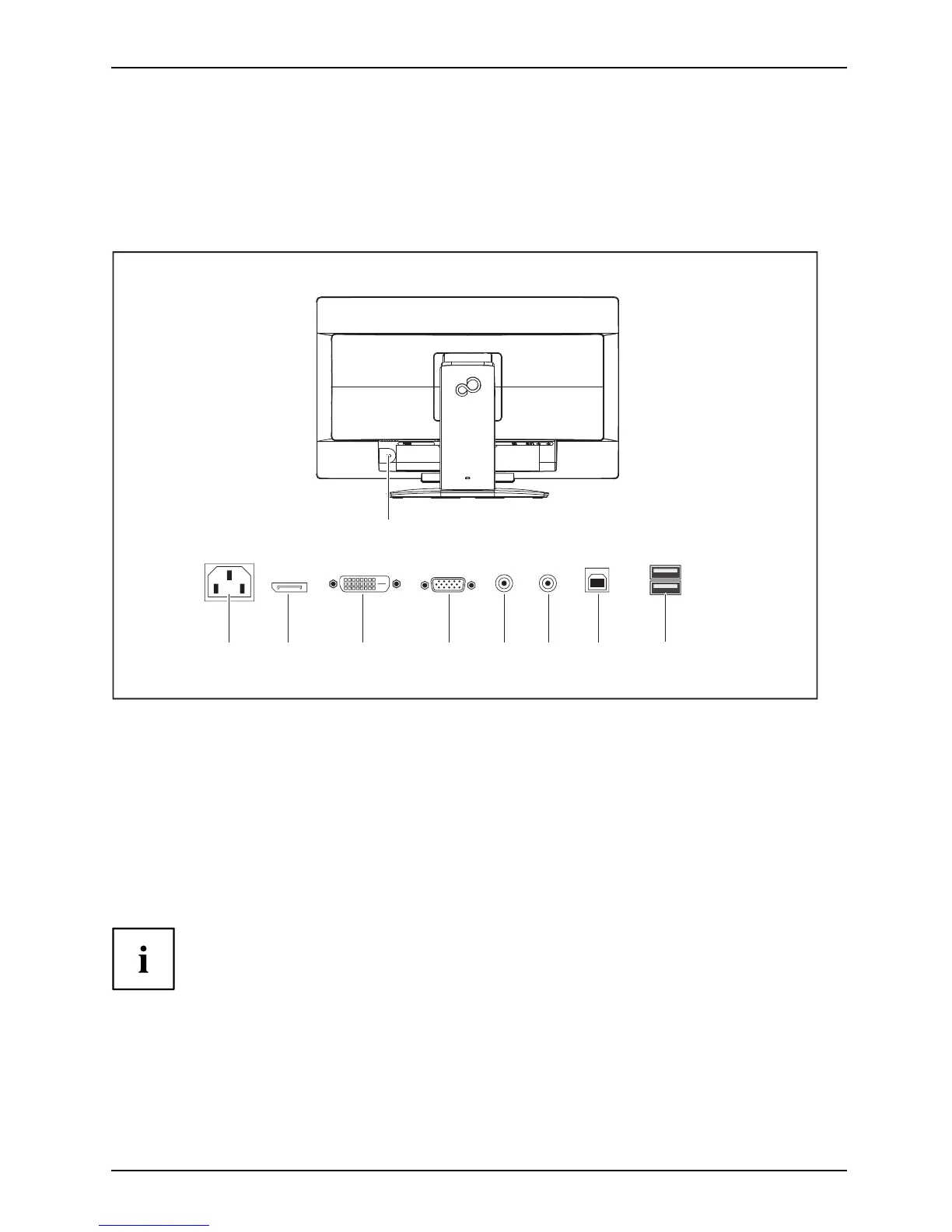
Connecting cables to the monitor
The data cables supplied have two 15-pin D-SUB connectors or two 24-p in D VI
connectors for connection to the monitor and to the computer.
Information on th e compu ter connections and interfaces is c onta ined in the
operating m an ual for the computer.
2
1
3 4 5 76 8
9
1 = Secur ity slot for "Security Lock"
2 = AC connector socket
3 = D isplayPort socket
4 = DVI-D socket (DVI)
5 = D -SUB socket (VGA)
6 = AUDIO-IN so ck et
7 = AUDIO-OUT soc k et
8 = USB 2.0 (upstream)
9 = USB 2.0 (downstream)
► Select the appropriate data cable for your computer.
► Connect one of the connectors of the data cab le to the DVI-D or DisplayPort socket of the
monitor and se cure the DVI-D plug-in connect ion by tightening the safety screws.
The monitor automatically detects the input (VGA, DVI, DisplayPort)
when only one signal source is connected.
► Insert one connector of the audio line into the AUDIO IN socket (6) on the
monitor and make sure it is properly engaged.
► Plug the power cable supplied into the power conn ector of the monitor.
Fujitsu 17














 To Next Page