24 – English Mainboard D3488
Installing the Memory
Before attempting to install any memory, make sure that the memory you have is compatible with the
motherboard as well as the processor. The D3488 board supports up to twelve 288-pin 1.2 V / 2.5 V,
2133/2400/2667 MHz DDR4 modules.
Here are a few key points to note before installing memory into your D3488:
● The following memory modules are supported: 4 GB, 8 GB, 16 GB, 32 GB, 64 GB registered
and LR-DIMM ECC modules
● All installed memory will be automatically detected - no need to set any jumpers
● The D3488 supports up to 1 TB of memory
● Modules with different timing parameters can be installed on different slots within the same
channel, but only timings that support the slowest Module will be applied to all.
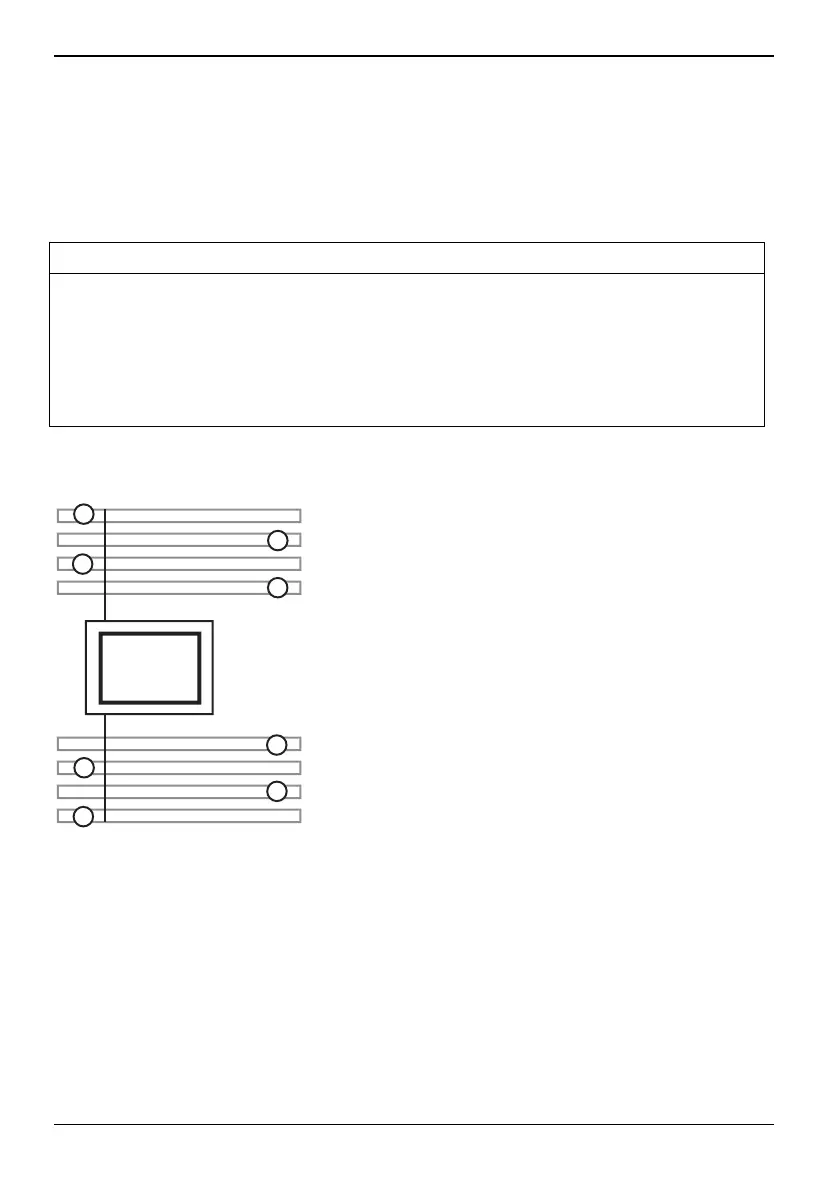
To reach maximal performance, plugging the modules in the following sequence.
If only one CPU is equipped, equip CPU 0 as follows:
CH-C 1
CH-B 1
CH-A 1
CH-A 2
CH-D 2
CH-D 1
CH-E 1
CH-F 1
CPU 0
LGA3647
2
5
4
1
3
8
7
6
62 Fujitsu


 To Next Page