CONTENTS
Introduction
1 NAMES AND FUNCTIONS OF PARTS
2 BASIC SCANNER OPERATION
3 SCANNING VARIOUS TYPES OF DOCUMENTS
4 DAILY CARE
5 REPLACING CONSUMABLES
5.1 Consumable and replacement cycle
5.2 Replacing the brake roller
5.3 Replacing the pick roller set
6 TROUBLESHOOTING
7 ONLINE SETUP
8 DOCUMENT SPECIFICATION OF ADF
9 OPTIONS
10 SCANNER SPECIFICATIONS
Appendix
5.1 Consumable and Replacement Cycle (Continued from the previous page)
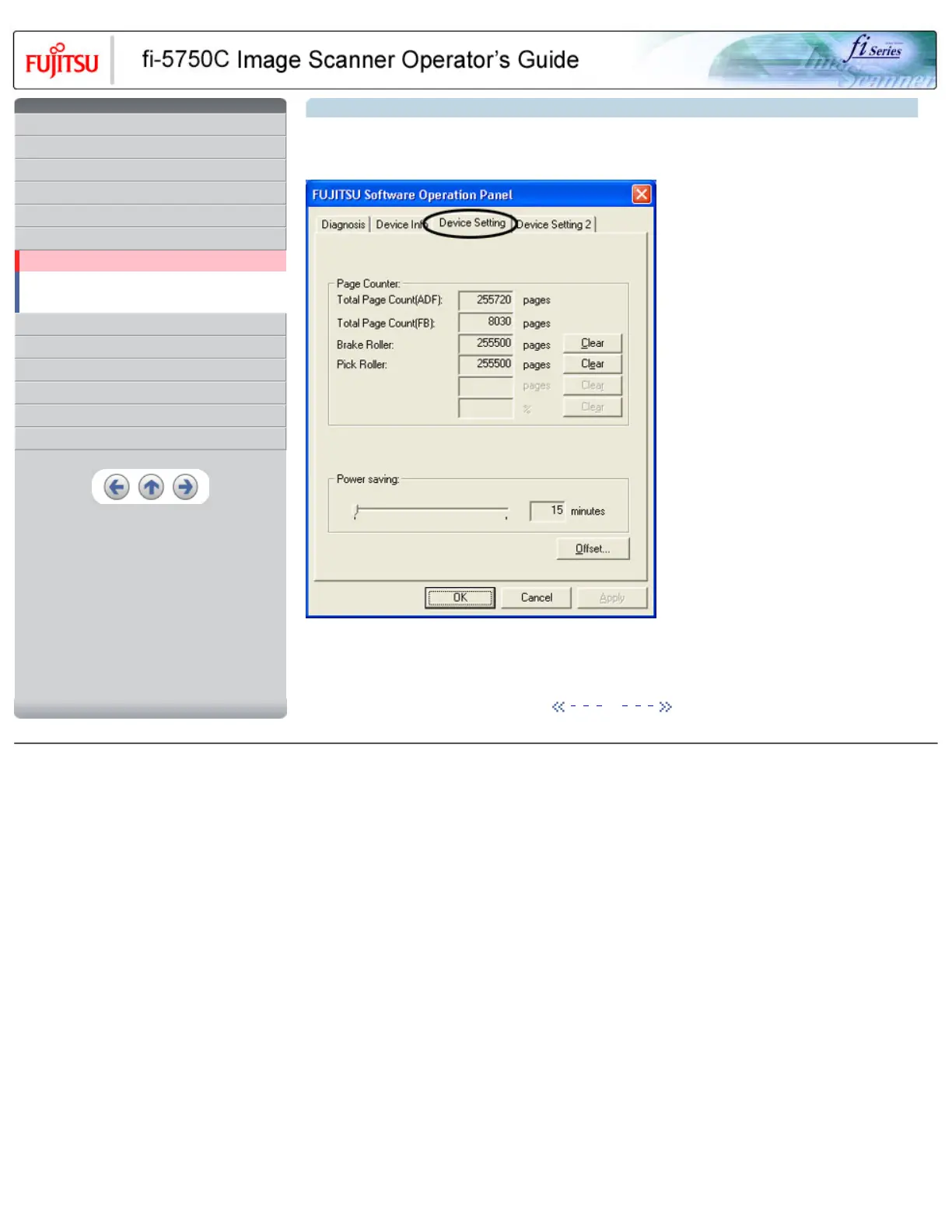
3. Click the [Device Setting] tab
>> The following panel appears.
You can confirm the following information on this panel:
● Total number of scans
● Brake Roller counter (approximate number of scans after resetting the Brake Roller counter)
● Pick Roller (approximate number of scans after resetting the Pick Roller counter)
1 | 2 | 3 | 4 | 5 | 6 | 7
All Rights Reserved, Copyright (C) PFU LIMITED 2003



 To Next Page
 Loading...







