CONTENTS
Introduction
1 NAMES AND FUNCTIONS OF PARTS
2 BASIC SCANNER OPERATION
3 SCANNING VARIOUS TYPES OF DOCUMENTS
4 DAILY CARE
5 REPLACING CONSUMABLES
6 TROUBLESHOOTING
7 ONLINE SETUP
7.1 Online setup
7.2 Double-feed detection
7.3 Setting of Page Edge Filler
7.4 Setting dropout color
7.5 Setting of pre-pick mode
7.6 Resetting the consumables counters
7.7 Adjusting the offset
7.8 Adjust the magnification
7.9 Power saving
8 DOCUMENT SPECIFICATION OF ADF
9 OPTIONS
10 SCANNER SPECIFICATIONS
Appendix
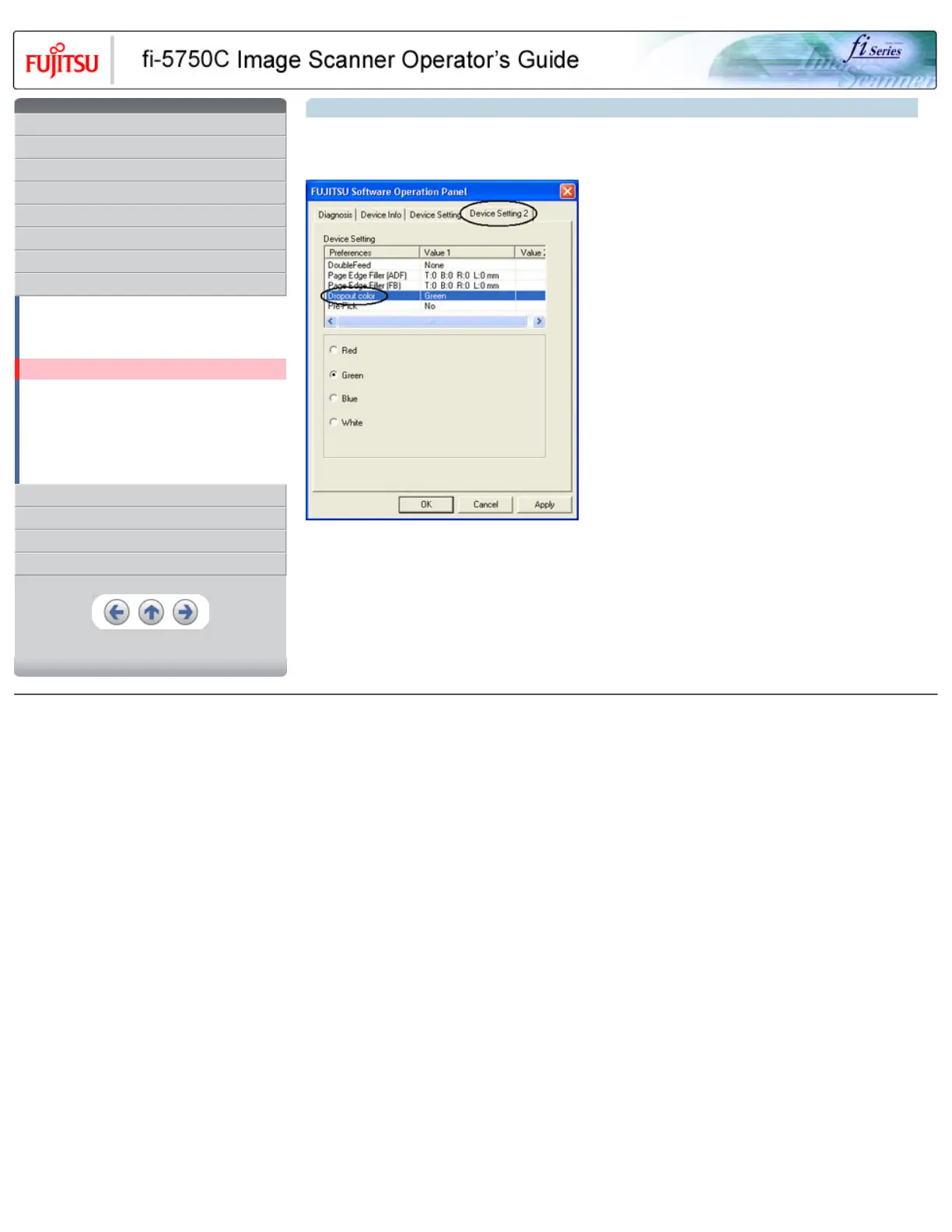
7.4 Setting dropout color
Set a color to be dropped out as follows.
1. Click [Device Setting 2] tab, and select [Dropout color] from [Preferences].
2. Mark the check box of the color to be dropped out (Red, Green, Blue and White).
Red : Red will be dropped out.
Green : Green will be dropped out.
Blue : Blue will be dropped out.
White : No dropout
HINT
It will take precedence FUJITSU TWAIN32 Scanner driver configuration.
All Rights Reserved, Copyright (C) PFU LIMITED 2003










 To Next Page