U41578-J-Z875-1-76 37
RAID wizard
RAID systems are usually configured in stages as follows:
1. Physical drives are grouped together into disk groups or arrays.
2. Logical drives inside groups are mapped as LUNs.
3. These LUNs are assigned a RAID level.
4. SAN-LUN mapping defines which HBA is assigned to which LUN.
Remark: You can also order the FibreCat S80 factory preconfigured!
Starting configuration
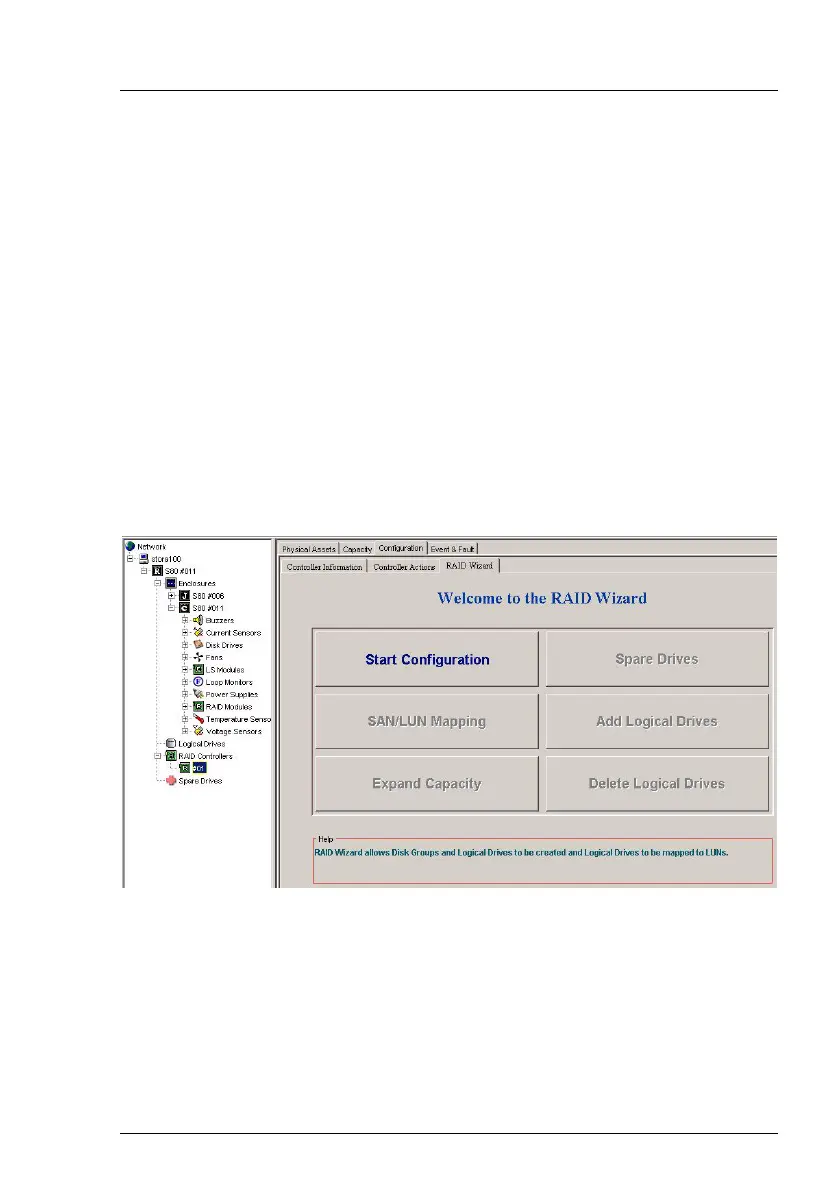
Select the Configuration and RAID Wizard file cards. The following display will
appear.
You only need to configure one controller even on systems with two controllers.
In dual systems, the data are automatically transferred to the second controller.
Before you start the RAID system configuration proper, you should first check
that you have deleted the old configuration. The display shown above, with the
Start Configuration button active, will only appear if the old configuration has
already been deleted. If other buttons (e.g. Expand Capacity) are active, this
indicates that the old configuration has not yet been deleted.







 To Next Page