EasyManua.ls Logo

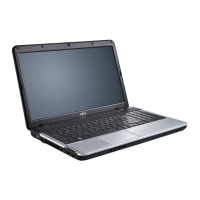
Fujitsu LIFEBOOK A530 - User Manual

Fujitsu LIFEBOOK A530
87 pages
Print Icon
To Next Page IconTo Next Page
Loading...
System
Operating Manual
LIFEBOOK A530
LIFEBOOK AH530

Table of Contents

Questions and Answers

  • A
    Ashley HawkinsAug 8, 2025
    What to do if my Fujitsu LIFEBOOK A530 Laptop cannot be started?
    • T
      Terry PinedaAug 8, 2025
      If your Fujitsu Laptop won't start, there are several possible causes: * The battery may not be installed correctly. Ensure it is properly placed in its compartment, and then try switching on the notebook. * The battery might be dead. Try charging the battery, inserting a charged one, or connecting the mains adapter. * The power adapter could be incorrectly connected. Verify that it's properly connected to the notebook before attempting to switch it on.
  • D
    Dr. Jason PowellAug 15, 2025
    What to do if when I type on my Fujitsu Laptop keyboard, I only get numbers?
    • L
      Lisa SanchezAug 15, 2025
      If you're getting numbers instead of letters when typing on your Fujitsu Laptop, it's likely that the virtual numeric keypad is activated. Press the Num key to deactivate it.
  • J
    Jennifer HansenAug 31, 2025
    Why does my Fujitsu Laptop printer not print?
    • C
      curryjennaAug 31, 2025
      If your printer isn't printing, consider these possibilities: * The printer may not be switched on. Ensure the printer is on and ready. * The printer might not be connected properly. Check the data cable connecting the notebook to the printer. * The printer driver may be faulty, incorrectly installed, or the wrong driver. Verify the data cable connection and check if the correct printer driver is loaded.
  • J
    jessica46Nov 22, 2025
    What to do if I get error messages on the screen of my Fujitsu LIFEBOOK A530 Laptop?
    • M
      melissa54Nov 22, 2025
      Error messages on the screen can have various causes and solutions: * **System CMOS checksum bad - default configuration used**: Switch the notebook off and on. Press F2 to enter BIOS Setup. Go to the Exit menu, select 'Load Setup Defaults', and press Enter. * **Extended memory failed at offset**: Check if the additional memory module is correctly inserted. * **Failure Fixed Disk n**: Start the BIOS Setup (Primary Master submenu) and select the correct settings. * **Keyboard controller error**: Turn the notebook off using the power switch, wait 3-5 seconds, then turn it back on. * **Keyboard error**: If using an external keyboard, check the connection and reboot the notebook. * **Stuck key**: Ensure that no key is being pressed. * **Operating system not found**: Verify in th...

Fujitsu LIFEBOOK A530 Specifications

General IconGeneral
ProcessorIntel Core i3/i5
RAMUp to 8 GB
Display15.6-inch
Resolution1366 x 768
GraphicsIntel HD Graphics
RAM TypeDDR3
Battery6-cell
Optical DriveDVD Super Multi

Related product manuals