Four
User Installable Features
LifeBook E Series from Fujitsu
85
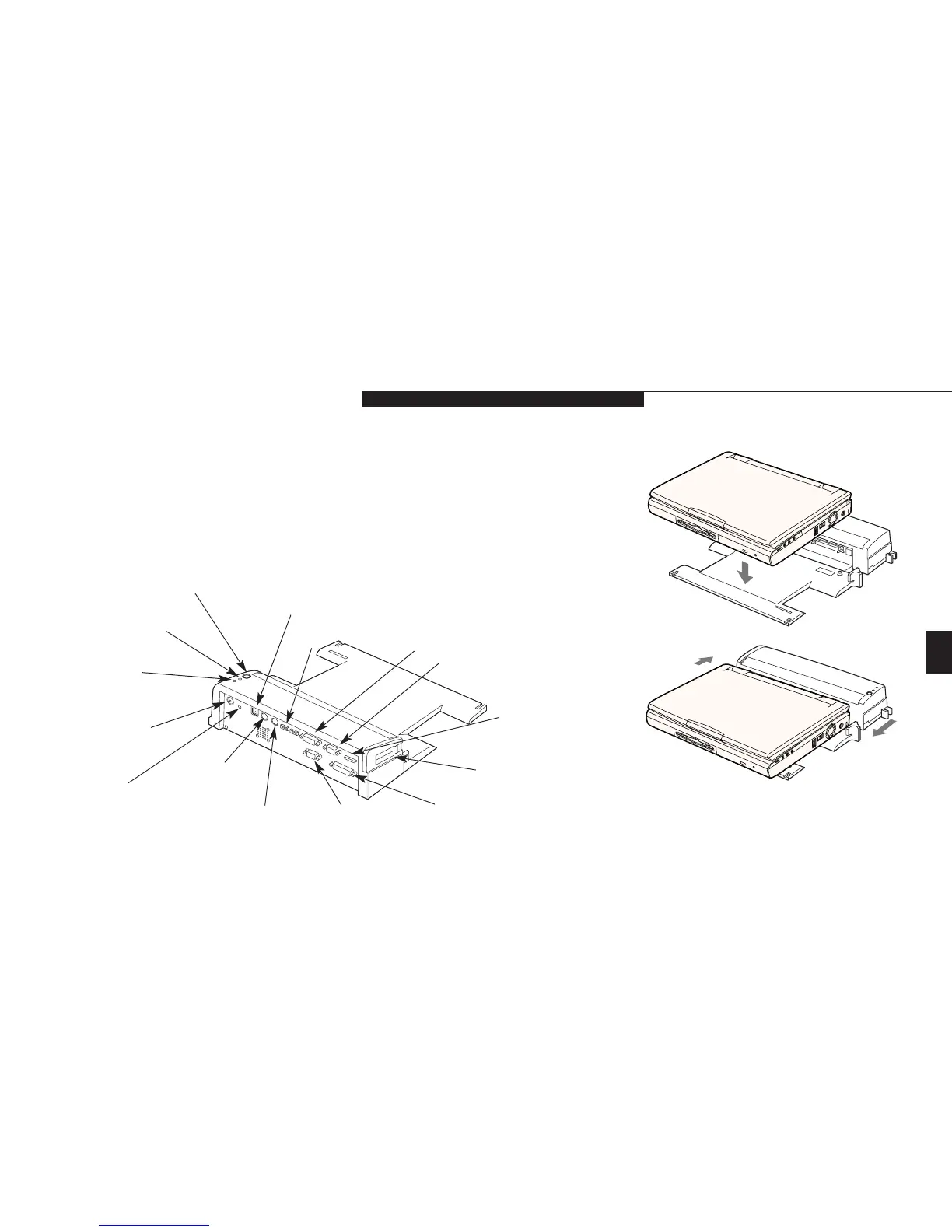
Undock Request Button
PC Card Slot
External Monitor Port
External Floppy
Disk Drive Port
Headphone
Jack
MIDI/Joystick Port
Dual USB Ports
Ethernet
(RJ-45 Jack)
Ready to Undock LED
Docked LED
DC Power Jack
Serial Port
PS/2 Mouse Port
Parallel Port
PS/2 Keyboard Port
Figure 4-16 LANdock Rear View
6. Arrange the notebook/leveler combination
to align the docking connector on the dock-
ing device body with the Docking port on
your notebook and the notches on the
leveler with the notches on the docking
device body.
7. Push together firmly.
Figure 4-17 Installing a LANdock
8. Lock in place by pulling the Docking
Release lever forward.
9.
Verify that docking is complete by checking
that the LifeBook Docked LED is illuminated.
(See Figure 4-16.)
10.
Your notebook is ready to use. (When setting
it up for the first time you must use the
power switch.)








 To Next Page