Section Four
84
CAUTION
Follow the instructions that come with
your LANdock or Port Replicator. The
instructions and illustrations in this
manual are only to serve as a guideline.
The LANdock manual that is included
with the LANdock unit supersedes
these instructions.
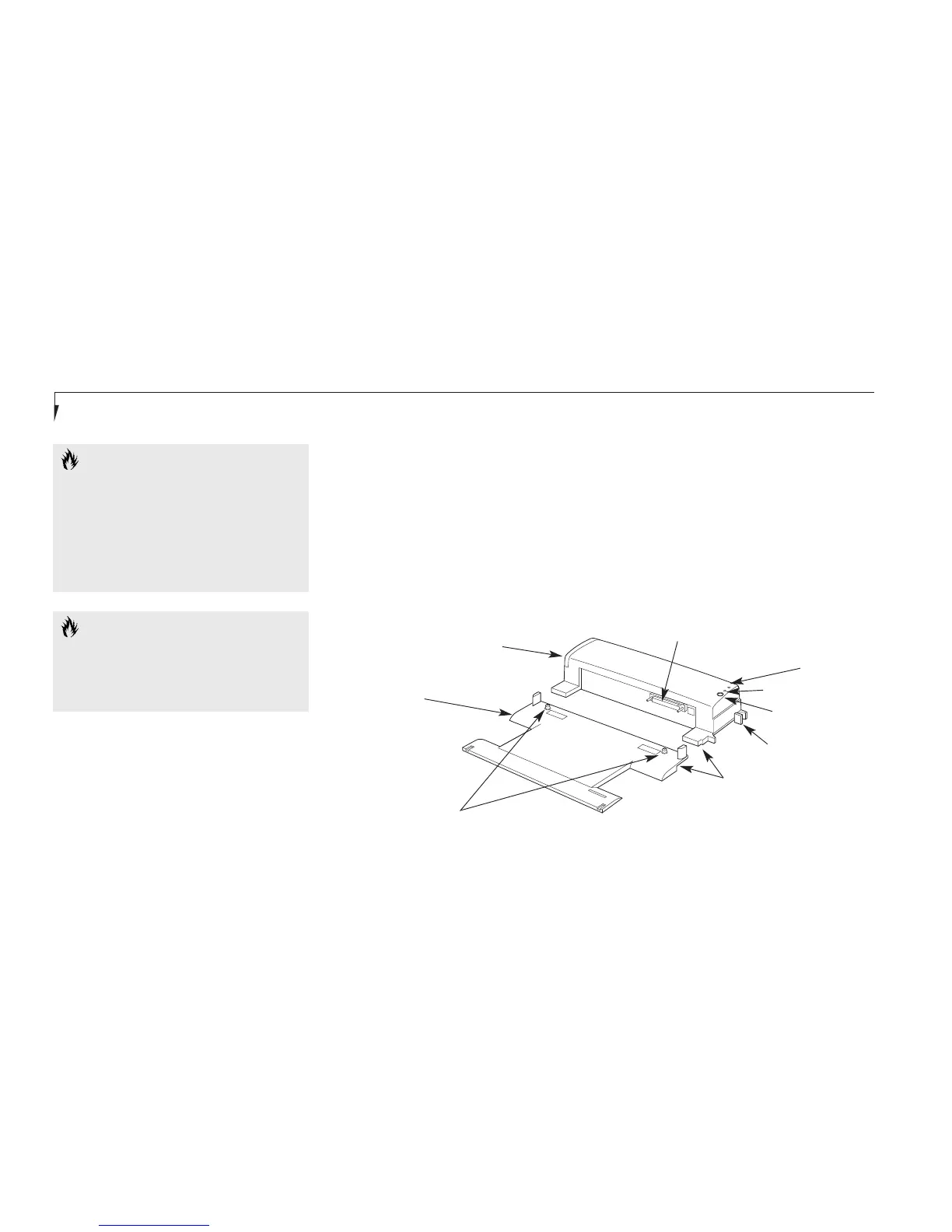
LANdock unit
Leveling
Alignment Foot
Alignment Notches
Docking Connector
Undock Request Button
Docked LED
Ready to Undock LED
Docking Release Lever
Docking Alignment Pins
Figure 4-15 LANdock Front View
LANDOCK
To Hot Dock your Notebook in a
LANdock with Windows 98 Second Edition
1. To use a docking device with your notebook
they both must be on a flat surface.
2. Remove all connections from the rear
panel of your notebook. (See Figure 1-10
on page 10.)
3. Make sure that the adjustment feet are flat
against the bottom of the notebook and the
covers of the connectors, both rear panel
and right side panel, are closed.
4. Make sure that the slide cover in the rear
panel is completely open.
5. Set your notebook on the Docking Station
Leveler, making sure that the Alignment
pins on the leveler (Figures 4-15 and 4-17.)
fit into the Docking Alignment receptacles
in the bottom of your notebook.
CAUTION
Make sure you always have a battery
installed in Multi-function Bay 1 or 2
when hot-docking your notebook. Failure
to do so can severely damage the system.








 To Next Page