3.1 Main Dialog Box Functions
To disconnect from a target device:
Press Print Screen and then Alt+0 (zero). This leaves the user in a free state, with
no target device selected. The status flag on your desktop displays Free.
Soft switching
Soft switching is the ability to switch target devices using a hotkey sequence. You
can soft switch to a target device by pressing Print Screen and then, depending
on the method you’ve selected, typing the first few characters of its name or
number. If you have set a Screen Delay Time for the OSD and you press the key
sequences before that time has elapsed, the OSD will not display.
To soft switch to a target device:
1. Press Print Screen and type the port number the first few letters of the name
of the target device to establish it as unique and press Enter.
2. To switch back to the previous target device, press Print Screen then
Backspace.
Viewing the status of your switching system
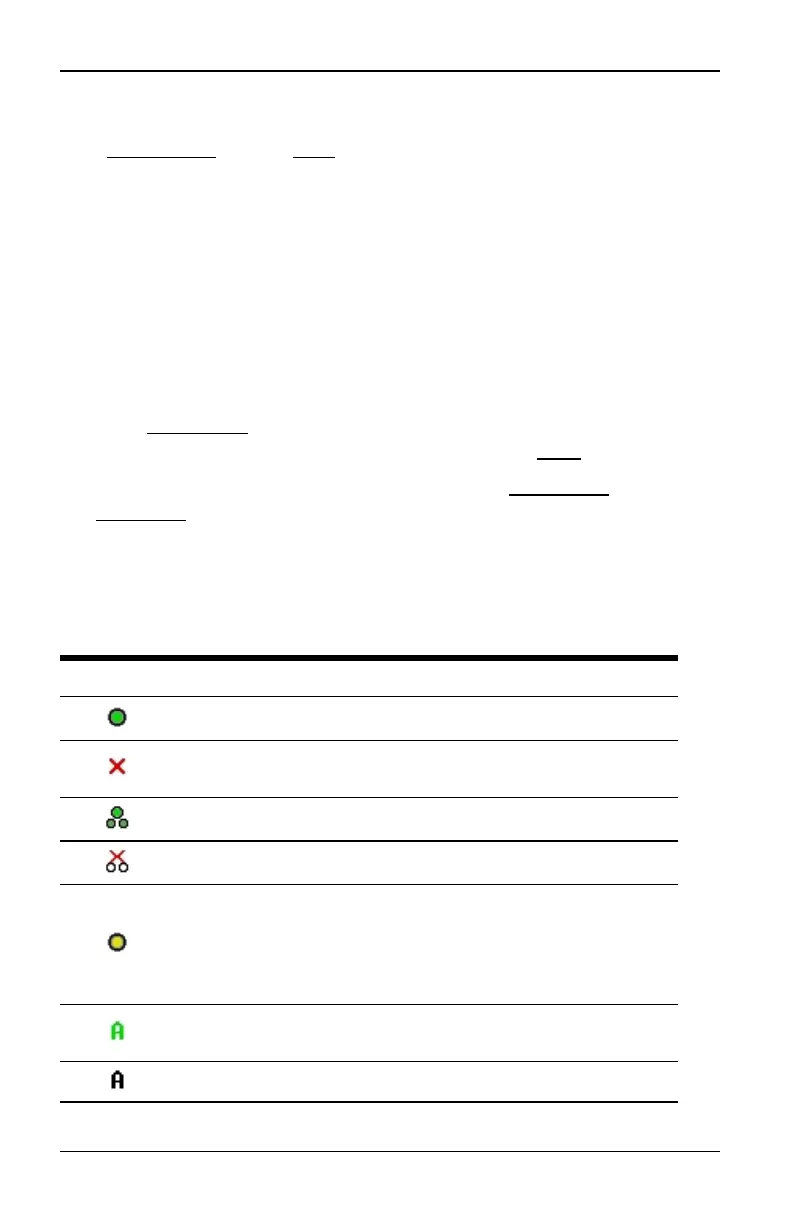
The status of target devices in your system is indicated in the far right columns of
the Main dialog box. The following table describes the status symbols.
Symbol Description
(green circle) Server connected, turned on and the IQ module isonline.
Connected target device is turned off or is not operating properly, and
the IQ module isoffline.
Connected switch is online.
Connected switch is offline or not operating properly.
(yellow circle) The designated IQ module isbeing upgraded. When this
symbol displays, do not cycle power to the switch or connected target
devices and do not disconnect IQ modules. Doing so may render the
module permanentlyinoperable and require the IQ module to be
returned to the factory for repair.
(green letter) IQ module is being accessed by the indicated user
channel.
(black letter) IQ module isblocked by the indicated user channel.
Table 3.2: OSD Interface Status Symbols
590-1035-640A
11



 To Next Page