3 Update Procedures
3.1 Online update
This procedure allows you to update components under the control of the
operating system that is currently running (Windows, Linux). In this case the
Update Manager uses tools which are provided by the software vendors.
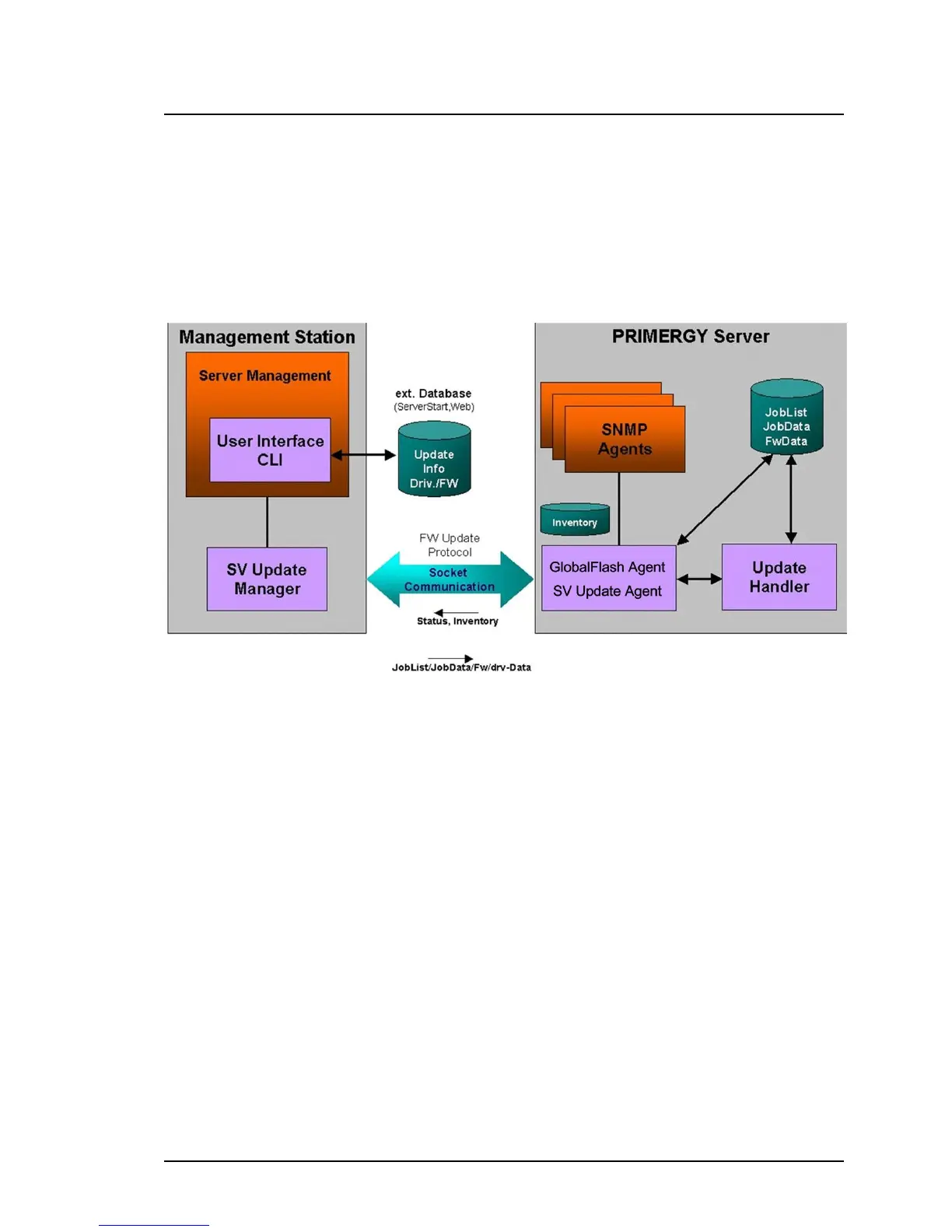
Figure 2: Diagram of the update procedure (online)
1. The Inventory Manager creates inventories by collecting information on
the installed software and firmware components of all servers in the
server list and storing this information in a database. The Inventory Man-
ager can create the inventories either on command or cyclically.
2. The Update Manager compares the inventories entered in the database
with the software and firmware components in the repository. Based on
the differences arising from this comparison, it then creates a list of
components and servers that need updating.
3. If you are updating via the graphical user interface select the com-
ponents which are to be updated. If you are working with the CLI use
the -U option to specify the repository from which the update data is to
be taken.
36 ServerView Update Management



 To Next Page