EN
22
12 - The Control Panels
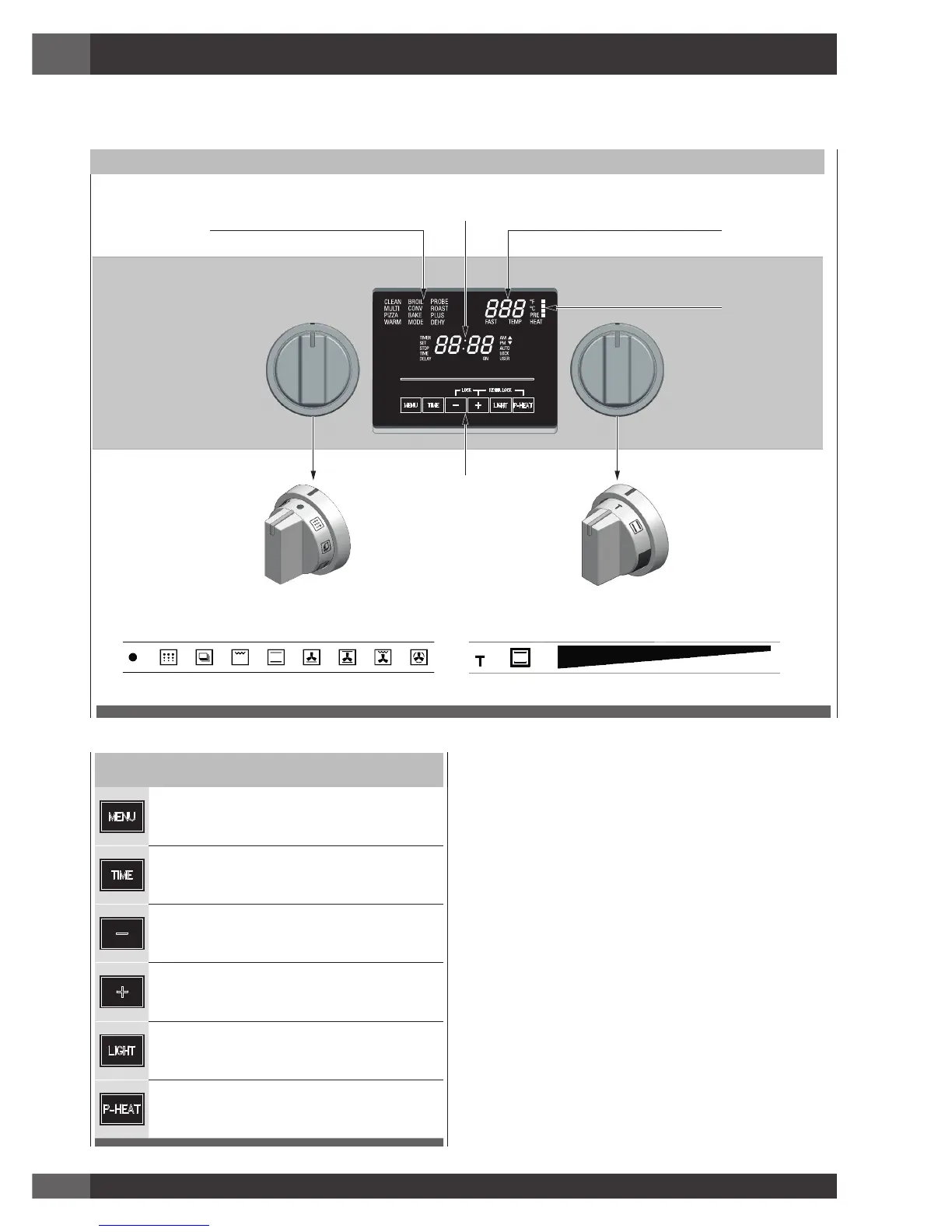
Command Keys
Touch this key to enable special functions, low
temperature modes or to enter special menu. See
section: “Selecting the Oven Mode”.
See section: “Setting the Clock and Timer”
key to decrease the value.
key to increase the value.
Touch to switch the oven lights status.
When a cooking function has been selected,
touch this key to enable the fast preheat mode.
The fast preheat is not available for all functions.
Display
Time Multi-function Display:
For time of day, minute minder, automatic cooking. AM/PM
indication is also present.
Automatic or manual door lock is also indicated here.
Temperature Setting Display:
Degree unit (°C or °F) indication is present. It shows the
temperature set-point for the current cooking mode, in the
selected cavity.
Cooking Mode Display:
Indicates which function has been selected.
Knobs
Cooking mode selector, with eight cooking modes + OFF
position.
Temperature selector with PRESET and ECO positions +
continuous range between MIN and MAX values.
The user interface has the following features: display, preheat light indicators, keys for commands, cooking mode and temperature
selectors.
CONTROL PANEL
COOKING MODE DISPLAY TEMPERATURE SETTING DISPLAY
PREHEAT LEVEL INDICATOR
TIME MULTI-FUNCTION DISPLAY
MODE SELECTOR TEMPERATURE SELECTOR
DIGITAL TOUCH COMMAND KEYS
ECO
ECO



 To Next Page