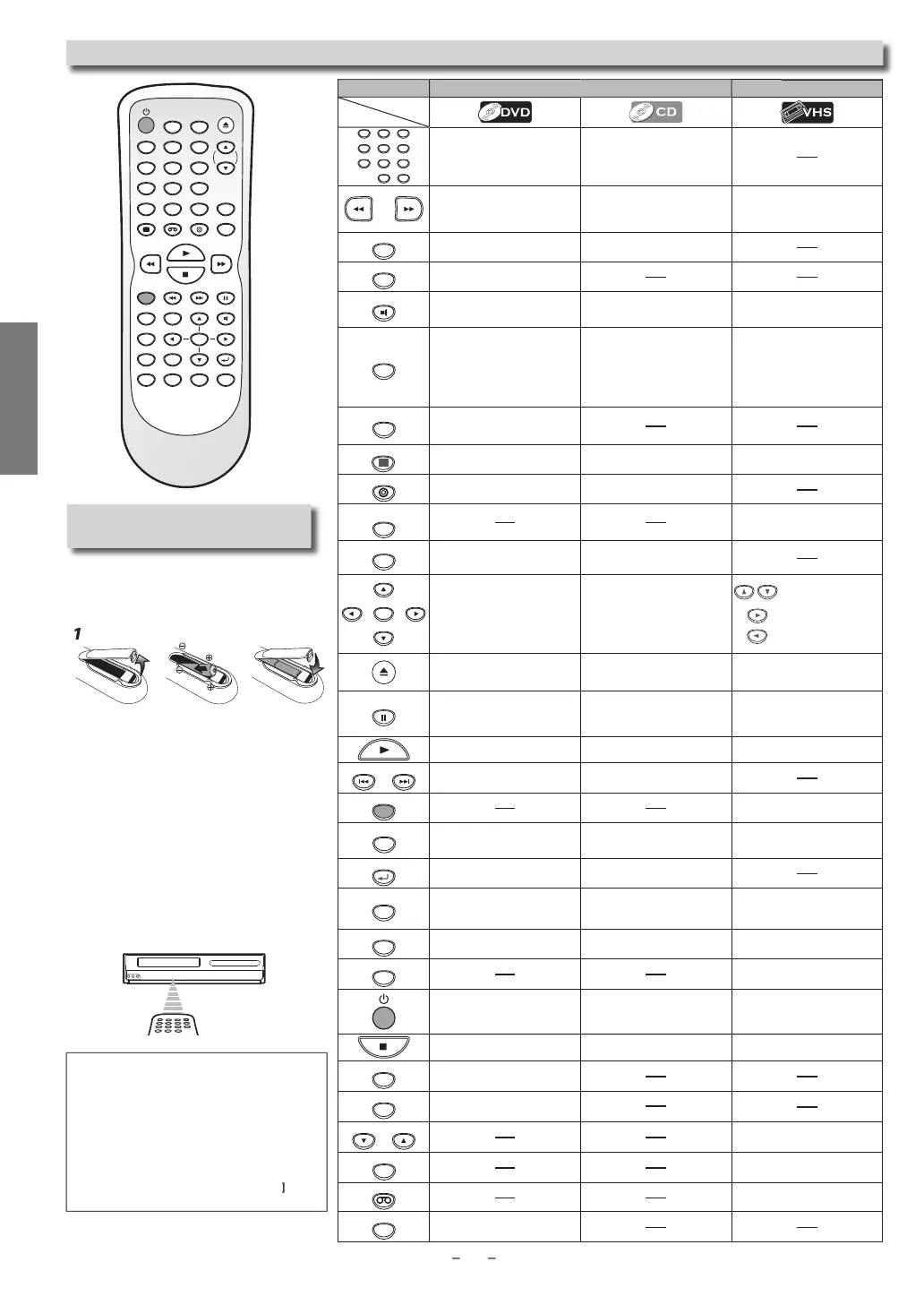
SETUP
1
OK
24'84'% 2#75'
6+6.'
%.'#4
5'#4%*
&+5%/'07
0':6
6+/'45'6
64#%-+0)
/1&'
#7&+1
&+52.#; 8%4 &8&
52''&
#0).'
57$6+6.'
4'2'#6 #$
<11/
5'672
4'6740
+0276
5'.'%6
+10
123
456
78
0
9
Installing the Batteries
or
e Remote Contro
Insta
two AA
atteries (su
ie
)
matching the polarity indicated inside
the battery compartment of the Remote
Control
Keep in mind the
ollowing when using the
Remote Contro
:
r
r
r
n
etween t
e Remote Contro
an
t
e
infr
r
n
r win
w
n
h
ni
• The maximum operable infrared si
nal
ranges
rom the Remote Control are as
follows.
ine of sight: approx. 23 feet (7m
ither side of center:
pprox. 16 feet (5m) within 30
A
v
rox. 16 feet (5m) within 15
Bel
rox.
10
eet
3m
within 30
em
te
ntr
VD m
e
R m
e
123
456
789
0
+10
To se
ect c
apter or tit
e
irect
To se
ect trac
irect
To search
orward/backward
through a disc
To be
in slow
orward/reverse
p
ay
ac
in t
e pause mo
e.
To search forward
backward
throu
h a disc.
• To forward/backward a ta
e
• To be
in slow forward
playback in the pause mode.
A-B
To repeat between your chosen
oint A and B.
To repeat between your
chosen
oint A and B
ANGLE
To select camera an
les on a
disc
AUDIO
To select audio languages on a
disc
To select “STEREO”
“L-ch” or
“R-ch”
• To select “HIFI” or “MONO”
mode during playback.
Hi-Fi tapes only)
CLEAR
T
l
r
h
m
rk
r
T
l
r n
m
r
n
r
in
r-
rectly.
To cancel the
oint for A-B
re
eat
To clear the markers.
To remove status number in
pro
ram input.
To clear numbers entered incor
rectly
To cancel the point
or A-B
repeat
• T
xi
h
V
R m
n
• To reset the ta
e counter
DISC MENU
To ca
up t
e
isc menu on a
isc
DISPLAY
To displa
the current disc
m
To displa
the current disc
m
• To displa
the current time, tape
n
r
n
L1
r L2
DVD
To se
ect DVD out
ut mo
e.
T
iv
DVD m
• To se
ect t
e DVD out
ut mo
e
T
iv
DVD m
+0276
5'.'%6
• To select in
ut “L1” or “L2”
MODE
To set black level on/o
.
To arrange t
e p
a
ing or
er or
p
a
ran
om
.
OK
To move t
e cursor an
eter-
m
ne
ts
os
t
on.
To move t
e cursor an
eter-
m
ne
ts
os
t
on.
T
n i
m
n
h
V
R m
n
T
v
n
n
x
V
R m
n
To
o
ac
one step
urin
c
oc
an
timer pro
rammin
To open or close the disc tra
To open or close the disc tra
• To eject the cassette tape
rom
the cassette compartment.
PAUSE
To pause
isc p
ay
ac
.
To advance playback one
rame
at a time
To pause
isc p
ay
ac
• To pause tape p
ay
ac
or
recor
in
.
• To advance playback one frame
at a time.
To
egin
isc p
a
ac
.
To
egin
isc p
a
ac
• To
egin tape p
a
ac
NEXTPREV
To ski
cha
ters or titles.
To ski
tracks
REC
• To start recordin
or one-touch
timer recordin
(OTR)
REPEAT
To pla
back a chapter or title
repeatedl
.
To p
a
ac
a trac
or
isc
repeate
• To select the re
eat mode on
ff
RETURN
To return to t
e previous opera
t
on
n menu
To return to t
e previous opera-
t
on
n menu
SEARCH
To search chapter, title or time.
To set or search the markers.
To searc
trac
.
To searc
time.
To set or searc
t
e mar
ers.
• To call up the index or time
r
h m
n
SETUP
To call u
the DVD setu
menu.
To call u
the DVD setu
menu
• To call u
the VCR menu
SPEED
• To se
ect t
e recor
in
spee
To turn t
e Unit on or to turn t
e
Unit into t
e stan
y mo
e. (To
completely turn o
the Unit, you
must unp
u
t
e AC power cor
.)
To turn t
e Unit on or to turn t
e
Unit into t
e stan
y mo
e. (To
completely turn o
the Unit, you
must unp
u
t
e AC power cor
.
• To turn t
e Unit on or to turn t
e
Unit into t
e stan
y mo
e. (To
ompletely turn o
the Unit, you
must unplug the AC power cord.)
To stop playback
To stop playback
• To stop playback or recording.
SUBTITLE
T
i
n
i
TITLE
To call u
the to
menu on a
disc
TRACKING TRACKING
• To a
just t
e trac
ing manua
y
uring p
ay
ac
TIMER SET
• To put the VCR into standby
mode for a timer recordin
.
VCR
• To select the VCR output mode
• To activate VCR mode
ZOOM
To magnify part of a picture.
2x/4x
utto
Me
i
Note(s)
Do not mix a
a
ine an
manganese
atteries
D
n
mix
l
n
n
w
ri
Always remove batteries from Remote Control
i
they are dead or i
the Remote Control is not
o be used for an extended period of time.
his will prevent batter
acid from leaking
into t
e
atter
compartment
f
ou turn off this Unit,
OPEN/CLOSE
n
h
nit or Remote Control is not available



 To Next Page