VCR FUNCTI
N
1
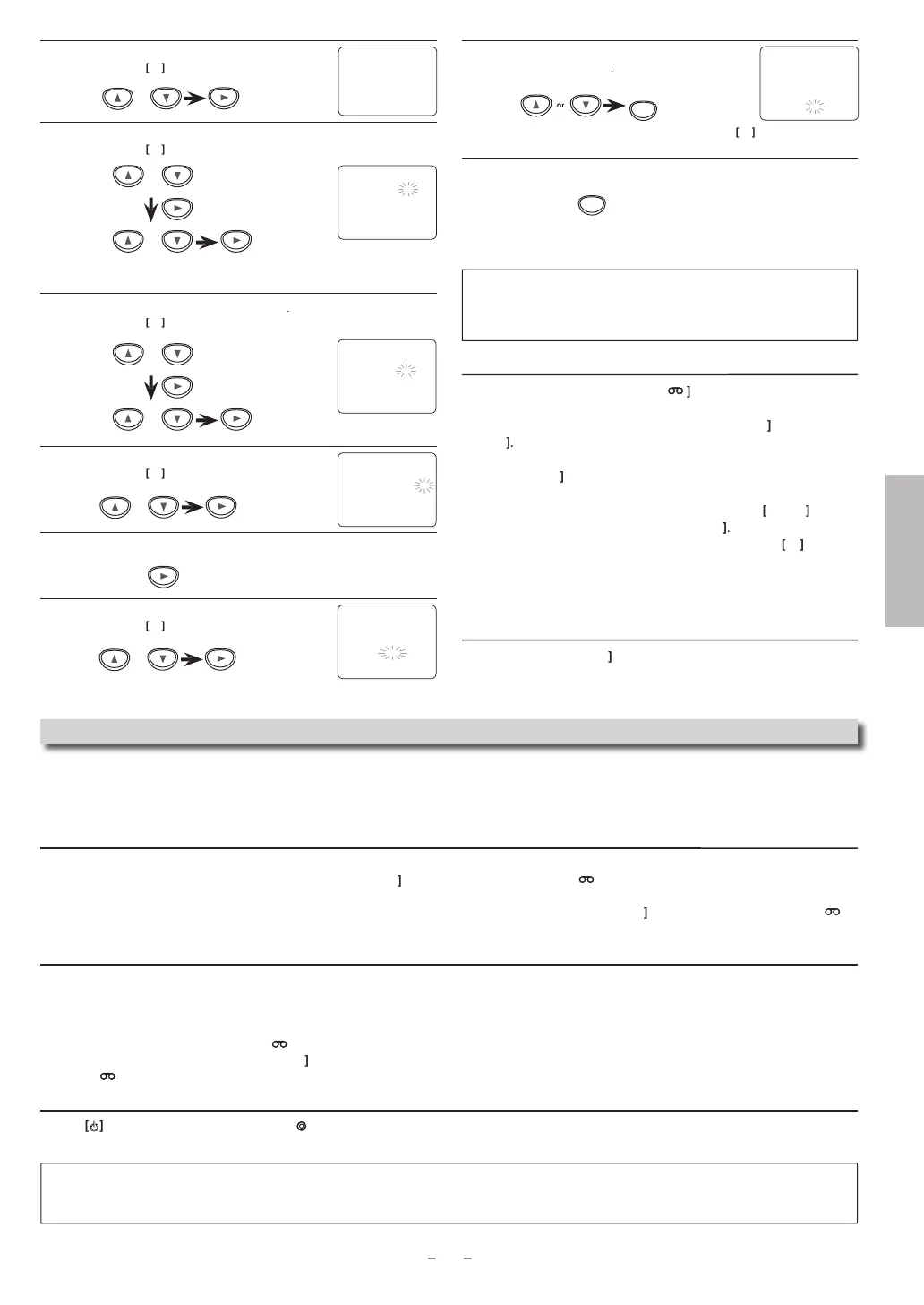
Select “ONCE”
“DAILY” (Mon-Fri) or “WEEKLY”
en
ress
o go
o nex
s
ep
l
h
ir
hen
ress
to go to next step
You can program the Unit to record up to 8 programs, for up to
a
ear in a
vance.
e
ect t
e
esire
starting time
our
en press
o go
o nex
s
ep
l
“AM”
r “PM”
hen press
to go to next step
Repeat the procedure in steps 5 and 6 to set the endin
time.
l
“L1”
r “L2”
hen
ress
to
o to next step
ote(s)
To go back one step, press [
uring steps 3 to 9.
Select “L1” to activate rear input jacks. Select “L2” to activate
ront input
jacks
To c
ec
, correct or cance
a timer
ro
ram
Press
TIMER SET
t
en
VCR
on t
e Remote Contro
2
Press
[SETUP
to ca
up t
e main menu.
) Se
ect “TIMER PROGRAMMING”
y using
, t
en
ress
4) Se
ect t
e program num
er w
ic
you want to c
ec
y
s
ng
The details o
the program you selected will
ear on t
e TV screen.
• Go to t
e
igit you want to c
ange
y using
T
en,
nter correct num
ers
y using
/
• You may cance
t
e entire program
y pressing
w
i
e
t
e program num
er
in
s.
Press
CLEAR
to ex
t
Press
TIMER SET
to return to t
e timer stan
y mo
e
To cancel a timer recordin
in
ro
res
ress
STOP/EJECT
on t
e Unit
NE TIME PR
GRAM
PR
GRAM N
MBER
L1
L2 – –
RE
PEED – –
NE TIME PR
GRA
PR
GRAM N
MBER
DATE 1 0
0 2 TUE
TART TIME
7
– –
END TIME – –
– – – –
L1
L2 – –
RE
PEED – –
NE TIME PR
GRA
PR
GRAM N
MBER
DATE 1 0
0 2 TU
TART TIME
7
P
EN
TIME
L1
L2 L
RE
PEED – –
o
NE TIME PR
GRA
PR
GRAM N
MBER
DATE 1 0
0 2 TU
TART TIME – –
– – –
EN
TIME – –
– – –
L1
L2 –
RE
PEED –
Notes
or Timer Recording & One-touch Timer Recording (OTR)
• I
a cassette ta
e is not in the Unit or does not have the erasure
revention tab, TIMER REC indicator on this Unit blinks and timer
recordin
cannot be performed. Please insert a recordable cassette tape
• When timer recordings are set, TIMER REC indicator on this Unit lights up. To use the VCR as usual, until the time for the recording,
ress
TIMER SET
h
TIMER REC indicator li
ht turns of
A
ter a one-touch timer recordin
or a timer recordin
has been set, this Unit o
erates as described below
• If a cassette tape runs out before a one-touch timer recording or a timer recording is finished, the Unit ejects the cassette tape. Press
TIMER SET
n
h
R
m
n
r
l
r
STOP/EJECT
on the Unit, then
ress
VCR
to activate the VCR function a
ain.
• Once the Unit turns to the timer standb
mode, no VCR functions are available until
TIMER SET
is
ressed.
• To cancel the timer standb
mode, press
TIMER SET
n
h
R
m
n
r
l
r
STOP/EJECT
on the Unit, then press
VCR
to activate the VCR
unction again.
When an one-touch timer recordin
or a timer recordin
is com
leted...
• TIMER REC indicator on this Unit flashes if there are no more timer recordings on standb
.
• The Unit
oes to the DVD mode and all the VCR functions will be unavailable. All the DVD functions are available durin
one-touch
timer recordin
, timer standb
mode and timer recording
•
Press
STOP/EJECT
n this Unit or
TIMER SET
on the Remote Control to use the VCR when the Unit is turned off.
• Press
SOURCE
on this Unit or
VCR
on the Remote Control to use the VCR when the Unit is turned on. In case timer recordin
is
n standb
mode, press
STOP/EJECT
on this Unit or
TIMER SET
on the Remote Control and then
ress
SOURCE
on this Unit
VCR
on the Remote Control
If
ou want to use the DVD
la
er durin
a timer recordin
or while TIMER REC indicator on this Unit is on or blinkin
.
• Pr
rn
n
h
ni
Pr
DVD
on the Remote Control to choose DVD mode, then continue with the other DVD features
ri
in
hi
m
n
l
PR
GRAM N
MBER
N
AILY
WEEKLY
o
Se
ect recor
in
spee
.
T
en
res
CLEAR
•
To set another program after step 9, press
en continue wit
ste
2.
1
r
TIMER SET
to set t
e timer stan
mo
e
•
indicator on this Unit lights up and the Unit goes to
he DVD mode
NE TIME PR
GRAM
PR
GRAM NUMBER
DATE 1 0
0 2 TU
TART TIME
7
P
EN
TIME 0 8 : 3 0
L1
L2 L1
RE
PEED
P
P
SLP
CLEAR
Note for timer recordin
•
I
there is a power
ailure or the Unit is unplugged
or more than 30 seconds, clock time setting and ALL timer programs will be lost.
W
en power is restore
or Unit is p
ugge
in again t
e c
oc
an
timer programs wi
nee
to
e set up again.
ontinue
on next page



 To Next Page