SETUP
Playing 2 Channel Analog Audio Playing Multi Channel Digital Audio
AUDIO OU
DIGITAL AUDIO OU
SETUP > QUICK >
DOLBY DIGITAL
Connecting to a Do
y Digita
eco
er
for Dolby Digital audio output.
BIT
TREA
Connectin
to other device (an MD dec
or DAT deck etc.) without Dolby Digital
ecoder.
CM
Connection to an Au
io S
stem
To complete these settings, re
er to pages 20-21.
ote
s
The audio source on a disc in a Dolby Digital
l
i
h
nn
l
rr
n
format cannot be recorded as digital sound b
an MD or DAT deck
B
hooking this Unit up to a Dolb
Digital decoder,
ou can enjo
high-qualit
Dolb
Digital multi channel surround sound as heard in the
vi
r
P
a
ing
ac
a DVD using incorrect settings ma
generate noise
istor
ion and ma
also damage the speakers
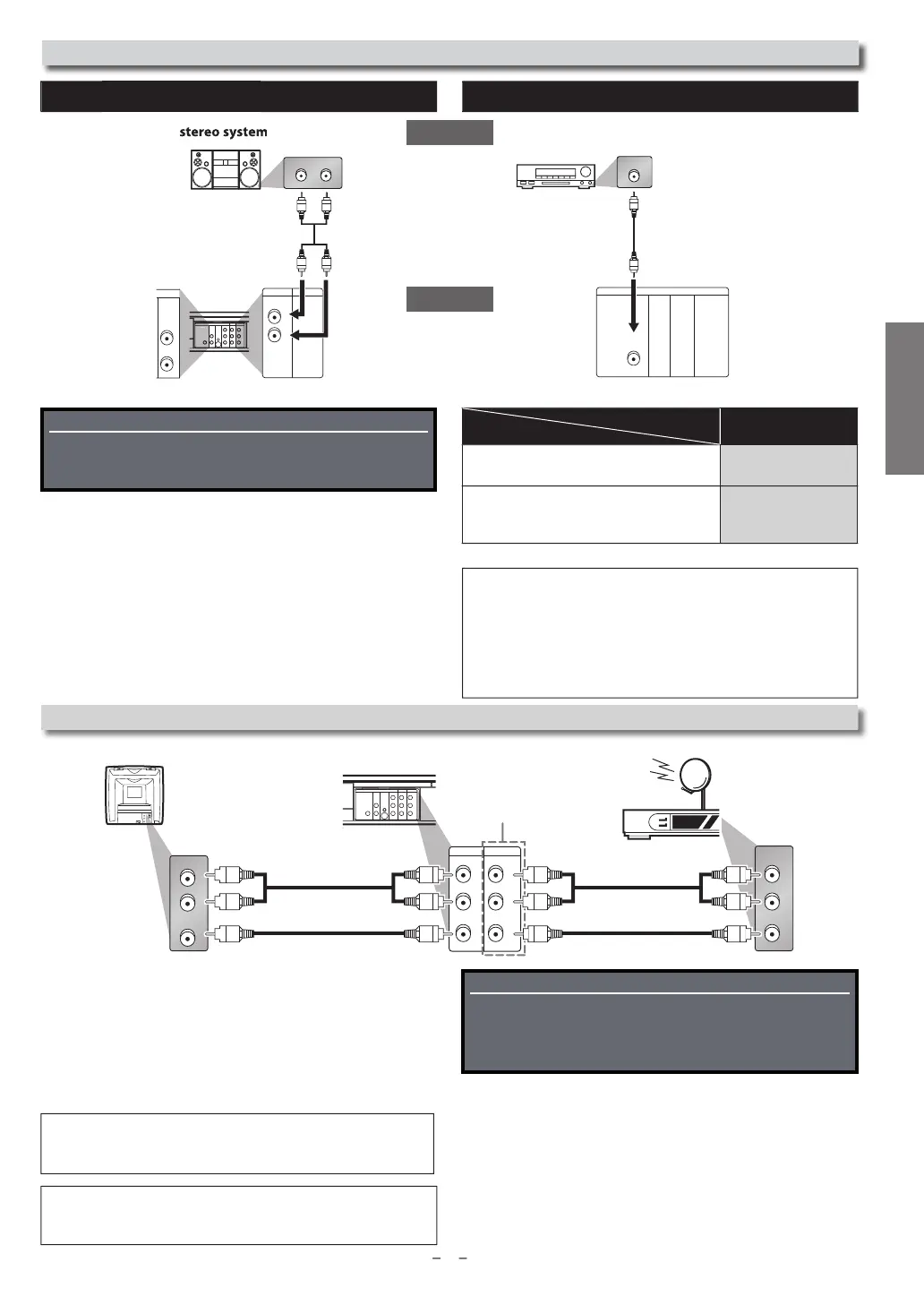
Connection to an External Tuner (Cable/Satellite or DTV to analo
TV Converter Set-top box)
Usin
the Unit with an External Tuner (Cable/Satellite
or Converter Set-to
Box
1.
Connect RCA audio and video cables to the audio and video
utput jacks of
our External Tuner (Cable/Satellite or Converter
et-top Box) and to the audio and video input
acks at the rear
f the Unit.
2. Press
INPUT SELECT
on
our Remote Control until “L1” is
displa
ed on
our TV
DIGITAL
AUDIO OUT
COAXIAL
AUDIO
OUT
DVD VCR
DVD/VCR
S-VIDEO
OUT
COMPONENT
VIDEO OUT
VIDEO IN
AUDIO OUT
VIDEO OUT
L
LY
R
AUDIO IN
L
R
R
AUDIO IN
VIDEO IN
L
R
C
B
/
P
B
C
R
/
P
R
AUDIO IN
VIDEO IN
VCRDVD/VCR
AUDIO OUT
L
VIDEO OUT
R
L
R
VIDEO IN
AUDIO IN
L
R
AUDIO OUT
VIDEO OUT
L
R
Audio
This Unit
RCA au
io ca
e
RCA video cable
R
A
i
l
RCA video cable
rear o
T
rear o
the Unit Externa
Tuner (Ca
e/Sate
ite or Converter Set-top Box
1: Rear
anel terminal
2: Front
anel terminal
Re
er to “Front & Rear Terminals” on page 9
or more in
ormation.
L1
Note
s
• Your Ca
e/Sate
ite Set-top Box can
e accesse
on
y
y connecting it
to L1 (rear pane
jac
s) on t
e Unit
Connection
Setting
Supplied cables used in this connection are as follows:
• RCA audio cable (L/R) x 1
• RCA video cable x 1
Please purchase the rest of the necessary cables at your
local store.
Special Note when connected to an External Tuner
(Cable/Satellite or Converter Set-top Box)
Onl
the active channel on
our External Tuner ma
be viewed
r recor
e
w
en connecte
to t
is Unit.
Do not chan
e channels durin
a recordin
. You cannot record
n the active channel while viewin
another channel.
Always use the LEFT (white) audio output jack
rom the External
uner to ensure that the audio is mixed down correctl
to mono
for this Unit. If
ou use the RIGHT (red) jack,
ou will record the
rig
t au
io on
y.
Supplied cables used in this connection are as follows:
• RCA audio cable (L/R) x 1
Please purchase the rest of the necessary cables at your
local store.
Continue
on next page
L R
DIGITAL
AUDIO OUT
COAXIAL
AUDIO
OUT
DVD VCR
DVD/VCR
S-VIDEO
OUT
COMPONENT
VIDEO OUT
AUDIO IN
VIDEO IN
AUDIO OUT
VIDEO OUT
L
LY
R
L
R
R
C
B
/
P
B
C
R
/
P
R
T
AXIAL
VCRDVD/VCR
AUDIO OUT
L
R
AUDIO
OUT
DVD
L
R
ana
og au
io
input jacks
RCA audio cable
i
ital audio
nput jac
igital audio coaxial cable
DIGITAL
AUDIO OUT
COAXIAL
AUDIO
OUT
DVD
S-VIDEO
OUT
COMPONENT
VIDEO OUT
COAXIAL
Dolb
Digital decoder,
D
eck
r DAT
eck
r



 To Next Page