PRECAUTI
N
A
out Cassette Ta
es an
Disc
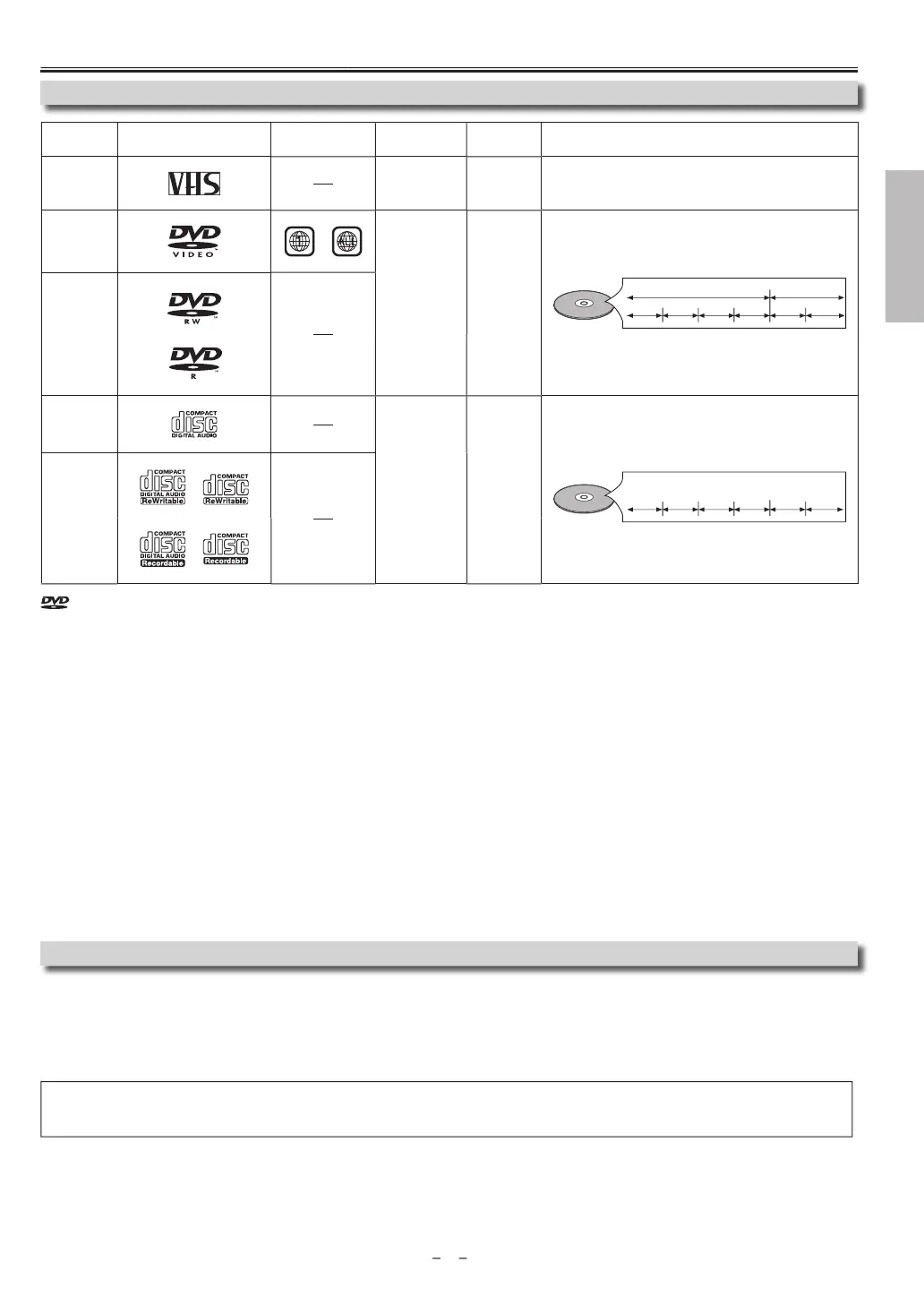
Playable Media
Unp
aya
e Disc
NEVER pla
the following discs as a malfunction ma
result!
DVD-RAM, DVD-audio, CD-i, photo CD, video CD, DVD with region codes other than 1 or ALL, DTS-CD, DVD-ROM
or personal computers,
CD-ROM
or personal computers, CD-RW/-R with MP3, Windows Media™ Audio or JPEG
iles, HD DVD, Blu-ray Disc™.
On the followin
disc, the sound MAY NOT be heard
super au
io C
ote(s)
• On
t
e soun
recor
e
on t
e norma
CD
isc
a
ers can
e
e
ivere
. T
e soun
recor
e
on t
e
ig
ensit
super au
io CD
isc
a
ers cannot
e
e
ivere
An
discs without compatibilit
indications and not mentioned in the “Pla
able Media” chart above are not pla
able.
I
ou cannot pla
back a disc which bears one o
the marks above, check the
ollowing
*1: This Unit con
orms to the NTSC color s
stem. Discs recorded in other color s
stems such as PAL cannot be pla
ed back.
*2: Certain DVD-VIDEO does not o
erate as described in this manual due to the intentions of the disc’s
roducers
*3: Scratc
e
or staine
iscs ma
not
e p
a
e
ac
*4: Some discs cannot be pla
ed back because o
incompatible recording conditions, characteristics o
the recorder or special prop-
r
i
i
*5: You can pla
back discs which bear the marks above. I
ou use nonstandardized discs, this Unit ma
not pla
them back. Even i
t
e
are p
a
e
ac
, t
e soun
or vi
eo qua
it
wi
e compromise
.
*6: You ma
pla
back the unfinalized DVD-RW/-R recorded in the video format on our brand’s DVD recorder. However, depending
on the recording status o
a disc, the disc ma
not be pla
ed back at all or normall
(the picture or sound ma
not be smooth,
etc.). In this case,
ou need to finalize the disc with the DVD recorder. Refer to the manual accompan
ing the DVD recorder.
*7: Onl
discs recorded in the video format and finalized can be pla
ed back
Unfinalized discs cannot be pla
ed back. Depending on the recording status of a disc, the disc ma
not be pla
ed back at all (the
picture or soun
ma
not
e smoot
, etc.).
*8: If the recorded portion of the disc is too small (less than 2-3/16 inches (55 mm) across), it ma
not pla
back properl
.
*9: Do not g
ue paper or put stic
ers on to t
e
isc. T
ese ma
amage t
e
isc an
t
e Unit ma
not rea
it correct
*10: Discs recorded in the VR (video recording) format cannot be pla
ed back.
is a trademark of DVD Format/Logo Licensing Corporation.
ype o
me
i
ark (logo)
egion cod
ec
r
e
igna
s
Media size Tape speed and disc t
pe
casse
e
tap
ana
o
vi
e
ta
e wi
t
1/2 inc
e
12.65 mm
P: 1-5/16 inc
/sec. (33.40 mm/sec.
LP: 7/16 inc
/sec. (11.12 mm/sec.
DVD-VIDE
1, 2, 3, 5,
or
igital vide
MPEG2
in
h
(12 cm
r
in
h
8 cm
e.g.)
title 1 title 2
chapter 1 chapter 2 chapter 1
chapter 2
chapter 3 chapter 4
DVD-R
V
-
1, 3, 4, 5, 6,
7,
,
, 1
audio C
3, 5, 9
i
ital audi
in
h
(12 cm
in
h
8 cm
e.g.)
track 1 track 2 track 5 track 6track 3 track 4
D-R
D-
*3, 4, 5, 8,
ontinued on next pa
e



 To Next Page