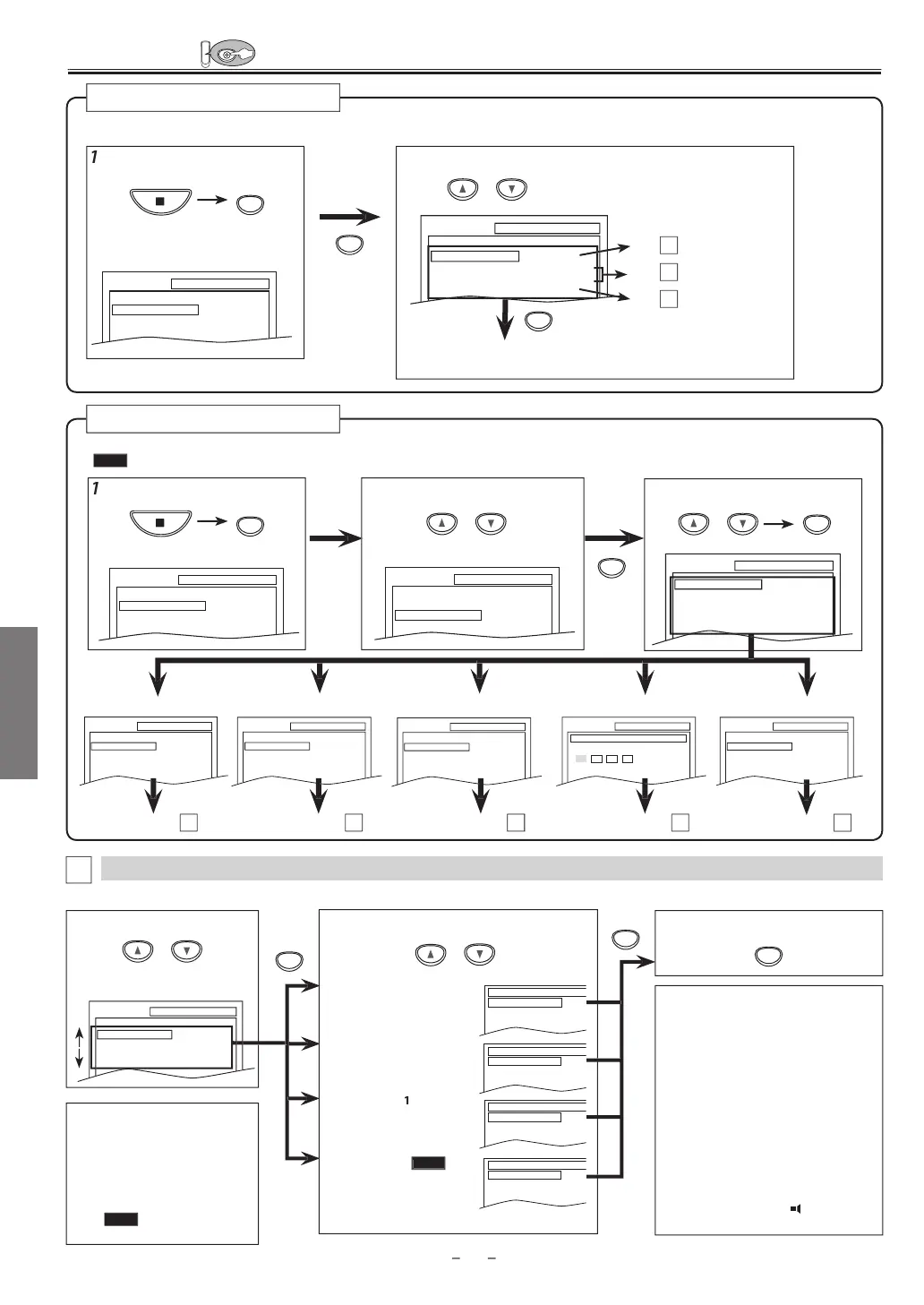
DVD FUNCTIONS
2
l
“
T
M”
VD Sett
n
Note(s)
• Lan
ua
e options are not available
wi
h
m
i
• I
“OTHER” is selected on “AUDIO”,
“SUBTITLE” or “DISC MENU” screen
press 4-digit number to enter the code
or the desired Language. Re
er to the
“Lan
ua
e Co
e List” on pa
e 24.
• Onl
the Languages supported b
the
isc can be selected
*2
• “LANGUAGE” settin
or
AUDIO” and
BTITLE
r
n
v
il
l
wi
h
m
i
Th
n
AUDIO
n
SUBTITLE
. Re
er to page 19
LANGUAGE Settin
Follow steps 1 to 3 in the “CUSTOM Menu” section above.
4
l
h
ir
i
m
T
xi
h
m
n
Se
ect t
e
esire
Language.
DI
1
2
(De
ault: ORIGINAL
ets t
e au
io Language
UBTITLE:
Default: OFF
ets the subtitle Language
I
MEN
Default: ENGLISH
ets the Language
or DVD
LAYE
MENU:
QUICK
(De
ault: ENGLISH)
Sets the Language
or the
n-screen
isp
a
2 Select the desired item.
Re
er to the sections “PLAYER MENU”, “TV ASPECT”,
“PROGRESSIVE” or “DOLBY DIGITAL” section on page 20 or 21
ress
SETUP
in the Sto
mode
SETUP
QUICK
CUSTOM
INITIALIZE
SETUP QUICK
PLAYER MENU
TV ASPECT
PROGRESSIVE
DOLBY DIGITAL
ENGLISH
4:3 LETTER BOX
OFF
BITSTREAM
UICK Men
You can select “PLAYER MENU”, “TV ASPECT”, “PROGRESSIVE” or “DOLBY DIGITAL” from “QUICK” menu quickl
.
AUDIO
ORIGINAL
ENGLISH
FRENCH
SUBTITLE
OFF
ENGLISH
FRENCH
DISC MENU
ENGLISH
FRENCH
SPANISH
PLAYER MENU
ENGLISH
FRANÇAIS
ESPAÑOL
LAN
A
E m
n
P2
Step
P21
Step
P21
C
Step
SETUP LANGUAGE
AUDIO
SUBTITLE
DISC MENU
PLAYER MENU
ORIGINAL
OFF
ENGLISH
ENGLISH
ir
i
m
Pr
SETUP
in the Sto
mode.
SETUP CUSTOM
LANGUAGE
DISPLAY
AUDIO
PARENTAL
OTHERS
C
STOM Men
SETUP OTHERS
ANGLE ICON ON
SETUP AUDIO
DRC
DOWN SAMPLING
DOLBY DIGITAL
ON
ON
BITSTREAM
SETUP DISPLAY
TV ASPECT
STILL MODE
PROGRESSIVE
4:3 LETTER BOX
AUTO
OFF
You can change the Settings of the Unit.
QUICK
on pages 20-21 indicates DVD setting menus also accessible from “QUICK” menu
ET
P m
n
A
DI
m
n
I
PLAY m
n
THER
m
n
SETUP LANGUAGE
AUDIO
SUBTITLE
DISC MENU
PLAYER MENU
ORIGINAL
OFF
ENGLISH
ENGLISH
LAN
A
E m
n
page 20
A
age 2
age 2
age 22
SETUP PARENTAL
PASSWORD
Please enter a 4-digit password.
A
ENTAL m
n
age 2
SETUP
QUICK
CUSTOM
INITIALIZE
SETUP
QUICK
CUSTOM
INITIALIZE
r
or
o
or
SETUP menu
Confirm that “
UICK” is selected
Note
s
• In “QUICK” menu
“PLAYER
MENU”
“TV ASPECT”
“PROGRES
IVE”
r “D
LBY DIGITAL”
r
vailable. “QUICK “ menu consists
o
the setting menu
requentl
use
an
t
e
are accompanie
wit
QUICK
. You can ma
e a
settings in “CUSTOM” menu
ontinue
on next page



 To Next Page