10
PREPARATION
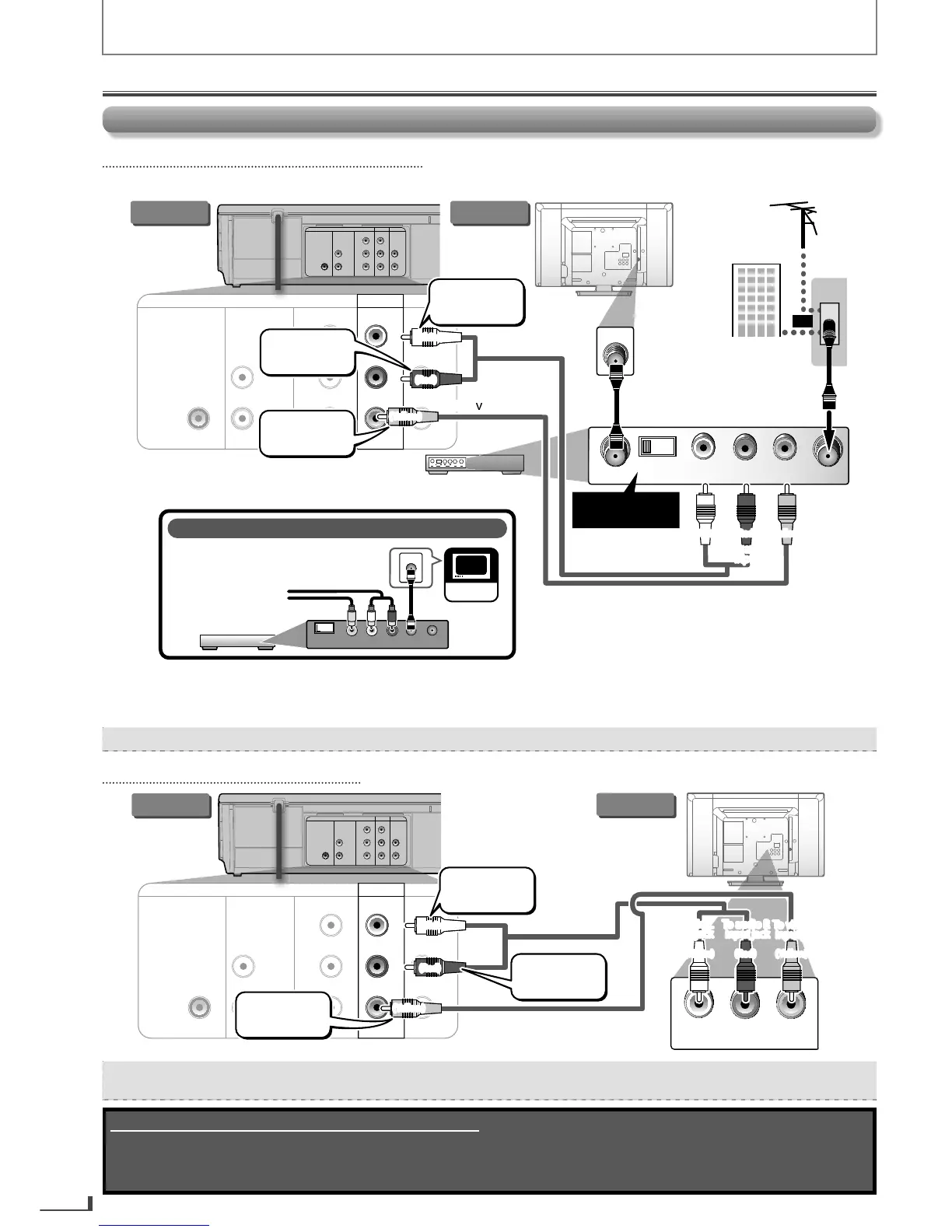
Connection to a T
If Your TV Has an Antenna In Jack Only
If Your TV Has an Antenna In Jack Only
Be
ore connecting, make sure the Power on the devices is turned O
rear of your RF modulator
(not supplied)
DIGITAL
AUDIO OUT
COAXIAL
AUDIO OUT
DVD VCR
DVD/VCR
COMPONENT
VIDEO OUT
AUDIO IN
VIDEO IN
AUDIO OUT
VIDEO OUT
L
L
Y
R
R
CB
CR
AUDIO IN ANT. INvTO TV
RL
CHANNEL
43
VIDEO IN
Set channel
3 or 4
ANT. IN
DIGITAL
AUDIO OUT
COAXIAL
AUDIO OUT
DVD VCR
DVD/VCR
COMPONENT
VIDEO OUT
AUDIO IN
VIDEO IN
AUDIO OUT
VIDEO OUT
L
L
Y
R
R
CB
CR
DVD/VCR
AUDIO OUT
VIDEO OUT
L
R
If your TV only has an Antenna Input
(no A/V inputs), you will need an
RF modulator (NOT INCLUDED) to
connect this player
to the TV.
RF modulator
AUDIO IN
RL
VIDEO IN
CHANNEL
43
TO T V
TV
ANT. IN
ANT. IN
No Antenna (RF) Output!
RF coaxial
cable
VHF / UHF
antenna
cable TV company
or
(White)
(Red)
(Yellow)
(Yellow)
To video
input jack
RF coaxial cable
RF modulator (not supplied)
(White) (Red)
this unit TV
To audio L
input jack
(White)
(Red)
(Yellow)
(Yellow)
To audio L
input jack
To video
input jack
(White) (Red)
To audio R
output jack
To audio L
output jack
To video
output jack
To audio R
input jack
To audio R
input jack
A
ter making the connection illustrated above
this unit is connected to an RF modulator
VCR and Basic DVD Connection
VCR and Basic DVD Connection
AUDIO IN
RL
VIDEO
IN
DIGITAL
AUDIO OUT
COAXIAL
AUDIO OUT
DVD VCR
DVD/VCR
COMPONENT
VIDEO OUT
AUDIO IN
VIDEO IN
AUDIO OUT
VIDEO OUT
L
L
Y
R
R
CB
CR
DIGITAL
AUDIO OUT
COAXIAL
AUDIO OUT
DVD VCR
DVD/VCR
COMPONENT
VIDEO OUT
AUDIO IN
VIDEO IN
AUDIO OUT
VIDEO OUT
L
L
Y
R
R
CB
CR
DVD/VCR
AUDIO OUT
VIDEO OUT
L
R
(White) (Red)
(White)
(Red)
(Yellow)
(Yellow)
To video
input jack
this unit
TV
To audio L
input jack
To audio R
input jack
(White) (Red)
To audio L
input jack
(White)
(Red)
To audio R
input jack
(Yellow)
(Yellow)
To video
input jack
To audio R
output jack
To audio L
output jack
To video
output jack
R
Connect this unit directl
our TV. If an RCA audio/video cables are connected to a VCR, pictures ma
Supplied cables used in this connection are as follows:
• RCA audio cable (L/R) x 1
• RCA video cable x 1
Please purchase the rest of the necessary cables at your local store.
Connections
E8R6AUHDV220FX5OMv1.indd10 2014/10/0615:41:41



 To Next Page