EasyManua.ls Logo

FUNAI DV220FX5 - Operations and Feature Customization; Basic Playback Functions

FUNAI DV220FX5
28 pages
Print Icon
To Next Page IconTo Next Page
To Previous Page IconTo Previous Page
Loading...
EN
14
BASIC OPERATIONS
1
BASIC PLAYBACK
2
2
3
3
For advanced pla
y
back, re
f
er to the
f
ollowing pages
.
Tim
e
Sea
r
ch
p.
17
I
n
de
x
Sea
r
ch
p.
17
Auto
R
epea
t
p.
17
Note:
T
o prevent
d
amage to t
h
e cassette tape, pause o
r
slow mode will automaticall
y
stop a
f
ter 5 minutes
.
T
o return to pla
y
back
f
rom the picture search,
pause or slow mode, press
.
te tape so
at
the unit wi
In
se
rt
a cassette tape so th
a
se
rt a cassette tape so th
at
h
at
e
tt
e tape s
o
e
ta
pe s
o
t
t
o
e
tt
a
pe
se
t
e tape s
o
t
p
p
p
p
c
a
a
ta
a
t
t
t
s
s
s
s
s
s
s
t
t
t
t
t
t
t
t
i
i
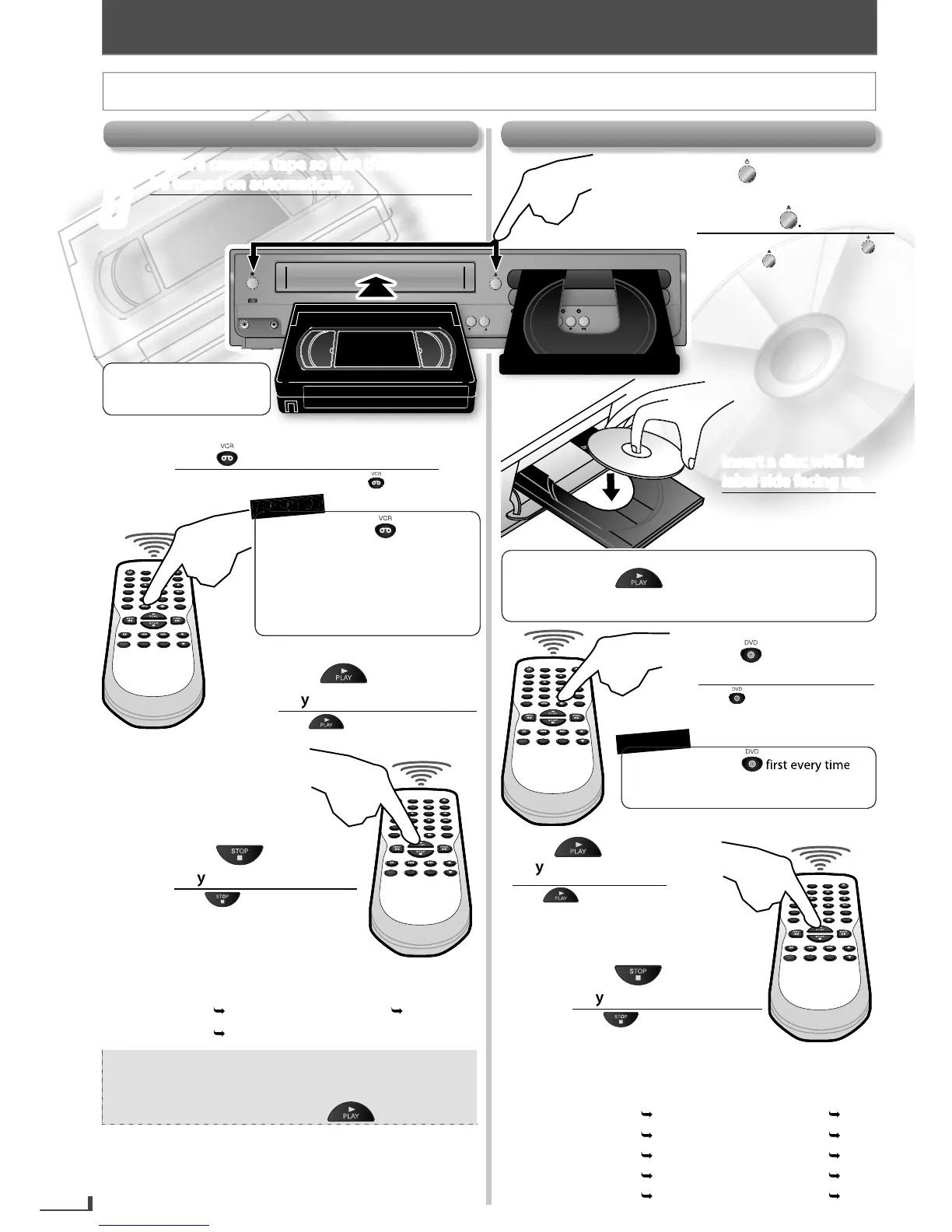
Insert a cassette tape so that the unit will
y
.
omat
be
turned on automatical
ly
b
be
t
d
on automatic
ut
omat
c
ut
t
t
b
on
a
u
on
a
.
o
o
o
b
c
a
d
d
t
t
t
t
a
c
a
t
t
t
i
be turned on automatically.
Inserte un casete para que la unidad se encienda
automáticamente.
Pr
ess
Press
witch to the VCR mode.
w
t
c
w
it
to
sw
to switch to the VCR mode.
Para cambiar al modo de VCR, pulse .
Press
Press
to start
to start
playbplayb
ack.
a
ack.
Pulse para comenzar la
reproducción.
4
4
Press
Press
to stop the
to stop the
playback.playback.
Pulse para detener la
reproducción.
PLAY
DISC IN
DVDVCR
POWER ON
AUDIO
REC
REC
TIMER REC
TRACKING
SOURCE
VIDEO
PLAY
DISC IN
DVD
VCR
SOURCE
O
TRACKING
I
f the
p
rotection tab has
remove
d
, p
l
ay
b
ac
k
wi
ll
start automatica
lly
.
B
e
f
ore
:
Turn on the TV.
5
5
BASIC OPERATIONS
For VCR P
l
a
yb
ac
k
1
Press
Press
to turn on the
to turn on the
unit. unit.
Then press
Then press
.
.
Para encender la unidad, pulse .
Luego pulse .
For Disc P
l
a
yb
ac
k
R
E
M
E
M
B
E
R
2
2
3
3
t
h
h
h
h
h
h
h
t
t
w
w
w
w
w
w
s
c
w
n
se
a
d
e
rt
a
n
e
d
ts
t
t
t
s
s
s
s
s
t
t
t
t
t
i
ii
i
ii
Insert a disc with its
p
p.
g up
p
ng
label side facing
el side
bel side
e
f
s
e
f
s
.
p
b
b
b
c
d
d
d
d
g
fa
s
a
ac
b
be
a
f
d
label side facing up.
Inserte un disco con el lado
de la etiqueta hacia arriba.
Press
Press
to switch to
to switch to
the DVD mode.the DVD mode.
Pulse para cambiar al modo
de DVD.
4
4
Press
Press
to start
to start
playback.playback.
Pulse para comenzar
la reproducción.
Press
Press
to stop the
to stop the
playback.playback.
Pulse para detener la
reproducción.
For advanced pla
y
back, re
f
er to the
f
ollowing pages
.
D
i
sc
M
e
n
u
p
.1
6
Resume P
l
a
yb
ac
k
p
.1
6
P
ause
M
ode
p.
15
Step-
by
-step P
l
a
yb
ac
k
p.
15
Z
oom
p
.1
6
Repeat P
l
a
yb
ac
k
p
.1
7
Sea
r
c
h F
u
n
ct
i
o
n
s
p.1
6
An
g
l
e
p.1
6
JPEG P
l
a
yb
ac
k
p
.1
8
Ran
d
om P
l
a
yb
ac
k
p
.1
8
You nee
d
to
p
res
s
y
ou operate an
y
o
f
DVD
f
unctions
/
featu
r
es.
R
E
M
E
M
B
E
R
You need to press
f
irst ever
y
t
ime
y
ou operate an
y
o
f
VCR
f
eatu
r
es.
W
h
en using DVD AUDIO OUT jac
k
,
DIGITAL AUDIO OUT COAXIAL
j
ac
k
a
nd COMPONENT VIDEO OUT
j
ack,
no VCR au
d
io / vi
d
eo wi
ll
b
e out
p
ut.
R
E
E
E
E
M
E
M
M
E
E
M
E
E
M
E
M
M
B
E
E
R
R
R
E
E
E
M
E
E
M
E
R
E
M
E
M
B
E
R
Depending on the disc, playback will start automatically
without pressin
g
.
In case the DVD is recorded on both sides, make sure the
label o
f
the side
y
ou want to pla
y
back is
f
acing up
.
E8R6AUHDV220FX5OMv1.indd14 2014/10/0615:41:48

Related product manuals