EasyManua.ls Logo

FUNAI DV220FX5 - Hint for Disc Playback; Fast Forward; Fast Reverse Playback; Pause and Step-By-Step Playback; Slow Forward Playback

FUNAI DV220FX5
28 pages
Print Icon
To Next Page IconTo Next Page
To Previous Page IconTo Previous Page
Loading...
PRECAUTIONS PREPARATION ADVANCED PLAYBACK
BASIC OPERATIONS
RECORDING
OPTIONAL SETTINGS TROUBLESHOOTING INFORMATION
EN
15
BASIC OPERATIONS
Hint
f
or Disc Pla
y
back
T
he contents o
f
DVD are generall
y
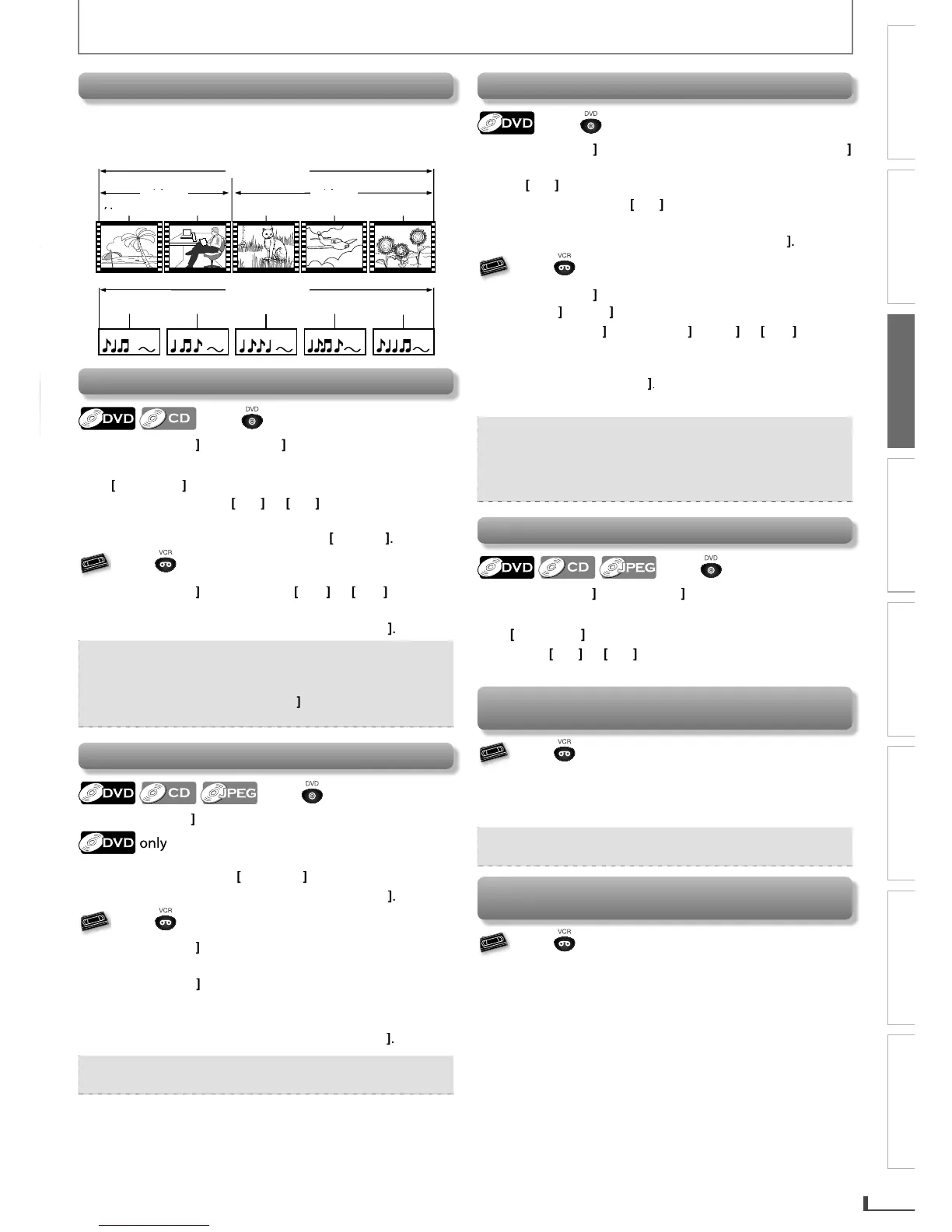
divided into “titles”.
T
itles ma
y
be further subdivided into “chapters”
.
T
h
e
aud
i
o
C
D
co
n
ta
in
s
t
r
ac
k
s
.
DVD id
DVD
-v
ideo
il
title
1
il
title
2
chapter 1
c
c
h
ch
h
c
c
ch
apter
2
ch
apter
1
ch
apter
2
ch
apter 3
di CD
au
di
o
CD
1
t
r
ack
1
t
r
ack
2
t
r
ack
3
t
r
ack
4
t
r
ack
5
Fast Forwar
d
/ Fast Reverse P
l
a
yb
ac
k
Press first.
Pr
ess
W
D
[
F
W
g
]
o
r
[
REV
h
]
repeatedl
y
during
k
to se
l
ect t
h
e
d
esi
r
p
l
a
yb
ac
k
e
d forward or reverse s
p
eed
.
Us
i
ng
[
H
,
[
],
G
]
o
n this
u
ni
t
and holdin
g
Pressin
g
[
H
]
or
[
G
]
o
n
t
hi
s
u
ni
t
will
a
l
so
f
orward or reverse pla
y
back speed
.
change
f
o
t
h
e norma
l
p
l
a
yb
ac
k
Return t
o
,
press
[
P
LA
Y
B
]
.
VHS
V
V
V
V
V
S
VHS
VHS
VHS
VHS
Press first.
P
r
ess
[
FWD
g
]
or
[
REV
h
]
(
[
g
]
or
[
h
]
o
n
th
i
s
unit)
d
uring p
l
a
yb
ac
k.
Return to t
h
e norma
l
p
l
a
yb
ac
k
, press
[
PLAY
B
]
.
Note:
For DVD and audio CD,
f
ast
f
orward or
f
as
t
reverse speed is di
ff
erent depending on the disc.
A
pproximate speed is x2, x4, x8 and x20
.
For V
C
R,
p
ress
[
FWD
g
]
a
g
ain so t
h
e unit wi
ll
searc
h
at
h
ig
h
er-spee
d
(in t
h
e SLP mo
d
e on
ly
)
.
Pause and Step-b
y
-step Pla
y
bac
k
Press first.
P
r
ess
[
PAUSE
F
]
d
uring p
l
a
yb
ac
k
.
The picture goes forward b
y
one frame each
time
y
ou pr
e
ss
[
P
A
US
E
F
]
in t
h
e
p
ause mo
d
e
.
Return to the normal pla
y
back, press
[
PLAY
B
]
.
VHS
V
V
V
V
V
S
VHS
VHS
VHS
VHS
Press first.
P
r
ess
[
PAUSE
F
]
during pla
y
back
.
The picture goes forward b
y
one frame each time
y
ou
press
[
PAUSE
F
]
in t
h
e pause mo
d
e
.
If the picture is distorted or rolling verticall
y
, adjust the
v
ertical hold control on
y
our TV i
f
equipped
.
Return to the normal pla
y
bac
k
,
press
[
PLAY
B
]
.
Note:
For VCR, to prevent dama
g
e to the cassette tape,
p
ause mode will automaticall
y
stop after 5 minutes.
S
l
ow Forwar
d
P
l
a
yb
ac
k
Press first.
P
r
ess
[
PAUSE
F
]
d
uring p
l
a
yb
ac
k
, t
h
en press
[
FWD
g
]
repeatedl
y
to select the desired
f
orward speed
.
Us
i
n
g
[
G
]
on t
h
is uni
t
Pressing an
d
h
o
ld
ing
[
G
]
on t
h
is unit in t
h
e
p
ause
mode will also change
f
orward pla
y
back speed.
Return to the normal pla
y
back, press
[
PLAY
B
]
.
VHS
V
V
V
V
V
S
VHS
VHS
VHS
VHS
Press first.
P
r
ess
[
PAUSE
F
]
during pla
y
back, then press
[
FWD
g
]
.
(
[
g
]
on t
h
is unit.
)
P
r
ess
[
FWD
g
]
o
r
[
REV
h
]
(
[
g
]
o
r
[
h
]
o
n
th
i
s
unit) to chan
g
e the speed
.
•I
f
the distorting picture appears,
y
ou can adjust it b
y
us
i
ng
[
TRACKING
K
/
L
]
.
P
r
ess
[
PLAY
B
]
t
o return to t
h
e norma
l
p
l
a
yb
ac
k.
Note:
For
D
V
D,
slow
f
orward speed is di
ff
erent depending
o
n t
he
d
isc
.
App
roximate s
p
eed is x1/2, x1/4 and 1/8
.
For VCR, to prevent
d
ama
g
e to t
h
e cassette tape,
slow mode will automaticall
y
stop a
f
ter 5 minutes.
To Ski
p
Titles, Cha
p
ters, Tracks or File
s
Press first.
P
r
ess
[
SKIP
H
]
or
[
SKIP
G
]
d
uring p
l
a
yb
ac
k
to s
k
ip
titles, chapters, tracks or
f
iles to a desired point.
Using
[
H
],
[
G
]
o
n t
h
is
u
ni
t
P
ressing
[
H
]
or
[
G
]
on t
h
is unit wi
ll
a
l
so s
k
i
p
tit
l
es,
c
hapters, tracks or
f
iles to a desired point.
To Reset t
h
e Cassette Ta
p
e Counter
(
Counter Reset
)
VHS
V
V
V
V
V
S
VHS
VHS
VHS
VHS
Press first.
P
r
ess
[
DISPLAY
]
to
d
isp
l
a
y
t
h
e cassette tape counter on
the TV screen. Then, press
[
CLEAR
]
to
r
eset
t
h
e
cou
n
te
r
to
“0:00:00”.
Note:
This
f
unction is not available i
f
the unit be
g
ins the
timer recor
d
ing or one-touc
h
timer recor
d
ing.
To Rewin
d
t
h
e Cassette Tape automatica
lly
(
Auto Rewin
d)
VHS
V
V
V
V
V
S
VHS
VHS
VHS
VHS
Press first.
When a cassette tape ends during pla
y
back, fast
-
f
orward or normal recording, the unit will automaticall
y
rewind to the beginning of the cassette tape. After
rewinding
f
inishes, the unit will eject the cassette tape
.
E8R6AUHDV220FX5OMv1.indd15 2014/10/0615:41:58

Related product manuals