EasyManua.ls Logo

FUNAI DV220FX5 - Initial Setups; Turning on Unit for the First Time; Clock Setting

FUNAI DV220FX5
28 pages
Print Icon
To Next Page IconTo Next Page
To Previous Page IconTo Previous Page
Loading...
PRECAUTIONS
PREPARATION
ADVANCED PLAYBACK
BASIC OPERATIONS RECORDING OPTIONAL SETTINGS TROUBLESHOOTING INFORMATION
EN
13
PREPARATION
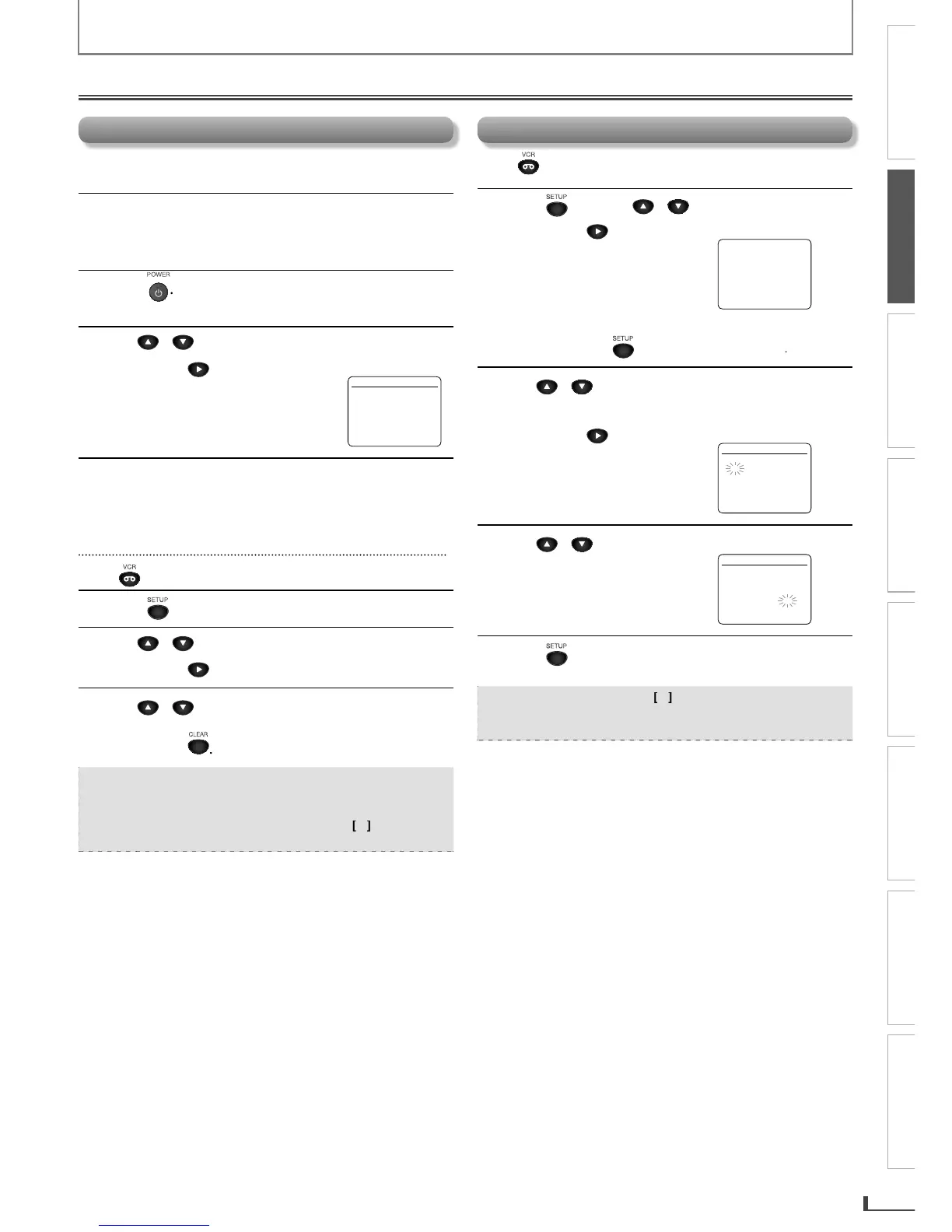
Initial Setups
C
l
oc
k
Settin
g
Press first.
1
P
r
ess
SETUP
a
n
d
Use
/
to
select
C
L
OC
K
S
ET”
.
T
h
en
p
ress
t
o
g
o
t
o nex
t
s
t
ep
.
-
M
E
N
U
-
TIMER PR
O
GRAMMING
SATELLITE LINK
AUT
O
REPEAT
[O
FF
]
B
C
L
OC
K
S
ET
LANG
U
AGE
S
ELE
CT
If the clock is not set yet, the “CLOCK SET menu appears
when
y
ou press
SETUP
.
In this case,
g
o to step
2
.
2
Use
/
to
select
t
h
e contents to suit
y
our
pre
f
erence
.
T
h
en press to go to t
h
e next item
.
C
L
O
CK SE
T
M
O
NTH DAY YEA
R
1 0 / - - - - - -
HOUR MINUTE AM
/
PM
- -
:
- - - -
3
Use
/
to
select
“AM
o
r “PM”
.
C
L
OC
K
S
E
T
M
O
NTH DAY YEA
R
1 0
/
0 7 TUE 2 0 1 4
H
O
UR MINUTE AM
/
P
M
0
5
:
4
0
P M AM
B
PM
4
P
r
ess
SETUP
to
e
xi
t
the
C
L
OC
K
S
ET” m
e
n
u.
Note:
To
g
o
b
ac
k
, press
[
0
]
d
urin
g
steps
2
t
o
3
.
Clock setting will be lost after a power failure or this
unit has been unplu
gg
ed for more than 30 seconds
.
T
urning On Unit
f
or the First Tim
e
Pl
ease
n
ote:
m
ost
in
st
r
uct
i
o
n
s
in
t
hi
s
m
a
n
ua
l r
efe
r
to
r
e
m
ote
co
n
t
r
ol
use.
1
Be sure
y
our TVs input is set to VIDEO.
(
Name
ma
y
var
y
with TV manu
f
acturer. See
y
our T
V
manual for details.
)
2
P
r
ess
.
“LANGUAGE SELECT menu a
pp
ears
.
3
Use
/
to se
l
ect
y
our on-screen
l
anguage
.
Then
p
ress
to
co
n
ti
n
ue.
L
ANG
U
AGE
S
ELE
CT
B
ENGLISH
[O
N
]
FRAN
C
AI
S
ESPA
Ñ
O
L
4
W
h
en “CLOCK SET menu appears,
go to step
2
in “Clock Setting on this page
.
To Change the Selected On-screen Language
Press first.
1
P
r
ess
SETUP
unti
l
t
h
e main menu a
pp
ears
.
2
Use
/
to
select
“LANG
U
AGE
S
ELE
C
T”
.
T
h
en press
t
o
g
o
t
o nex
t
s
t
ep
.
3
Use
/
to
se
l
ect
ENGLISH
”,
FRANCAIS
or
“E
S
PAÑ
O
L”
.
T
h
en press
.
Note:
If you accidentally select Spanish or French an
d
nee
d
En
gl
is
h:
P
r
e
ss
[
SETUP
]
a
n
d
ch
oo
s
e
S
ELEC
.
IDI
O
MA”
or
“S
ELECTI
O
N LANG
U
E
”.
Pr
e
ss c
u
rs
or
[
1
]
a
n
d
s
e
l
e
ct
“ENGLISH”. Fina
lly
, press
[
CLEAR
]
.
E8R6AUHDV220FX5OMv1.indd13 2014/10/0615:41:45

Related product manuals