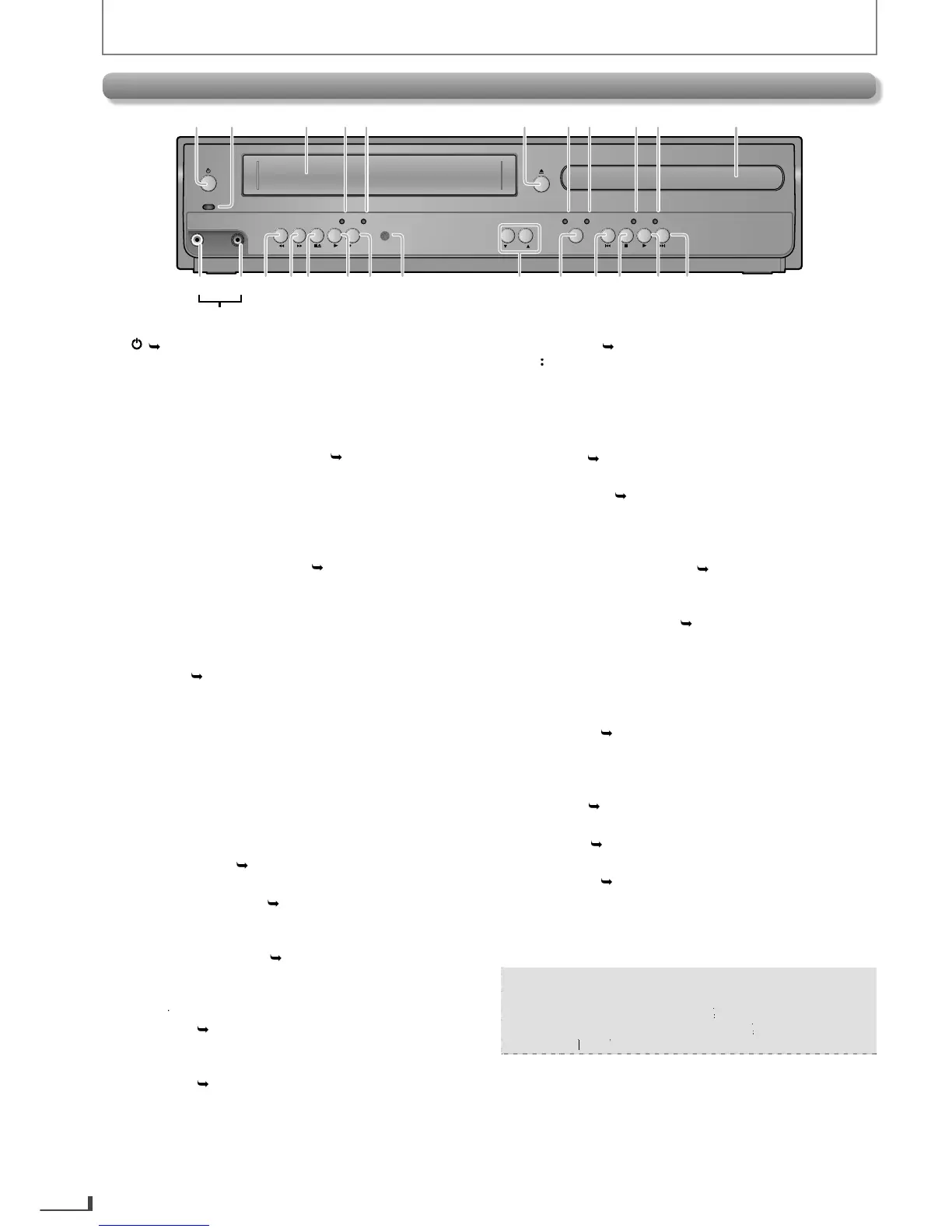
PLAY
DISC IN
DVDVCR
POWER ON
AUDIO
REC
REC
TIMER REC
TRACKING
SOURCE
VIDEO
1
12 13 14 15 17 18 20
2345 6789
10
11
1916 2221 24 2523
L2 input jacks
1
• Press to turn On the unit
or to turn the unit into the
Standb
hts up when the unit is turned On
hts up when the unit is in the DVD mode
• Place a disc when it is open
onnect an RCA video cable from the video output
our camcorder and other such devices here
e cassette tape or to view t
e cassette tape or view t
e
picture rapidly in forward during playback (forward
search
•
Press to Stop the Playback / Recording of a cassette tape
Press to remove the cassette ta
Press to Start the Playback o
• Press once to Start a Recordin
to activate an OTR (One-touc
rom the Remote Control so that
the buttons to stabilize the
icture
if the picture begins to vibrate vertically during the
cassette tape pla
• Press and hold it to be
Press to Start / Resume P
• Press to Skip Chapters / Titles / Tracks during Pla
You can turn On the unit b
pressing the buttons 6
or 24 (circ
inserting a cassette tape.
E8R6AUHDV220FX5OMv1.indd8 2014/10/0615:41:40



 To Next Page