EasyManua.ls Logo

FUNAI DV220FX5 - Preparation and Initial Setup; Media Compatibility Guide

FUNAI DV220FX5
28 pages
Print Icon
To Next Page IconTo Next Page
To Previous Page IconTo Previous Page
Loading...
PRECAUTIONS
PREPARATION
ADVANCED PLAYBACK
BASIC OPERATIONS RECORDING OPTIONAL SETTINGS TROUBLESHOOTING INFORMATION
EN
5
PREPARATION
About Cassette Tapes and Discs
Region Cod
e
Th
is unit
h
as
b
een
d
esigne
d
to p
l
a
y
b
ac
k
DVD
with region 1. DVD must be labeled
f
or ALL
regions or for region 1 in order to pla
y
back on
the unit. You cannot pla
y
back DVD that are
l
abeled
f
or other regions. Look
f
or the s
y
mbols
on
y
our DVD. I
f
these region s
y
mbols do not
appear on
y
our DVD,
y
ou cannot p
l
a
y
b
ac
k
t
h
e
DVD in
t
hi
s
u
ni
t.
T
he number inside the
g
lobe re
f
ers to re
g
ion o
f
the world
.
A DVD labeled
f
or a speci
f
ic region can onl
y
be pla
y
ed
back on the unit with the same region code
.
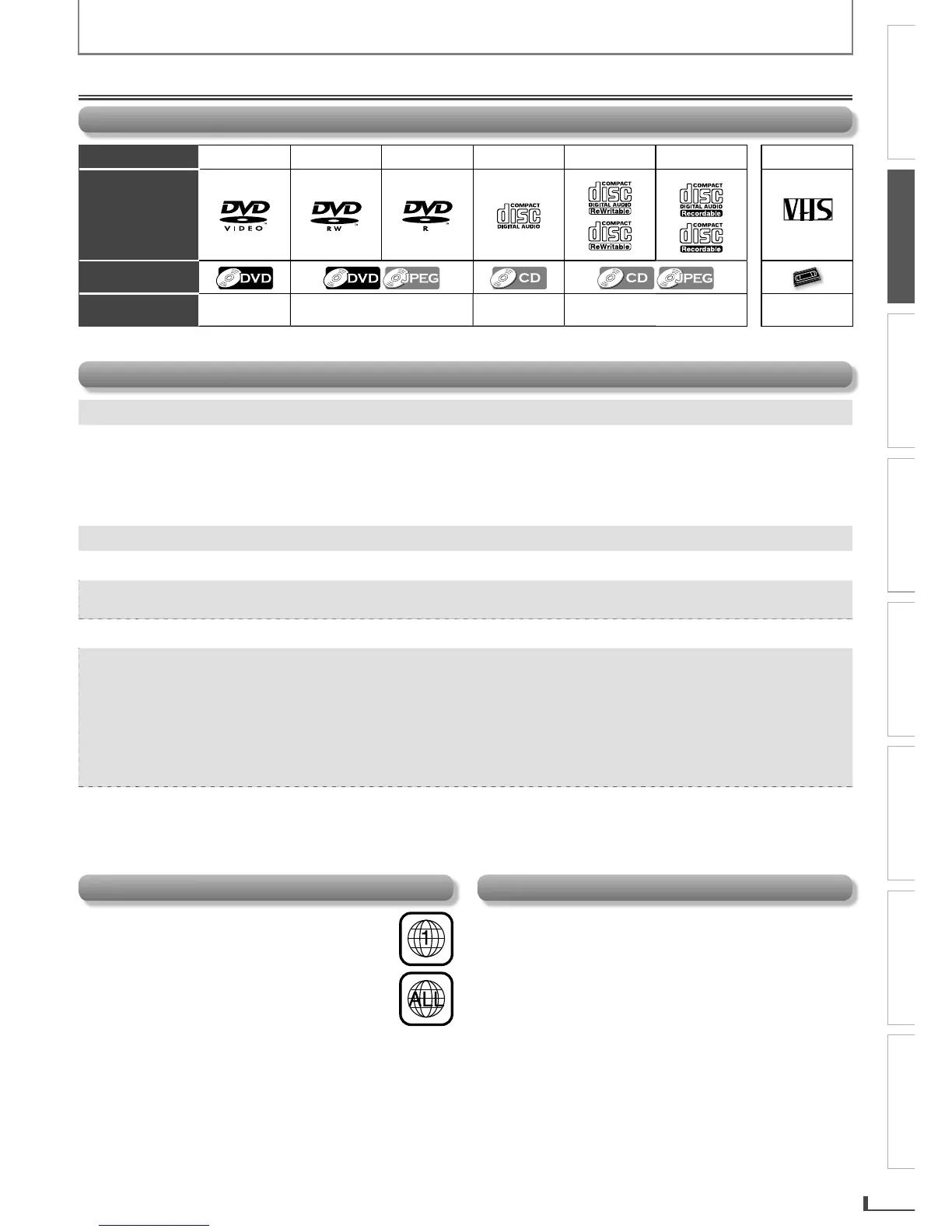
Playable Media
Media Type DVD-VIDE
O
D
V
D
-
RW
D
V
D
-
R
C
D-D
A
C
D-R
W
C
D-
R
C
assette Tap
e
Logo
Symbols used in
this manual
VHS
V
V
V
V
V
S
VHS
VHS
VHS
VHS
Recorded Signal
d
igital video
(
MPEG2
)
d
igita
l
vi
d
eo (MPEG2) or JPE
G
d
igita
l
au
d
i
o
d
igita
l
au
d
io or JPE
G
ana
l
og vi
d
eo
Unp
l
a
y
a
bl
e Dis
c
C
autio
n
:
Never play the
f
ollowing discs
.
D
V
D
-
R
A
M
DVD-
aud
i
o
C
D-
i
ph
oto C
D
• vi
deo
C
D
DVD with re
g
ion codes other than 1 or AL
L
DT
S
-
CD
DVD-ROM
f
or
p
ersonal com
p
uter
s
• CD-ROM for
p
ersonal com
p
uter
s
• t
h
e
d
iscs wit
h
l
a
b
e
l
s
,
scratc
h
es
,
stains
,
bl
emis
h
es
,
etc
.
H
D
D
V
D
Blu-ra
y
dis
c
Caution: The sound may not be heard on the
f
ollowing disc
.
s
uper audio CD
Note:
On
ly
t
h
e soun
d
recor
d
e
d
on t
h
e norma
l
CD
l
a
y
er can
b
e
d
e
l
ivere
d
. T
h
e soun
d
recor
d
e
d
on t
h
e
h
ig
h
d
ensit
y
super au
d
io
CD
l
a
y
er cannot
b
e
d
e
l
ivere
d.
An
y
other discs without compatibilit
y
indication
s
N
ote:
Un
f
inalized discs cannot be pla
y
ed back
.
F
or DVD-RW/R, discs recorded in the VR (video recording)
f
ormat cannot be pla
y
ed back. Onl
y
the
f
inalized video
f
orma
t
d
iscs can
b
e p
l
a
y
e
d
b
ac
k.
S
ome discs cannot be pla
y
ed back because of incompatible recording conditions, characteristics of the recorder or specia
l
p
ro
p
erties o
f
discs
.
Y
ou can pla
y
back discs which bear the marks listed in “Pla
y
able Media”. If
y
ou use nonstandardized discs, this unit ma
y
not pla
y
them back. Even if the
y
are pla
y
ed back, the sound or video qualit
y
will be compromised
.
I
f
the recorded portion o
f
the disc is too small (less than 2-3/16 inches (55 mm) across), it ma
y
not pla
y
back properl
y.
Color S
y
st
em
D
VD is recorded in di
ff
erent color s
y
stems throughout the
world. The most common color s
y
stem is NTSC (which is
u
se
d
primari
ly
in t
h
e Unite
d
States an
d
Cana
d
a)
.
Th
is unit uses NTSC, so DVD
y
ou p
l
a
y
b
ac
k
must
b
e
recorded in the NTSC s
y
stem. You cannot pla
y
back DVD
recor
d
e
d
in PAL co
l
or s
y
stems
.
E8R6AUHDV220FX5OMv1.indd5 2014/10/0615:41:36

Related product manuals