EasyManua.ls Logo

FUNAI DV220FX5 - Dubbing a Cassette Tape; Satellite Link

FUNAI DV220FX5
28 pages
Print Icon
To Next Page IconTo Next Page
To Previous Page IconTo Previous Page
Loading...
EN
22
RECORDING
S
a
tellite Lin
k
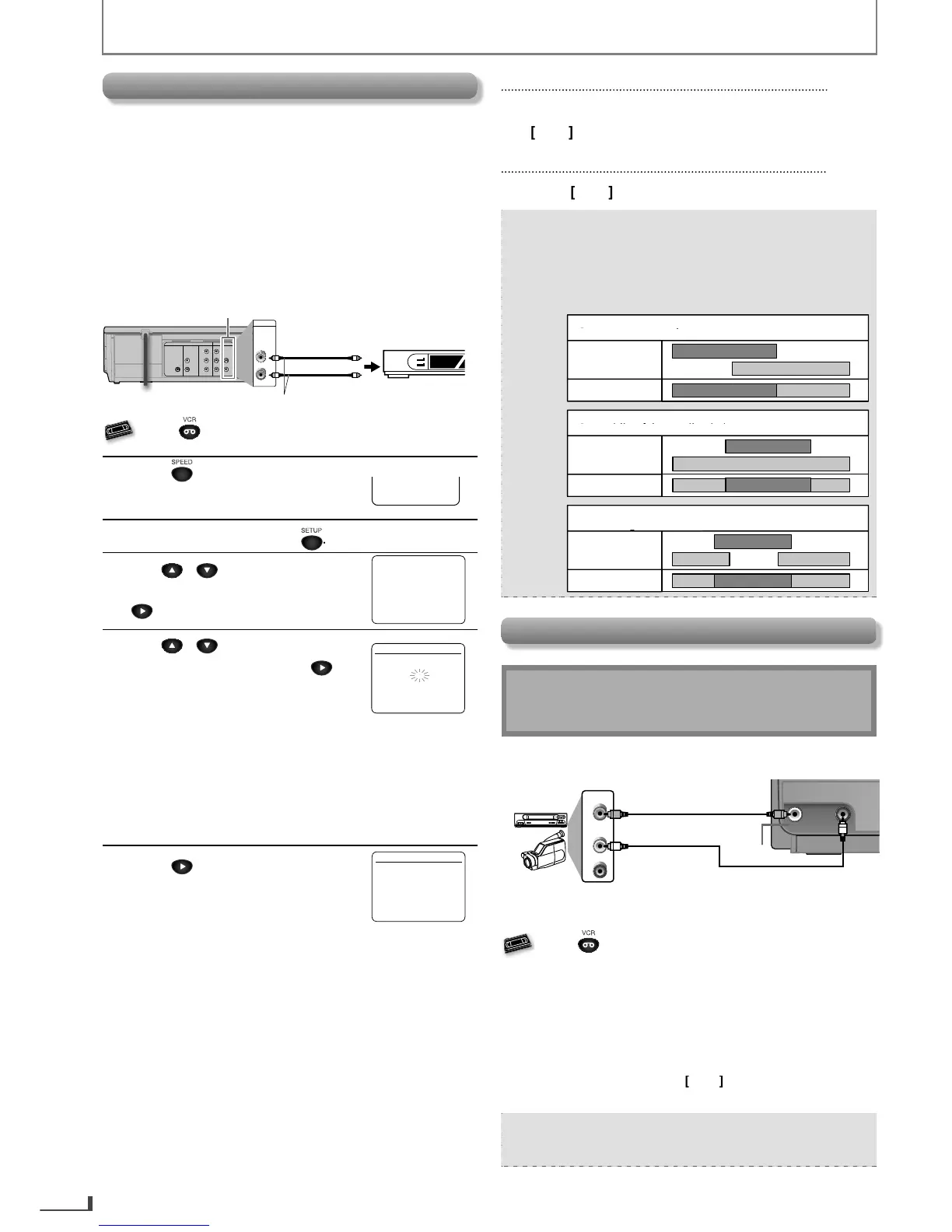
You can set the unit to start recordin
g
whenever it detects
a video signal
f
rom the external tuner
.
P
reparin
g
f
or the Satellite Link
:
Onl
y
L1 (rear) is available for satellite link and be sure
that this L1 needs to be connected b
y
the external tuner
.
T
he external tuner should be equipped with some kind
o
f
timer
f
unction. Using timer
f
unction o
f
the tuner, set it
to the output audio/video si
g
nals when it comes to the
time
y
ou want to start recor
d
ing, an
d
stop t
h
ose signa
l
s
when it comes to the time
y
ou want to finish recording
.
Re
f
er to the tuner’s manual on how to set the timer
.
DIGITAL
AUDIO OUT
COAXIAL
AUDIO OUT
DVD VCR
DVD/VCR
COMPONENT
VIDEO OUT
AUDIO IN
VIDEO IN
AUDIO OUT
VIDEO OUT
L
L
Y
R
R
CB
CR
VCR
AUDIO IN
VIDEO IN
To video out jack
L1
external tuner
To audio(L)out jack
RCA audio/video cables
VHS
V
V
V
V
V
S
VHS
VHS
VHS
VHS
Press first.
1
P
r
ess
to
select
the
des
ir
ed
t
a
p
e s
p
ee
d.
S
P
2
In t
h
e sto
p
mo
d
e,
p
ress
SETUP
3
U
se
/
to se
l
ect
“SATELLITE LINK”. T
h
en,
p
ress
to go to the next step
.
- M E N
U
-
TIMER PR
O
GRAMMING
B
S
ATELLITE LIN
K
AUT
O
REPEAT
[O
FF
]
C
L
OC
K
S
ET
LANGUAGE SELEC
T
4
Use
/
to
select
the
d
esire
d
h
our. T
h
en,
p
ress
to
go to the next step.
S
ATELLITE LIN
K
0 1 : 0 0 P
M
Then, repeat procedures above to
select
the
min
ute
as
w
ell.
Th
e
h
ou
r
ca
n
be
se
l
ected
f
r
o
m 1-12 wi
t
h AM
o
r
P
M
.
W
h
en t
h
e externa
l
tuner si
g
na
l
is stoppe
d
,
recor
d
in
g
wi
ll
b
e stoppe
d
.
5
P
r
ess
to
set
satell
i
te
l
in
k
stan
dby
mo
d
e
.
S
ATELLITE LIN
K
0
1
:
3
0
PM
[O
N
]
[
TIMER REC
]
in
d
icator:
l
ig
h
ts up an
d
t
h
e unit
goes to the DVD mode. I
f
y
ou do not use DVD
f
unction
,
turn OFF the unit.
A
n
e
x
te
rn
a
l
tu
n
e
r m
ust
be
tu
rn
ed
O
N f
o
r
sate
lli
te
link
to
sta
r
t.
If
e
x
te
rn
a
l
tu
n
e
r i
s
n
ot
set
t
o output si
g
na
l
s, sate
ll
ite
l
in
k
wi
ll
remain in
s
tan
dby
mo
d
e
.
To Cancel the Satellite Link on Standby:
P
ress
[
TIMER SET
]
on the remote control o
r
[
C
A
]
o
n
th
i
s
u
ni
t.
To Cancel the Satellite Link in Progress:
P
r
ess
[
C
A
]
o
n
th
i
s
u
ni
t.
N
ote
:
Recording picture will be distorted if the cop
y
protection signa
l
is
b
eing
d
etecte
d
d
uring sate
ll
ite
l
in
k.
W
h
en t
h
e timer recor
d
ing an
d
t
h
e sate
ll
ite
l
in
k
are over
l
appe
d
, t
h
ose recor
d
in
g
s are recor
d
e
d
as
i
ll
u
str
a
t
ed
be
l
o
w
.
e.
g
.
)
In case of the satellite link is overlapped on the exist-
ing timer recording.
g
t
im
e
r r
eco
r
d
in
g
recor
d
in
g
resu
l
t
sate
lli
te
l
ink
e.
g
.
)
In case of the timer recording is programmed in the
middle of the satellite link.
g
timer recording
r
ecording result
sate
lli
te
link
e.g.
)
In case of the timer recording is overlapped on the
existin
g
sate
ll
ite
l
in
k
.
g
t
im
e
r r
eco
r
d
in
g
recor
d
in
g
resu
l
t
satell
i
te
l
in
k
D
u
bb
in
g
a Cassette Tap
e
Warn
i
ng
:
Unauthorized recordings o
f
cop
y
righted
c
assette tapes ma
y
be an infringement o
f
c
opyright laws.
AUDIOVIDEO
AUDIO OUT
L
R
VIDEO OUT
or
output jacks of
external device
RCA audio cable
RCA video cable
front of the unit
L2
You can use a video disc pla
y
er, cable/satellite box or
other devices with Audio/Video output jacks
.
VHS
V
V
V
V
V
S
VHS
VHS
VHS
VHS
Press first.
1
)
Press [SPEED
]
o
n
t
h
e
r
e
m
ote
co
n
t
r
o
l
to
se
l
ect
recor
d
ing spee
d
(SP or SLP)
.
2
)
Press
[
INPUT
]
on the remote control to select L1 or L2
w
h
i
che
v
e
r
Jack
the
e
x
te
rn
al
de
vi
ce
i
s
co
nn
ected
to.
3
)
Press
[
REC
]
on the unit, and then start pla
y
back o
f
the
e
x
te
rn
al
de
vi
ce.
4
) To stop recordin
g
, press
[
C
A
]
on this unit
.
5) Stop pla
y
back o
f
the external device
.
Note:
For
b
est resu
l
ts
d
uring
d
u
bb
ing, use
b
uttons on t
h
is
unit w
h
enever possi
bl
e. T
h
e remote contro
l
mig
ht
a
ff
ect another device’s operation
.
E8R6AUHDV220FX5OMv1.indd22 2014/10/0615:42:18

Related product manuals