EasyManua.ls Logo

FUNAI DV220FX5 - Note for Timer Recording & OTR; Timer Recording

FUNAI DV220FX5
28 pages
Print Icon
To Next Page IconTo Next Page
To Previous Page IconTo Previous Page
Loading...
PRECAUTIONS PREPARATION ADVANCED PLAYBACKBASIC OPERATIONS
RECORDING
OPTIONAL SETTINGS
TROUBLESHOOTING INFORMATION
EN
21
RECORDING
T
imer Recor
d
in
g
VHS
V
V
V
V
V
S
VHS
VHS
VHS
VHS
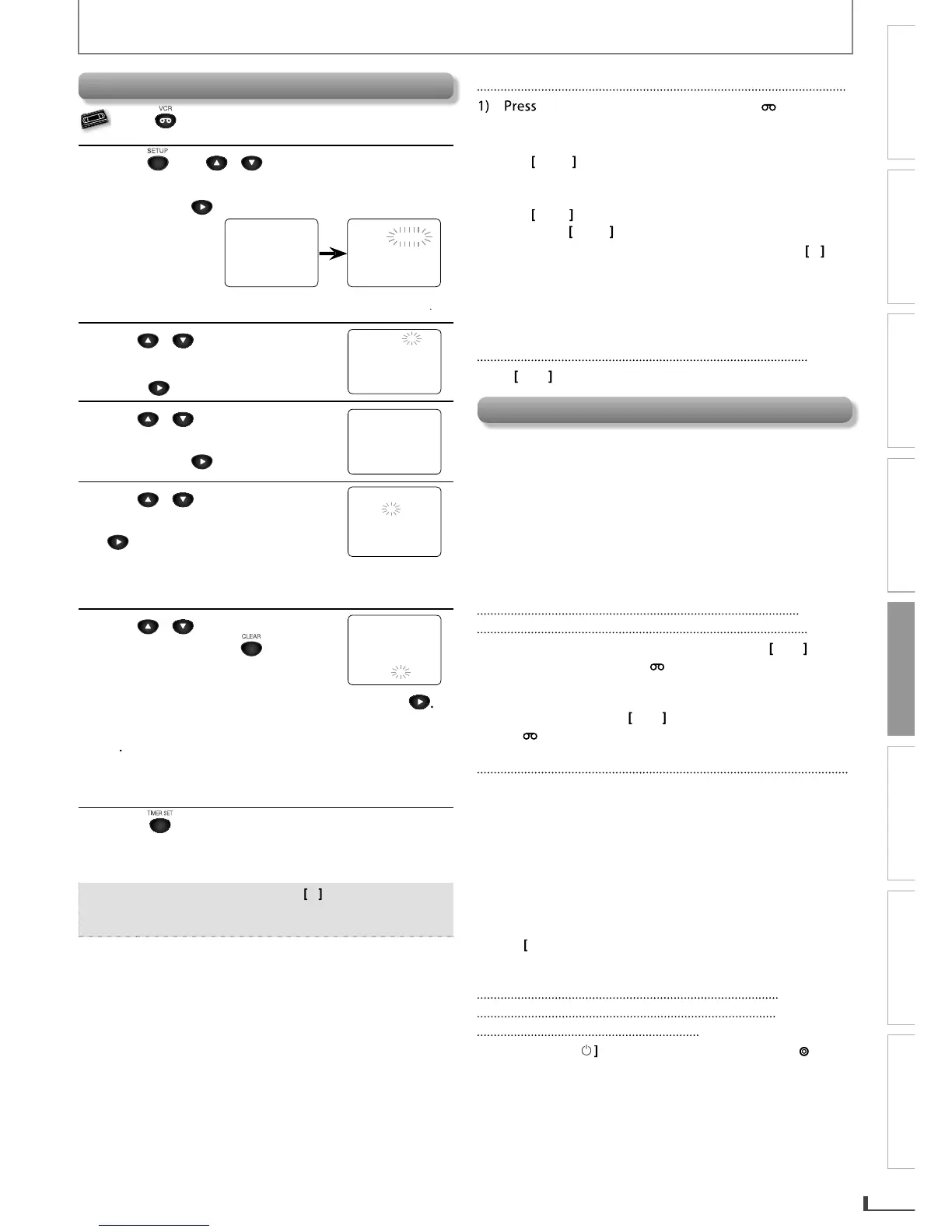
Press first.
1
P
r
ess
SETUP
,
Use
/
to
select
TIMER PR
O
GRAMMING
”.
T
h
en, press
t
o go
t
o nex
t
s
t
ep
.
TIMER PR
O
GRAMMING
PR
O
G
.
12
3
4
56
7
8
D
AT
E
START TIME
EN
D
TIME
L1
/
L
2
RE
C
S
PEED
- M E N
U
-
B
TIMER PR
O
GRAMMING
S
ATELLITE LINK
AUTO REPEAT [OFF]
C
L
OC
K
S
E
T
LANGUAGE SELEC
T
Avai
l
a
bl
e pro
g
ram
n
u
m
be
r
bl
in
ks
.
2
Use
/
to
select
an
empt
y
program number. Then,
press
t
o go
t
o nex
t
s
t
ep
.
PR
O
GRAM NUMBER 1
DATE – – / –
S
TART TIME
:
– – – –
END TIME
:
– – – –
L1/L2
REC SPEED
3
Use
/
to se
l
ect “ONCE“
,
“DAILY“
(
Mon-Fri
),
or WEEKLY“.
T
h
en,
p
ress
t
o go
t
o nex
t
s
t
ep
.
PR
O
GRAM NUMBER 1
B
O
N
CE
D
AIL
Y
WEEKL
Y
4
Use
/
to
select
the
d
esire
d
mont
h
. T
h
en, press
to
g
o to t
h
e next step
.
O
NE TIME PR
O
GRA
M
PR
O
GRAM N
U
MBER 1
DATE 1 0
/
0 2 TUE
START TIME – – : – – – –
END TIME
:
– –
L1
/
L2
REC SPEED
Then, repeat procedures above to select the da
y
,
start time, end time, and “L1” or “L2” as well.
5
Use
/
to select recording
spee
d
. T
h
en, press
to
r
e
m
o
v
e
the
MEN
U.
O
NE TIME PR
O
GRA
M
PR
O
GRAM N
U
MBER 1
DATE 1 0
/
0 2 TU
E
S
TART TIME
0
7
:
3
0
PM
EN
D
TIME
0
8
:
3
0
P
M
L1
/
L2 L
1
REC SPEED S
P
B
SP
S
L
P
To set another program after step
5
,
press
.
Then, re
p
eat
p
rocedures
f
rom ste
p
s
2
t
h
rou
gh
5
.
Y
ou can pro
g
ram t
h
e unit to recor
d
up to 8
programs, an
d
up to 1
y
ear in a
d
vance
.
6
P
r
ess
to set t
h
e timer stan
dby
mo
d
e
.
Th
e
[
TIMER REC] indicato
r
on this unit lights up
an
d
t
h
e unit goes to t
h
e DVD mo
d
e
.
Note:
To
g
o
b
ac
k
one step, press
[
0
]
d
urin
g
steps
3
t
o
5
.
S
e
l
ect “L1” or “L2” to activate rear input jac
k
s o
r
f
ront input jacks accordingl
y.
To Check, Correct or Cancel a Timer Program
[
TIMER SET
]
, an
d
t
h
en press
[
VCR
]
o
n
the
r
e
m
ote
co
n
t
r
ol.
2) Re
p
eat
p
roce
d
ures in ste
p
1 a
b
ove.
3
)
Use
[
K
/
L
]
to select the program number
y
ou want
to check. The details of the program you select will
appear on the TV screen
.
Use
[
0
/
1
]
to go to the digit
y
ou want to change
.
Th
en
,
use
[
K
/
L
]
to
e
n
te
r
the
co
rr
ect
n
u
m
be
r
s.
You can cance
l
t
h
e entire program
by
pressing
[
0
]
w
h
i
l
e t
h
e pro
g
ram num
b
er
bl
in
k
s
.
4)
Press
[
CLEAR
]
to
e
xi
t.
5
)
Press
[
TIMER SET
]
to return to t
h
e timer stan
dby
m
ode.
To Cancel a Timer Recording in Progress
P
r
ess
[
C
A
]
o
n
the
u
ni
t.
Note
f
or Timer Recordi
ng
& OT
R
If a
p
ower failure occurs or the cassette ta
p
e does not
h
ave t
h
e erase-protection ta
b,
the
[
TIMER REC
]
in
d
icato
r
bl
in
k
s an
d
timer recor
d
ing
cannot be per
f
ormed
.
If there is a
p
ower failure occurred or the unit is
unplu
gg
ed
f
or more than 30 seconds, clock settin
g
and
a
ll
programme
d
timer recor
d
ings wi
ll
b
e
l
ost
.
If a cassette ta
p
e runs out before an OTR or a timer
recording is
f
inished, the unit e
j
ects the cassette tape
.
After an OTR or a Timer Recording Has
Been Set, This Unit Operates as Follows:
P
r
ess
[
TIMER SET
]
o
n
the
r
e
m
ote
co
n
t
r
ol
o
r
[
C
A
]
on
t
h
e unit, t
h
en
p
ress
[
VCR
]
to
act
iv
ate
the
V
C
R
f
unction a
g
ain
.
To cance
l
t
h
e timer stan
dby
mo
d
e, press
[
TIMER SET
]
on
the
r
e
m
ote
co
n
t
r
ol
o
r
[
C
A
]
on t
h
e unit, t
h
en
p
ress
[
VCR
]
to activate the VCR
f
unction again.
When an OTR or a Timer Recording is Completed.
I
f
timer pro
g
rams are le
f
t on the VCR, the unit will switch
to t
h
e DVD mo
d
e an
d
t
h
en t
h
e VCR wi
ll
go stan
dby
f
or the next timer recordin
g
. (All the VCR
f
unctions will
be unavailable.) If auto
p
ower off has been in effect,
however, both DVD and VCR will go to standb
y
mode
.
A
ll
t
h
e
DVD
fu
n
ct
i
o
n
s
a
r
e
a
v
a
il
ab
l
e
whil
e
t
h
e
V
C
R i
s
in
OTR, Timer stan
dby
, or Timer Recor
d
ing mo
d
e
.
T
he
[
TIMER REC
]
in
d
icato
r
b
link
s
if
t
h
e
r
e
a
r
e
n
o
m
o
r
e
t
i
mer pro
g
rams
.
P
r
ess
[
C
A
]
o
n
t
hi
s
u
ni
t
o
r
[
TIMER SET
]
o
n
t
h
e
r
e
m
ote
co
n
t
r
o
l
to
use
t
h
e
V
C
R wh
e
n
t
h
e
u
ni
t
i
s
tu
rn
ed
o
ff
.
To Use the DVD Player During Timer
Recording or While the [TIMER REC]
Indicator is On or Blinking.
P
r
ess
[
P
O
WER
y
]
to
tu
rn
O
n
the
u
ni
t.
Pr
ess
[
DVD
]
on
t
h
e
R
e
m
ote
Co
n
t
r
o
l
to
c
h
oose
DVD m
ode.
Th
e
n
co
n
t
in
ue
wi
t
h
t
h
e
ot
h
e
r DVD
featu
r
es
as
desc
ri
bed
in
t
hi
s
m
a
n
ua
l
.
E8R6AUHDV220FX5OMv1.indd21 2014/10/0615:42:15

Related product manuals