11
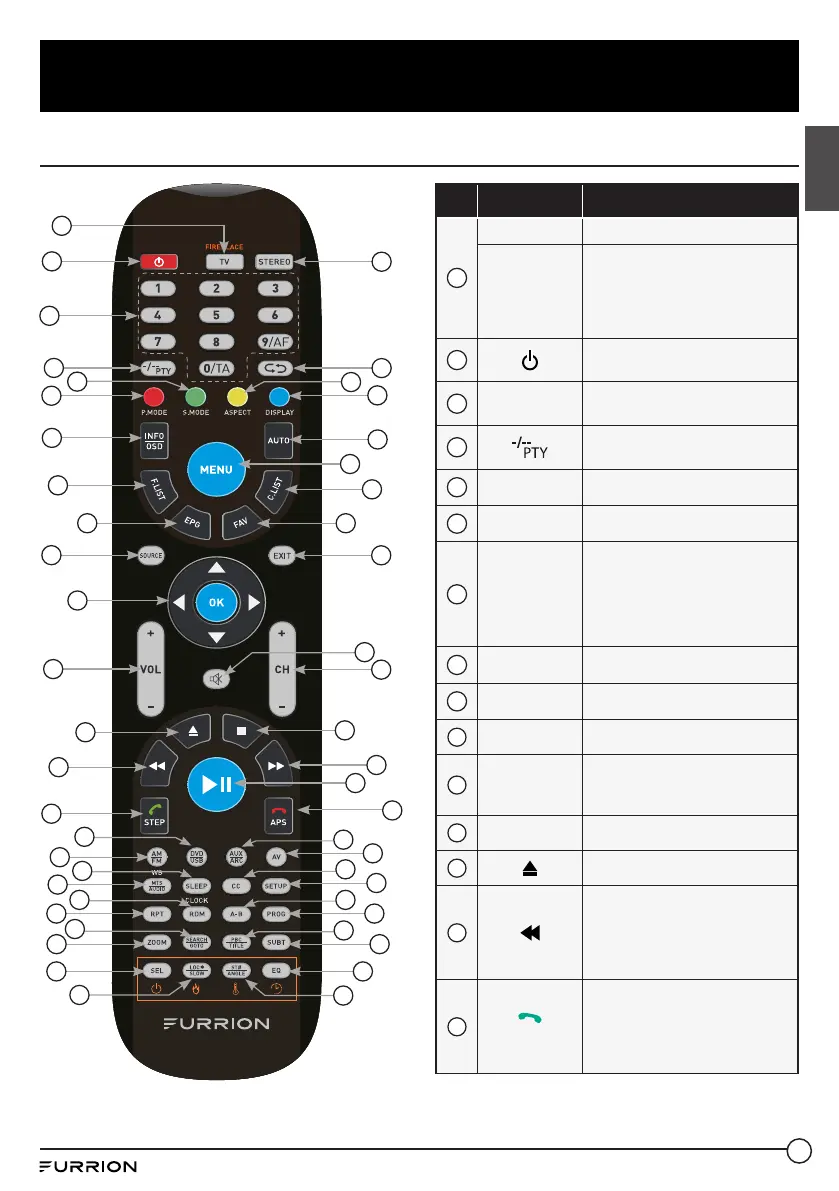
Function Overview
English
Unimote
No. Button Function
1
TV
Switches to TV mode.
FIREPLACE
Selects Furrion Fireplace
remote control functions.
* Please refer to your Furrion
Fireplace manual for more
information.
2
Press to turn the TV/
Entertainment System on/off.
3
NUMBER
BUTTONS
Enters numbers or select
channels.
4
Toggles between single &
double digit input.
5
S.MODE
Cycles through sound modes.
6
P.MODE
Cycles through picture modes.
7
INFO/OSD
Under TV mode, press to display
information on the selected TV
channel.
Under Stereo mode, press to
display DVD playback status.
8
F.LIST
Displays the favorites list.
9
EPG
Displays the program guide.
10
SOURCE
Cycles through input sources.
11
NAVIGATION
/OK
BUTTONS
Navigates within a menu;
Press OK to confirm your
selection.
12
VOL+/-
Increases/decreases volume.
13
Ejects DVD/ CD.
14
During playback, press to select
the previous track/chapter;
Press and hold to rewind;
Automatic or Manual tuning in
radio mode.
15
STEP
Press to forward frame by frame
during DVD/ VCD playback.
Dial or accept a call (when the
system is connected to a cell
phone).
1
2
3
4
5
6
7
8
9
11
10
12
13
14
15
16
17
18
19
20
21
22
23
24
25
27
26
28
29
30
31
32
33
34
35
37
49
38
39
40
41
42
43
44
50
45
46
47
48
36



 To Next Page