23
Change Settings
English
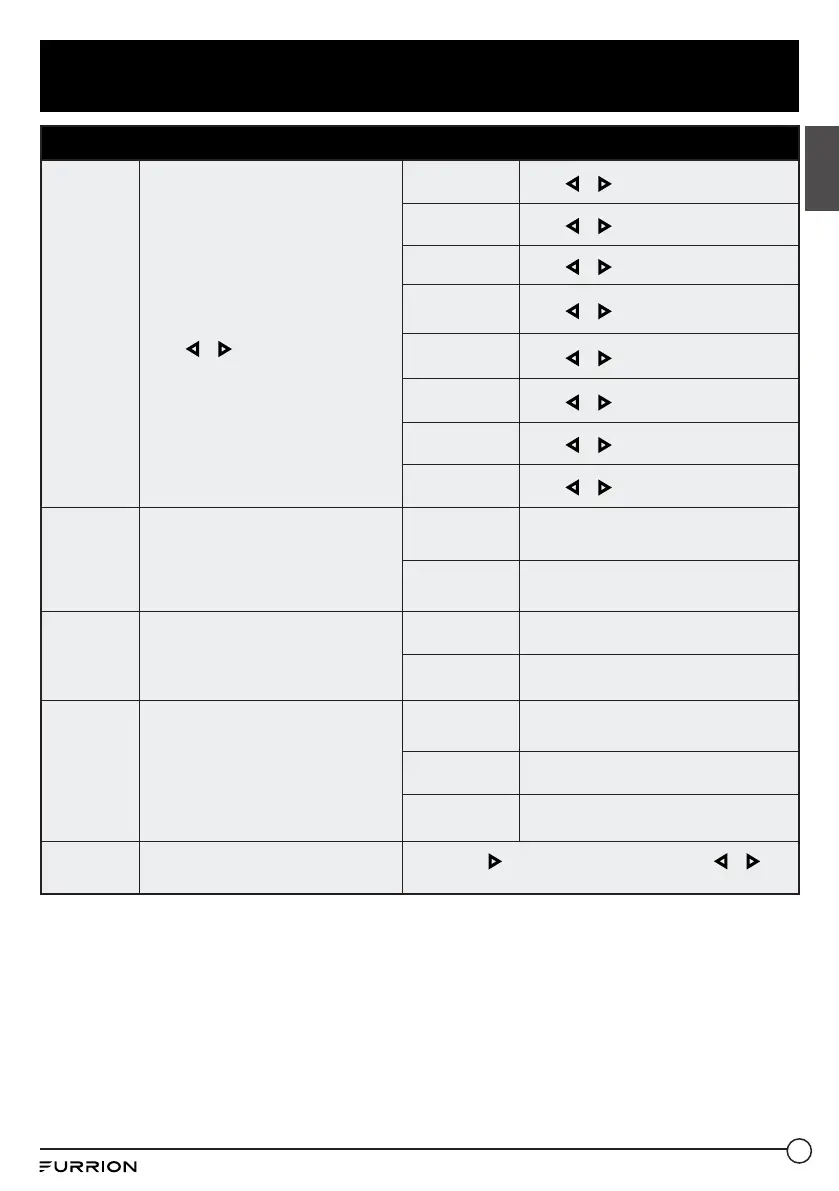
Lock Menu
Input Block
Password locks inputs
Press or to Block or Unblock.
TV
Press or to set as Block or Unblock.
AV
Press or to set as Block or Unblock.
Component
Press or to set as Block or Unblock.
HDMI 1
Press or to set as Block or Unblock.
HDMI 2
Press or to set as Block or Unblock.
HDMI 3
Press or to set as Block or Unblock.
PC
Press or to set as Block or Unblock.
Media
Press or to set as Block or Unblock.
US Rating
Sets parental locks based on US rating
system
* Only available after System Lock was
set as On mode
TV
Set the rating using age level and genre.
Refer to Age & Genre table for definition.
MPAA See US Rating System table.
Canada
Rating
Sets parental locks based on Canadian
rating system
* Only available after System Lock was
set as On mode
Canada
English
See Canadian Rating System table.
Canada French See Canadian Rating System table.
RRT Setting
Sets parental locks based on Canadian
rating system
* Only available when the DTV code
RRT traffic detected by the system
Humor Level See Canadian Rating System table.
Intelligence
level
See Canadian Rating System table.
Erotic level
20CHARS
See Canadian Rating System table.
Reset RRT
Restores to default RRT settings
Press OK or to enter the sub menu, then press or to
select Yes or No.



 To Next Page