3. SETTINGS AND STATUS
3-2
For the PC, click [Apply] or [Apply All] to confirm the settings.
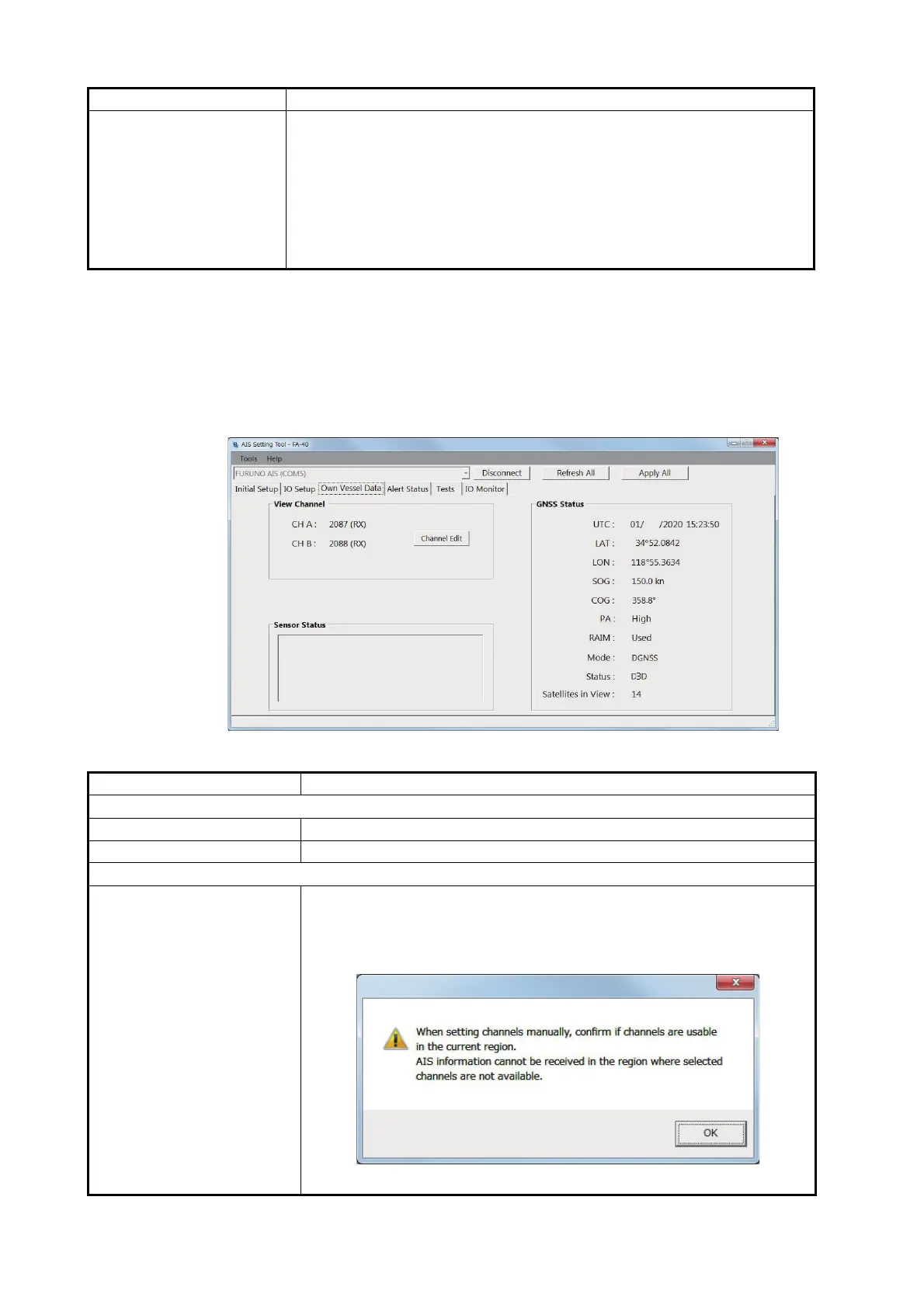
3.2 Own Vessel Data Screen
The [Own Vessel Data] screen shows AIS channel, sensor status, and GNSS status.
[Own Vessel Data] screen for PC
[NMEA1 Output GNSS],
[NMEA2 Output GNSS]
When selecting [GNSS] or [AIS + GNSS] in the [NMEA1/NMEA2 Output
Mode] menu, select the output GNSS sentence for NMEA1/NMEA2
among [OFF], [GGA + VTG (Sentences)], [GLL + VTG (Sentences)] or
[RMC (Sentence)].
[OFF]: Does not output GGA, VTG, GLL or RMC sentence.
[GGA + VTG (Sentences)]: Outputs GGA and VTG sentences.
[GLL + VTG (Sentences)]: Outputs GLL and VTG sentences.
[RMC (Sentence)]: Outputs RMC sentence.
Menu item Description
[View Channel]
[CH A] (for the PC) Shows the channel number and RX mode for channel A.
[CH B] (for the PC) Shows the channel number and RX mode for channel B.
[Channel Edit]
[CH Mode] Select the channel mode from [Auto] or [Manual].
[Auto]: Set the AIS channels automatically.
[Manual]: Sets the AIS channels manually.
When selecting [Manual], the following message appears.
Click [OK] to delete the message.
Menu item Description
Internal DGNSS in Use (Message 17)
Internal SOG/COG in Use
Heading Valid
Channel Management Parameters Changed
JAN
' N
'
W


 To Next Page