Using RAID Modes
p.22
Congure the RAID Mode for Mac
You can easily congure G-RAID Studio’s RAID mode with the following steps.
Important Note: Changing the RAID level will erase all data on the drive. Be sure all of
the data and les you want to save are backed up to separate media.
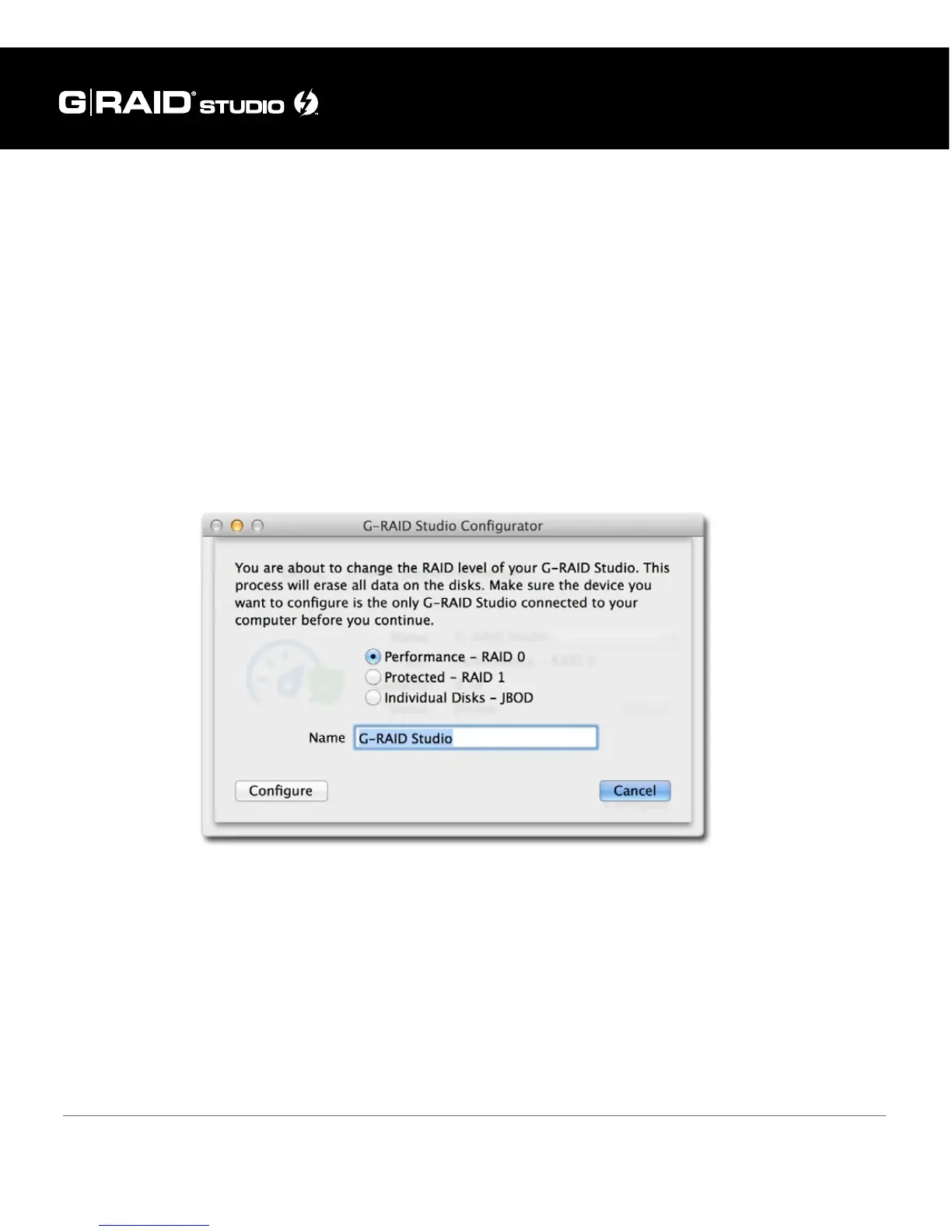
1. In the G-RAID Studio Conguration Utility, click on the Congure button. A dialog
window will pop up with three options for conguring your disk set, as shown
below. The dialog window also will warn you that when you congure your RAID set,
all data in the drive will be erased.
2. Select your desired conguration with the RAID 0 (Performance), RAID 1 (Protected),
or JBOD radio buttons. Then click the Congure button to continue.
3. Two warning windows will appear, both letting you know that the following step will
erase all of your data. Click the Yes buttons to continue.















 To Next Page