4. Operating System and Equipment
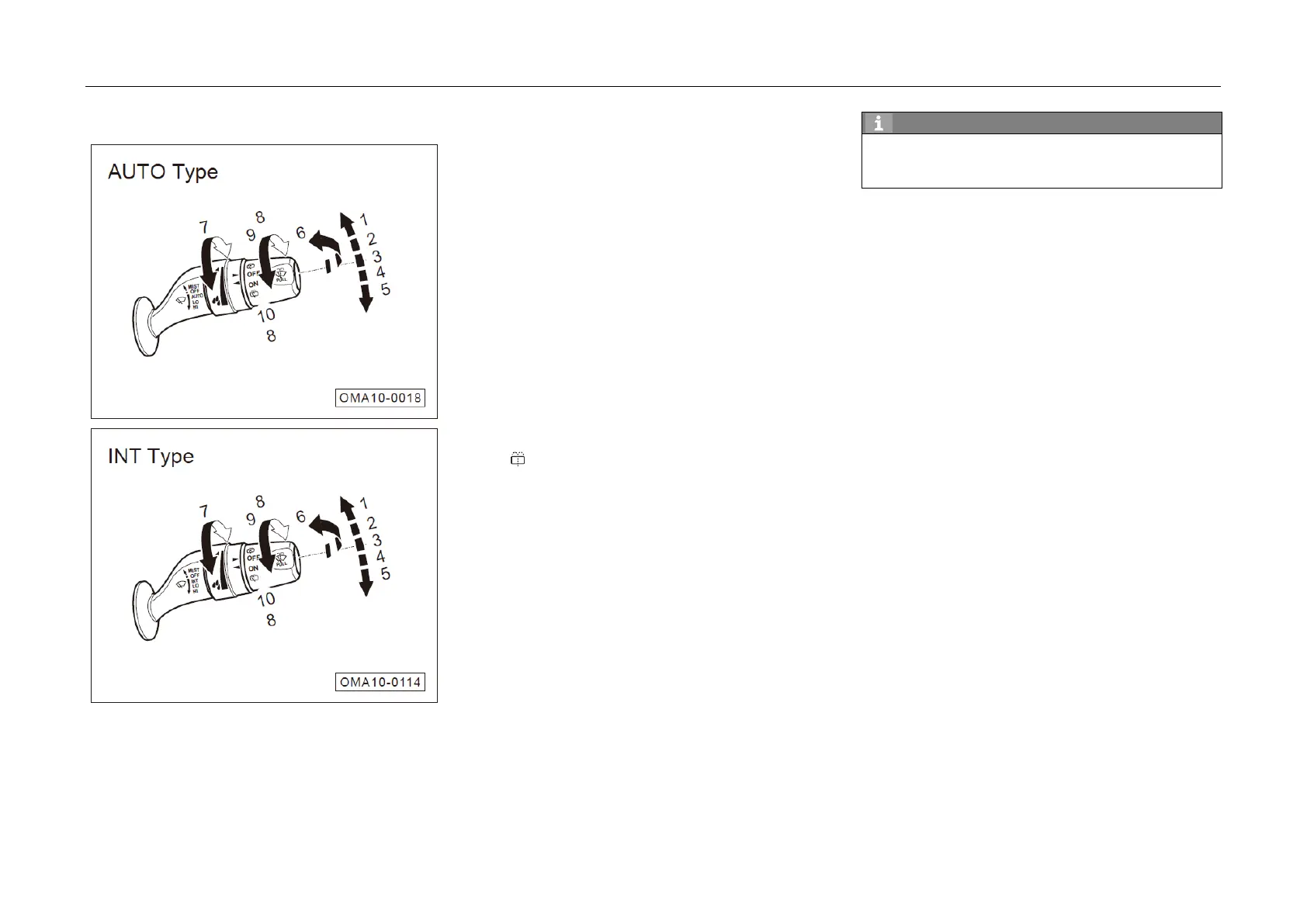
4.3.3 Wiper Combination Switch
When the ignition switch is at "ON" position,
the wiper combination switch can be operated:
1. MIST: Continuous Wiping
2. OFF: Turn off front windshield wipers
3. AUTO: Automatic Wiping*
– INT: Intermittent wiping*
4. LO: Low-speed wiping
5. HI: High-speed wiping
6. Turning on front windshield washer system
7. Adjustment knob:
– Adjust automatic wiper sensitivity (AUTO)*
– Adjust wiping frequency (INT)*
8. :Turning on rear windshield washer system
9. OFF: Turn off rear windshield washer or wiper
10. ON: Turn on rear wiper
With the front wipers in INT/LO/HI mode, if "R"
gear is engaged, the front and rear wipers wipe
synchronously.
MIST: Continuous Wiping
– If the wiper combination switch is shifted to
position ① (MIST), the front wipers will wipe
continuously.
– If the wiper combination switch released to let
it return to OFF position ②, the front wipers
will stop work.
OFF: Wiping Off
– If the wiper combination switch is shifted to
limit position ② OFF position, the front wipers
will stop wiping.
93



 To Next Page