Installation
27
The Interface 5000 Customization Label
Introduction to the Interface 5000 Customization Label
Modern electrochemical testing often involves replicate tests designed to measure or minimize the effect of
irreproducibility in the measurements. Battery tests are a good example, where multiple tests of a particular
battery composition and/or construction are generally required. Multiple potentiostat systems are often used to
speed up the testing process. If the multiple potentiostats can be randomly located in the lab, potentiostat
identification can be a problem. You may need to know “Is the potentiostat to the left of my host computer the
second or third potentiostat in the system?”
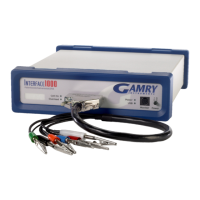
The Interface 5000 includes a customization label that makes each unit visually unique. This allows you to
know exactly which potentiostat will be used for each test. You can place labels easily in the instrument’s
Customization Label area. In a system containing eight potentiostats, the potentiostats might be labeled Pstat 1,
Pstat 2, Pstat 3, ... Pstat 8.
Insert simple paper labels in an area behind the clear plastic outer layer of the front panel. The paper is behind
the plastic, so it is not affected by the lab environment. Best of all, you can edit or print the labels so personal
labels, like Bob’s Stat, are also possible.
There are two versions of the Interface 5000: the Interface 5000P and Interface 5000E. If you upgrade from an
Interface 5000P to an Interface 5000E, you may also remove the P label from the top, and replace it with an E.
Caution: Interrupting a firmware update can cause a catastrophic failure of your system.
Do not turn off the Interface 5000, do not unplug the USB cable, and do not stop the operation of the
host computer when the USB LED is a continuous red color.
Do not interrupt a firmware update that is in progress. An incomplete update can render an Interface 5000
inoperable until it is returned to Gamry for reprogramming.
Should the firmware update be interrupted, contact Gamry before starting the return process.


 To Next Page