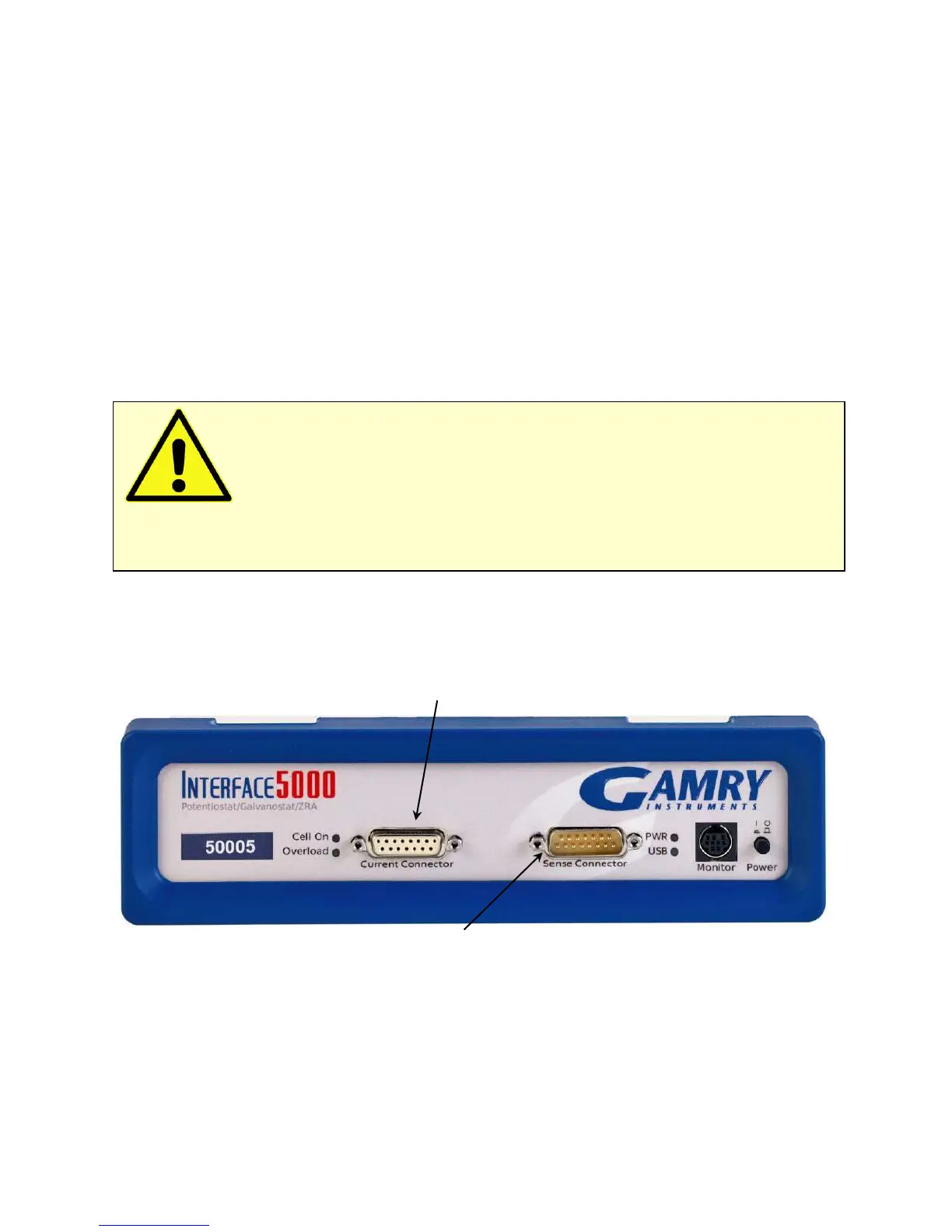
Panel Indicators and Connectors
46
When the Interface 5000 is first turned on, the PWR LED will glow steadily for a second or two, blink three
times, and then enter its normal continuous blue output.
When the PWR LED is off, these are possible causes:
• The Power button is off.
• There is no DC +48 V supply connected to the rear panel Power In connector.
• The external DC power supply has no input power or is malfunctioning.
• One part of the Power PC’s power-up self-test has failed.
An Interface 5000’s PWR LED blinks when that instrument is selected in the Framework’s Instrument Manager.
This allows easy identification of a specific instrument in a Multichannel system without looking at the
instrument Serial Label on the bottom of the instrument chassis.
Finally, the PWR LED continuously blinks if the instrument is subject to an over-temperature condition. In this
case, the instrument is not usable until it has been powered down, allowed to cool, and restarted.
Cell Connectors
The Interface 5000 has two cell cable connectors, each with a 15-pin D-type connector.
The left (female) connector is labeled Current Connector. It carries the cell current between the Counter
electrode wire and the Working electrode wires.
Current Connector
Sense Connector
The right (male) connector is labeled Sense Connector. It contains only high-impedance inputs used to sense
potentials in the cell.
In addition to the pins used for cell connections, each Interface 5000 Cell Connector also uses four pins to read
a cell cable ID. Gamry software can compensate for the cell-cable characteristics to attain optimal system
performance, especially in EIS (Electrochemical Impedance Spectroscopy). The cable IDs for the Interface 5000
are different from the IDs used by the Gamry Reference 3000. The cables look the same except for labeling,
but they are not interchangable. Gamry’s software does not allow use of a Reference 3000 cable on an
Interface 5000.
Caution: The PWR LED indicates power status, power-up tests have passed, to identify
instruments, and to indicate latch-up caused by an over-temperature event. Never rely on the PWR LED as a
true power-status indicator. Always unplug the Power In connection if you suspect your Interface 5000 is
malfunctioning.


 To Next Page