12 nüvi 2200/2300/2400 Series Owner’s Manual
Finding Locations
Finding Locations
The device offers many methods for
nding locations.
• By category (page 12)
• Near another location (page 14)
• By spelling the name (page 16)
• By address (page 16)
• Using the map (page 17)
• Using recently found locations
(page 17)
• Using coordinates (page 18)
• Using photos (page 18)
• Using Favorites (page 21)
About Points of Interest
The detailed maps loaded in your
device contain points of interest,
such as restaurants, hotels, and auto
services. Use the Points of Interest
function to browse for nearby
businesses and attractions.
Finding a Point of Interest by
Category
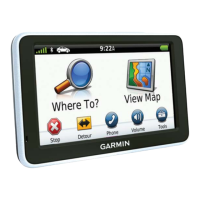
1. From the main menu, touch
Where To? > Points of Interest.
2. Select a category.
3. If necessary, select a subcategory.
4. Select a destination.
5. Touch Go!.
6. If necessary, select an option:
• Touch Drive.
• Touch Walk.
• Touch Public Transit to
calculate a route that combines
public transit and walking.


 To Next Page