8 GDL 30/30A Owner’s Manual
THE WEATHER FEATURES
Following is a brief description of each weather feature. The weather features are divided into three sub categories, Precipitation, Atmosphere, and Sea State.
Precipitation
The Precipitation category contains NEXRAD/Cloud Tops, Storm Cells, Lightning, and Hurricanes. Each feature can be turned on, off or set to display at a selected
zoom range.
NEXRAD
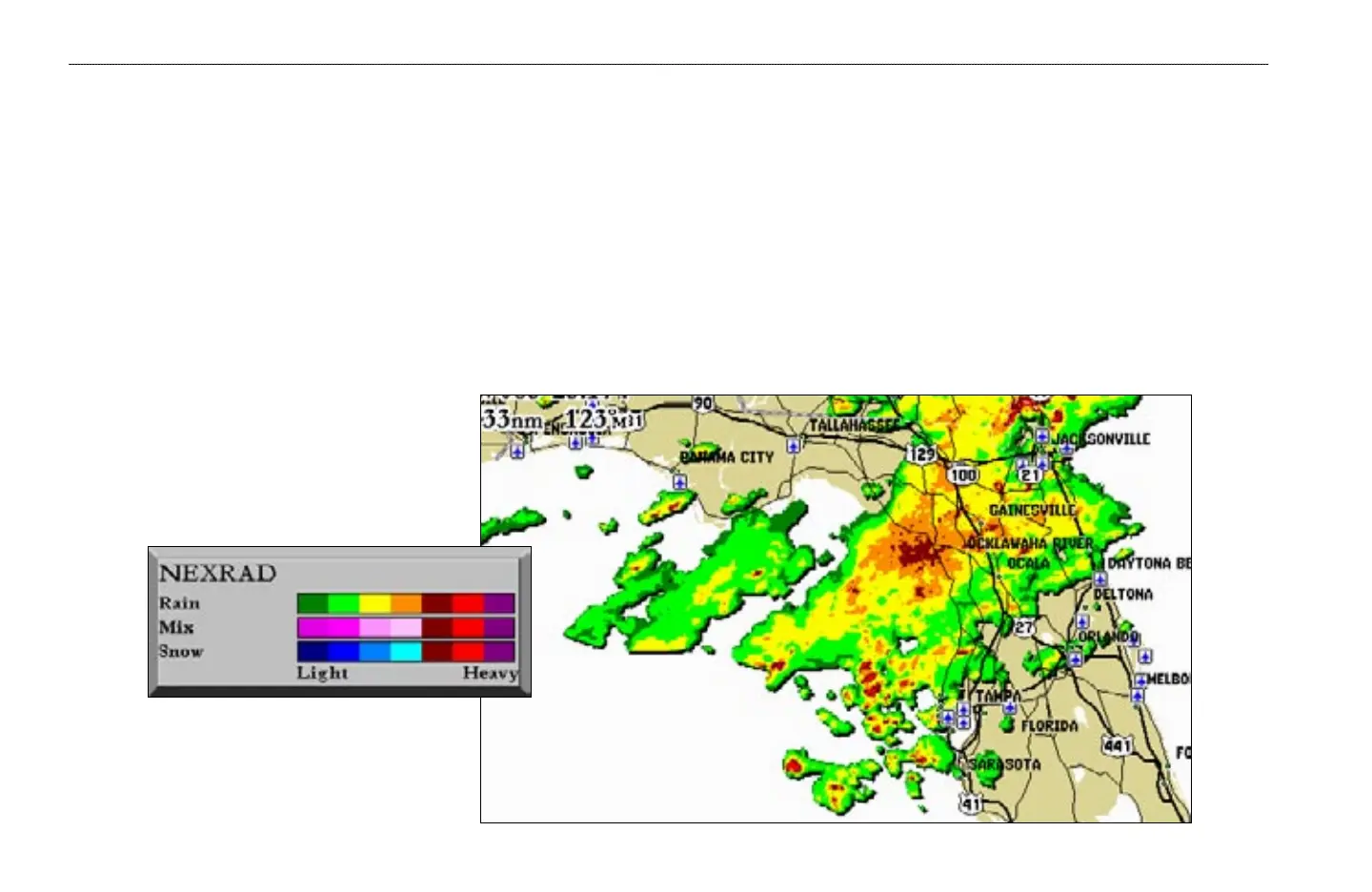
NEXRAD is an acronym for NEXt Generation Weather RADar. The NEXRAD feature displays precipitation from very light rain and snow up to strong thunderstorms in varying
shades and colors.
A legend showing the colors for Rain, Mix, and Snow can be displayed by pressing the ADJ key and selecting Weather Legend. NEXRAD can be
displayed independently or with Cloud Tops.
NEXRAD Legend
NEXRAD
WEATHER FEATURES > PRECIPITATION—NEXRAD


 To Next Page