16 GDL 30/30A Owner’s Manual
Fronts
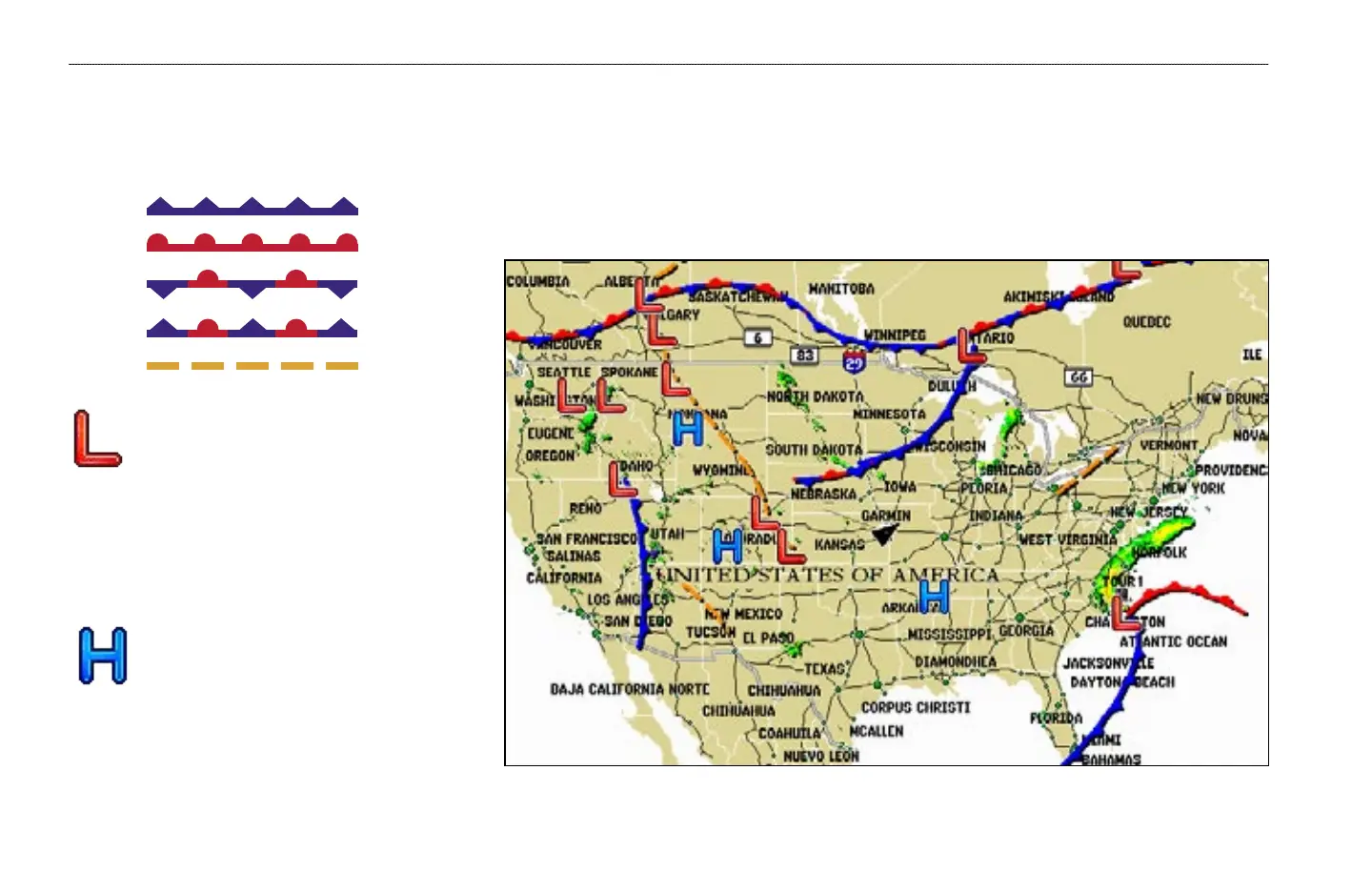
The Fronts feature displays the lines indicating the leading edge of an air mass that is replacing another. This feature also displays pressure centers. Pressure centers are
represented by a large Red “L” for low pressure centers or a large Blue “H” for high pressure centers. Pressure centers represent an area where pressure is measured to
be either the highest or lowest relative to the surrounding area.
Indicates a Low Pressure Center. A Low
Pressure Center is an area where the
measured pressure is lowest relative to the
surrounding area. Moving away from a Low
Pressure Center in any horizontal direction
results in increased pressure. Winds flow
counterclockwise around Low Pressure
Centers in North America.
Indicates a High Pressure Center. Similar
to a Low Pressure Center, a High Pressure
Center is an area where the measured pressure
is highest relative to the surrounding area.
Moving away from a High Pressure Center in
any horizontal direction results in decreased
pressure. Winds flow clockwise around Low
Pressure Centers in North America.
Cold Front
Warm Front
Stationary Front
Occluded Front
Dry Line
WEATHER FEATURES > ATMOSPHERE—FRONTS


 To Next Page