Fishnder 400C Owner’s Manual
InstallIng the FIshFInder 400c
Step 5: Test the Installation
To turn on your Fishnder 400C for the rst time, press and hold the POWER key until the unit beeps and turns on. Use the ROCKER
and the SELECT key and follow the screens to congure your Fishnder 400C.
NOTE: Although it is possible to perform some checks with the boat trailered, the boat should be in the water to properly test the installation.
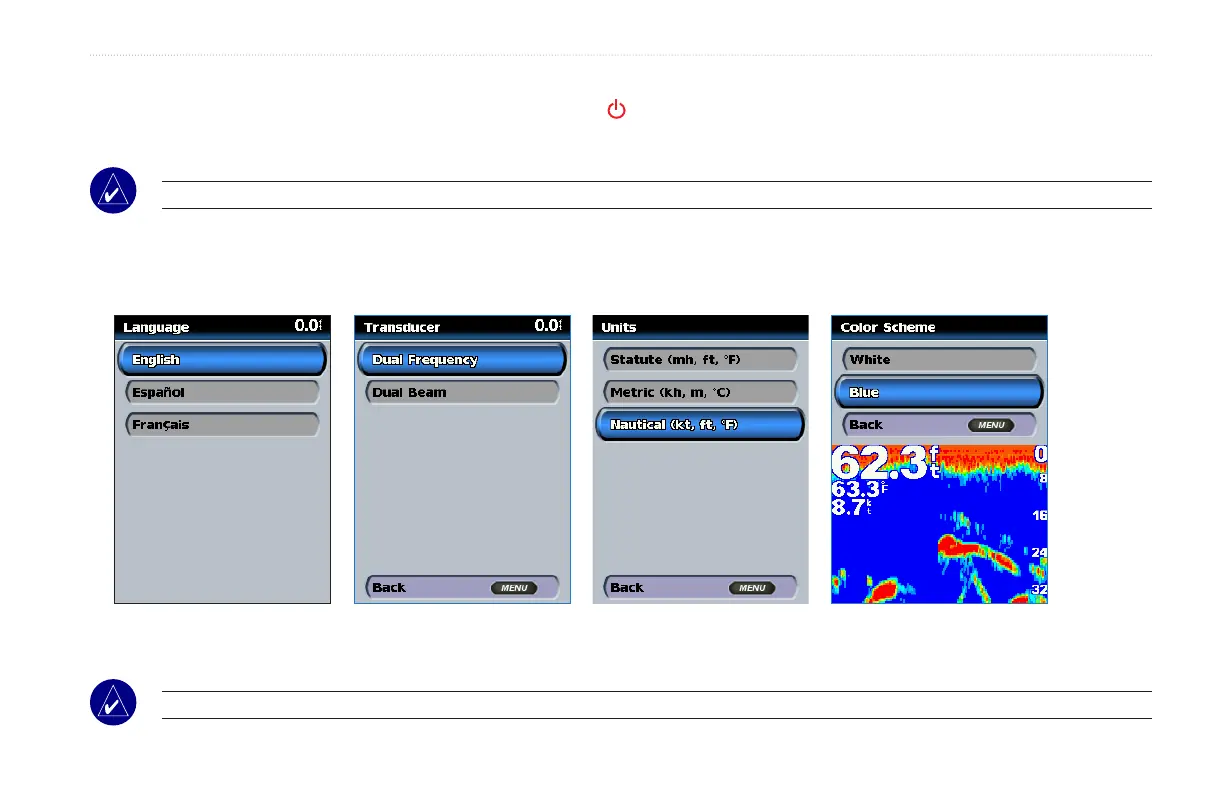
To congure your Fishnder 400C for the rst time:
Selectalanguage.
Selectatransducer
type.
Selectunitsof
measure.
Select a color
scheme.
The Home screen appears after you select your conguration options. After 15 seconds of inactivity, the shnder automatically switches to
Full Screen.
NOTE: If the transducer is not detected, a “Transducer Disconnected, Sonar Turned Off” message appears.












 To Next Page