Fishnder 400C Owner’s Manual
BasIc operatIon
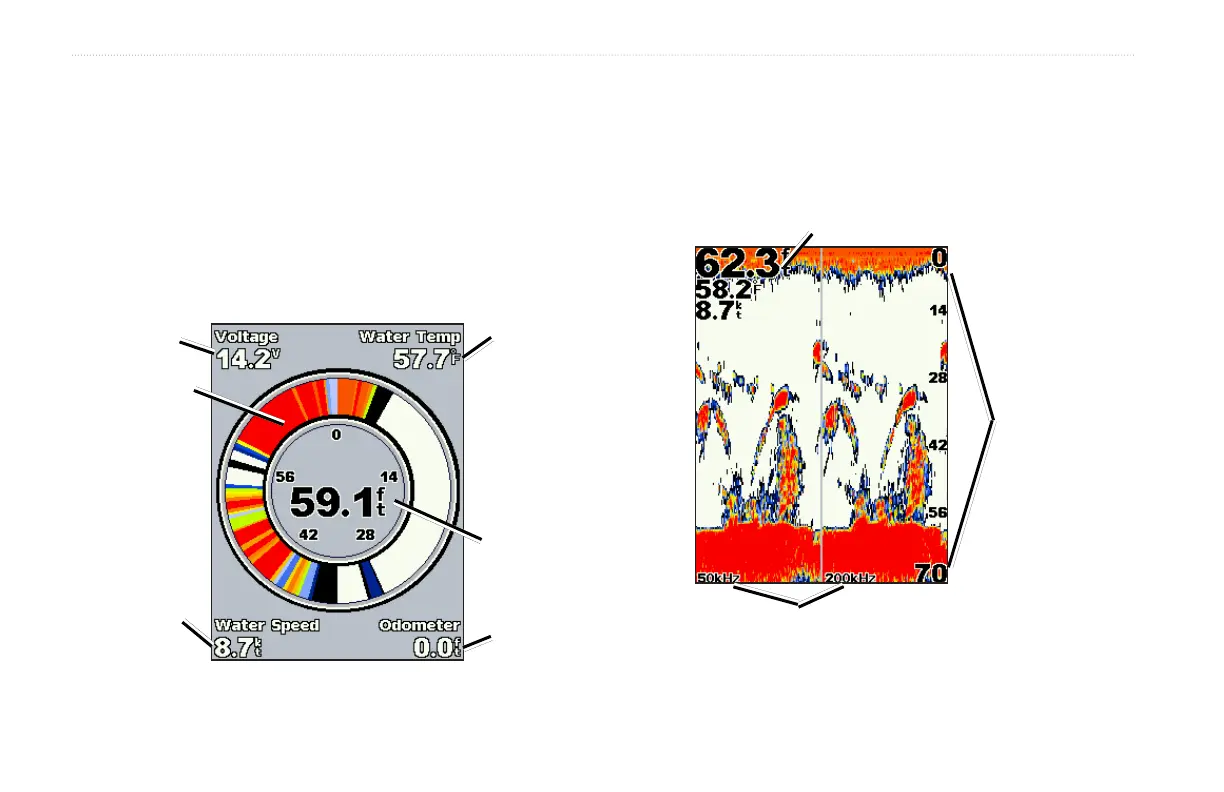
Understanding the Flasher Screen
The Flasher screen (dual beam transducer only) provides an almost
instantaneous return of what is below your boat. The depth scale is
organized as a ring that starts at the top, or 12:00, and progresses
clockwise. Sonar information ashes on the ring when it is received
at the depth indicated on the inside ring.
Like the regular graph,
The
colors indicate different strengths of the sonar return.
On the Home screen, highlight Flasher, and press SELECT.
Flasher ring
Depth
Water
Temp
Voltage
Water
speed
Odometer
Understanding the Split Freq Screen
Use the Split Freq screen (dual frequency transducer only) to view
both the 50kHz and 200kHz frequencies on the same screen.
On the Home screen, highlight Split Freq, and press SELECT.
Depth, temperature and speed
Range
Frequencies












 To Next Page