Garmin G5 User's Manual
190-02072-00 Rev. B
22
Installation Manual
Installation ManualPilot's GuideIndex
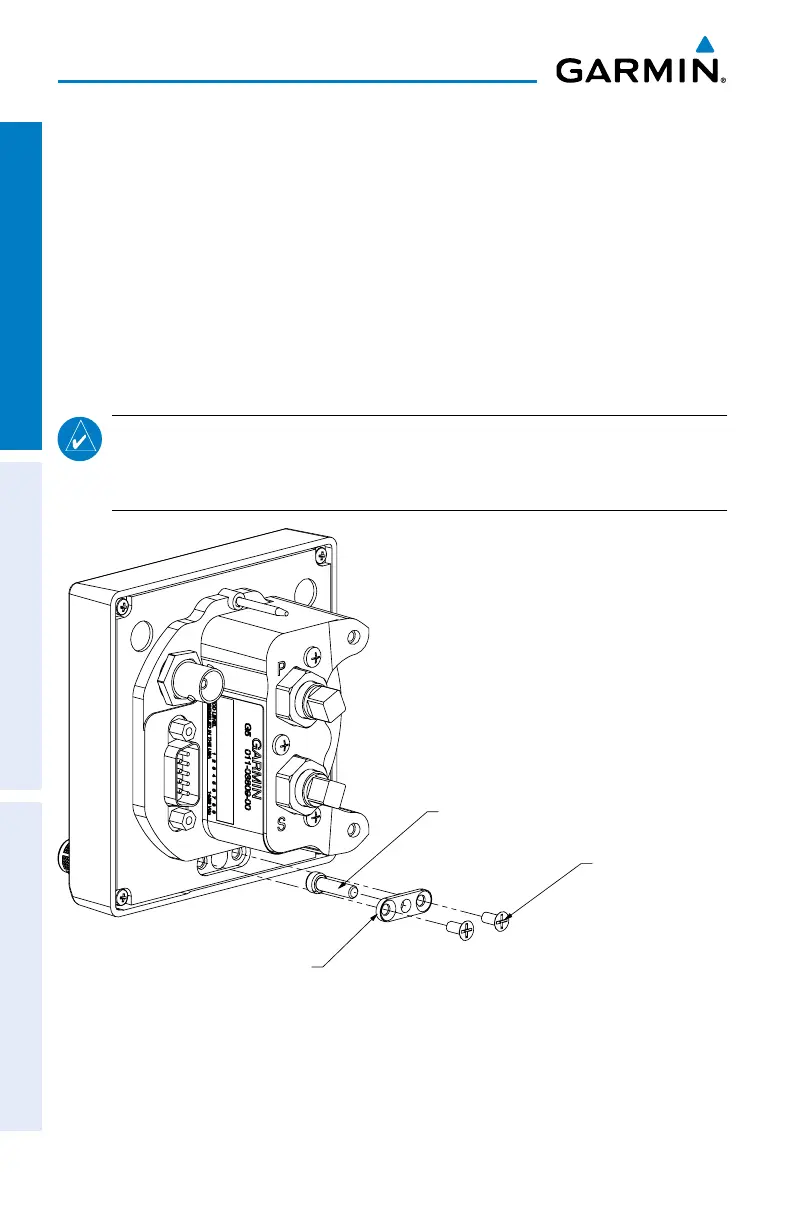
1.3.6.4 CAPTIVE MOUNTING SCREW REPLACEMENT
The captive 3/32” hex socket head screw can be used for panel
thicknesses up to 0.150”. For installations with a panel thickness greater
than 0.150”, the captive mounting screw can be replaced with a standard
#6-32 hex socket head screw. To replace the screw, remove the two
#4-40 flat head Phillips mount plate screws, the G5 screw mount plate, and the
captive screw as shown in Figure 1-9. Reverse this process to install the longer #6-32
hex socket head screw. Ensure correct orientation of the screw mount plate before
applying 6-8 in-lb. of torque to the #4-40 mount plate screws.
NOTE:
Standard #6-32 hex socket head screws use a 7/64” hex drive feature. The
access hole in the G5 bezel is large enough to accommodate this increase in hex
tool size.
G5 SCREW
MOUNT PLATE
MOUNTING SCREW,
#4-40 FLHP x 0.25[6.4
2 PLACES
CAPTIVE 3/32 HEX
SOCKET HEAD SCREW
Figure 1-9 G5 Captive Mounting Screw Replacement





 To Next Page