190-00870-02 Rev. A
Garmin G950 Pilot’s Guide for the Pilatus PC-6
301
HAZARD AVOIDANCE
SYSTEM
OVERVIEW
FLIGHT
INSTRUMENTS
EIS
AUDIO PANEL
& CNS
FLIGHT
MANAGEMENT
HAZARD
AVOIDANCE
AFCS
ADDITIONAL
FEATURES
APPENDICES INDEX
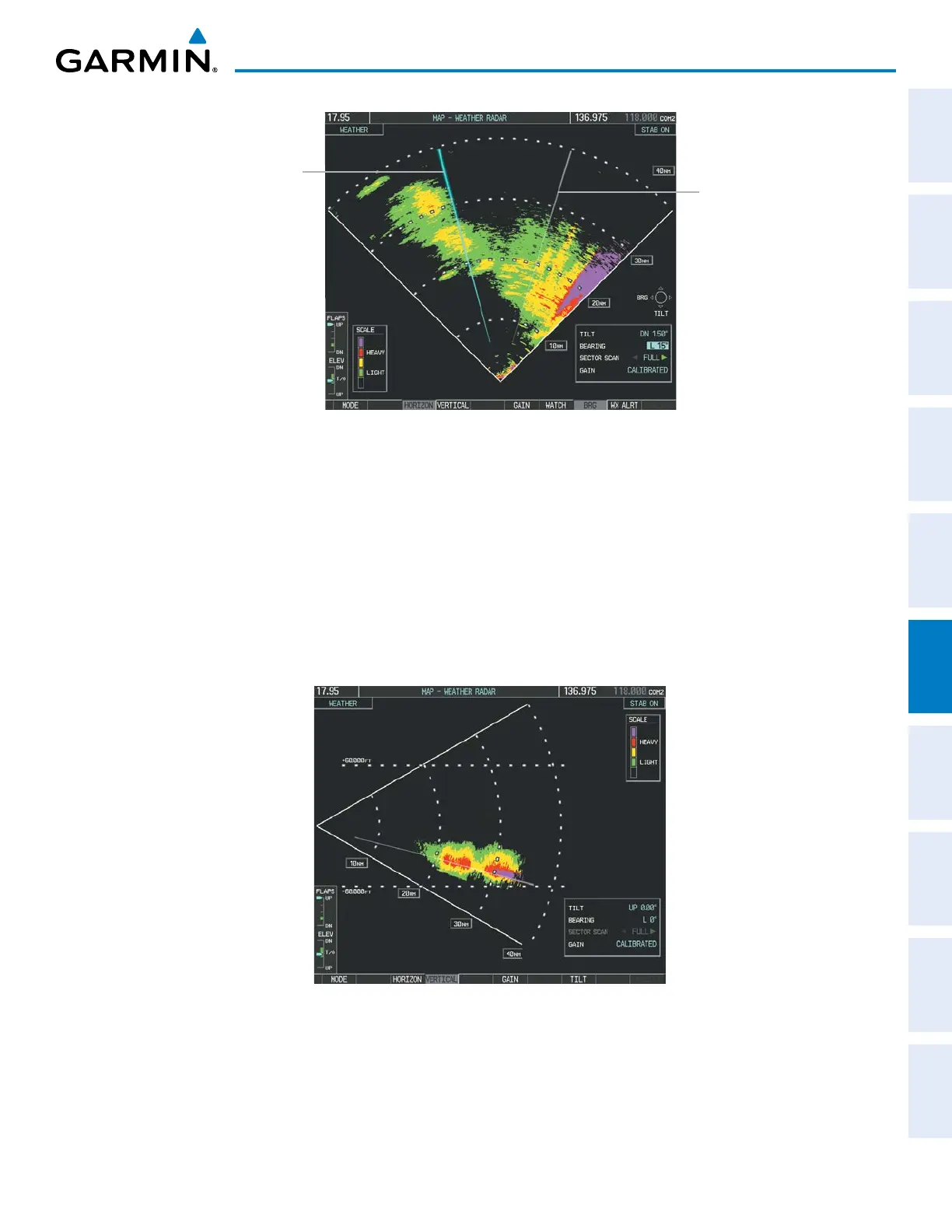
Figure 6-12 Bearing Line on Horizontal Scan
Bearing Line
Scan Line
4) Press the
VERTICAL Softkey. A vertical slice of the selected area is displayed (Figure 6-13).
5) The small
FMS Knob may be used to move the scanned slice a few degrees right or left.
6) Turn the Joystick to adjust the range.
7) Press the FMS Knob to remove the cursor.
8) To select a new area to be vertically scanned, press the HORIZON Softkey to return to the Horizontal Scan view
and repeat the previous steps.
The Joystick can also be used to adjust bearing from left to right.
Figure 6-13 Vertical Scan Display



 To Next Page