22 GPSMAP 292/298 Owner’s Manual
BASIC OPERATION > DSC
When the rescuer receives the call, they can immediately access the
caller’s information (such as who they are and the type of vessel) in
their database while they are in transit to the caller’s location.
A non-emergency DSC Position Report allows mariners to
exchange and show the positions of one another. When a DSC
position is received, the mariner can choose to create a waypoint or
to show the received location on an electronic map.
Anytime a vessel receives a DSC call, they can store and quickly
navigate to that location using a Go To. In order to use DSC, users
must first register their VHF radio with the FCC and receive a
Maritime Mobile Service Identity (MMSI) number. Garmin does
not provide MMSI numbers.
For more information about Digital Selective Calling and Maritime
Mobile Service Identity (MMSI) numbers, refer to page 97 in the
“Appendix.”
Understanding Distress Calls
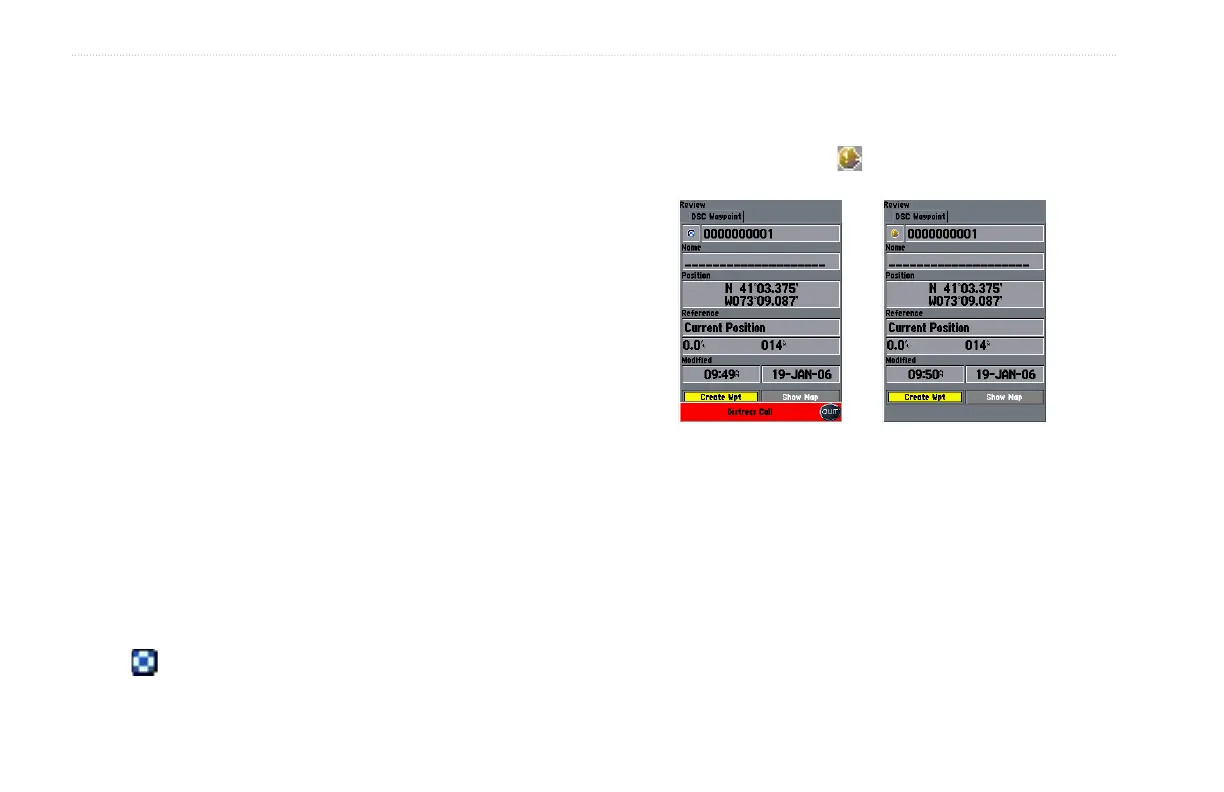
When the GPSMAP 292/298 receives a Distress Call from
a connected DSC enabled VHF radio, an alert message and
notification page are shown, and an alarm tone is sounded. Distress
Calls are shown in the DSC Call List, and Log with a checkered
symbol .
Understanding Position Reports
A Position Report is similar to a Distress Call except no alarm is
sounded. Position Reports are not broadcast to all DSC users and
are shown with a boat symbol .
Receiving DSC Calls
Each time you receive a Distress Call or Position Report, a
Notification Page is shown, and the call is placed in the DSC Call
List and Log. The Notification Page contains information about
the call including: the type of call (distress or position report),
the MMSI number of the caller, a user definable name, the time
and date of the call, the Bearing and Distance from your current
location, and the coordinates of the caller. To see the caller’s
location on a map, select the Show Map button. To create a
waypoint at the caller’s location, select the Create Wpt button. To
close the Notification Page, press QUIT.













 To Next Page