92 GPSMAP 292/298 Owner’s Manual
APPENDIX > CONNECTING THE POWER/DATA CABLE
Connecting the Power/Data Cable
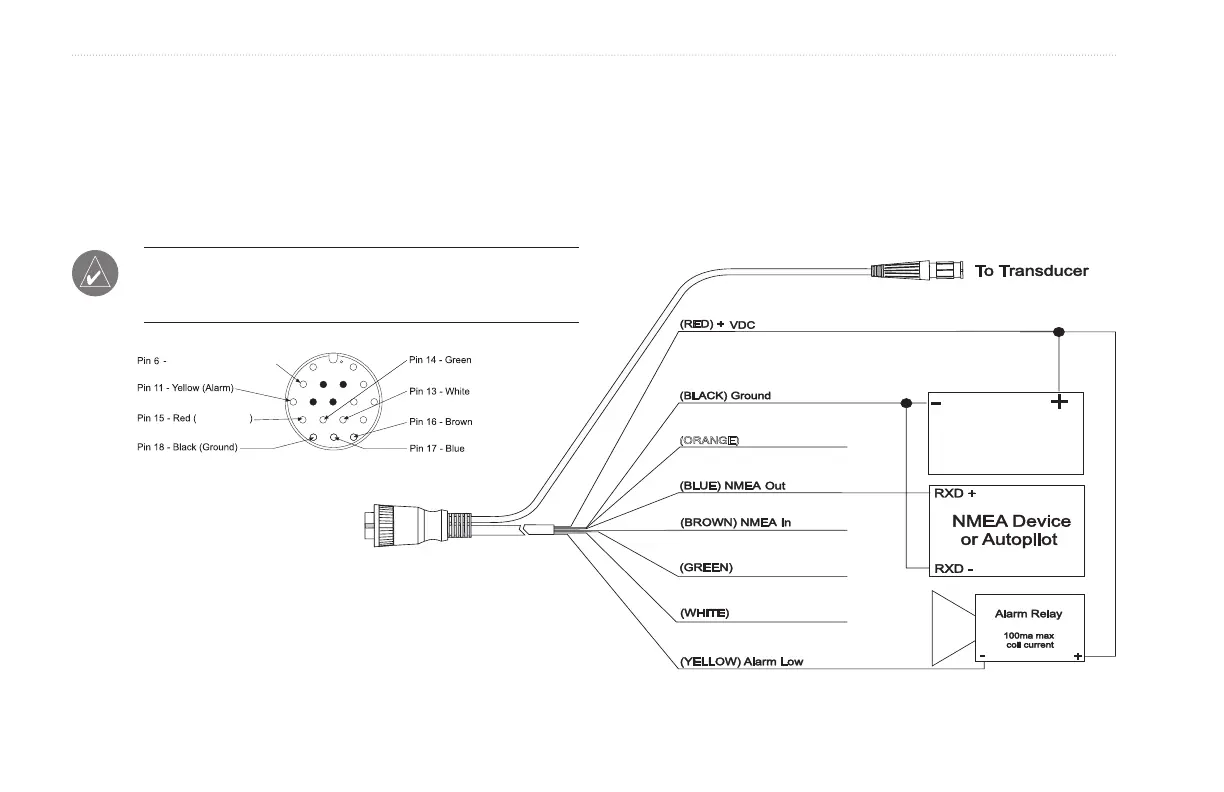
The power/data cable connects the GPSMAP 292/298 to a DC
supply and provides interface capabilities for connecting external
devices. The color code in the diagram below indicates
the appropriate harness connections. Replacement fuse is a
AGC/3AG - 3 Amp fuse.
NOTE: During a typical installation, only the Red and Black
wires are used. The other wires do not have to be connected for
normal operation of the unit.
CANet H
CANet L
Accessory On
DC Power
Source
DC Positive
(RX NMEA)
(TX NMEA)
(CANet H)
(CANet L)
Orange (Accessory On)













 To Next Page