GPSMAP 292/298 Owner’s Manual 45
MAIN MENU > CELES TAB
Celes (Celestial) Tab
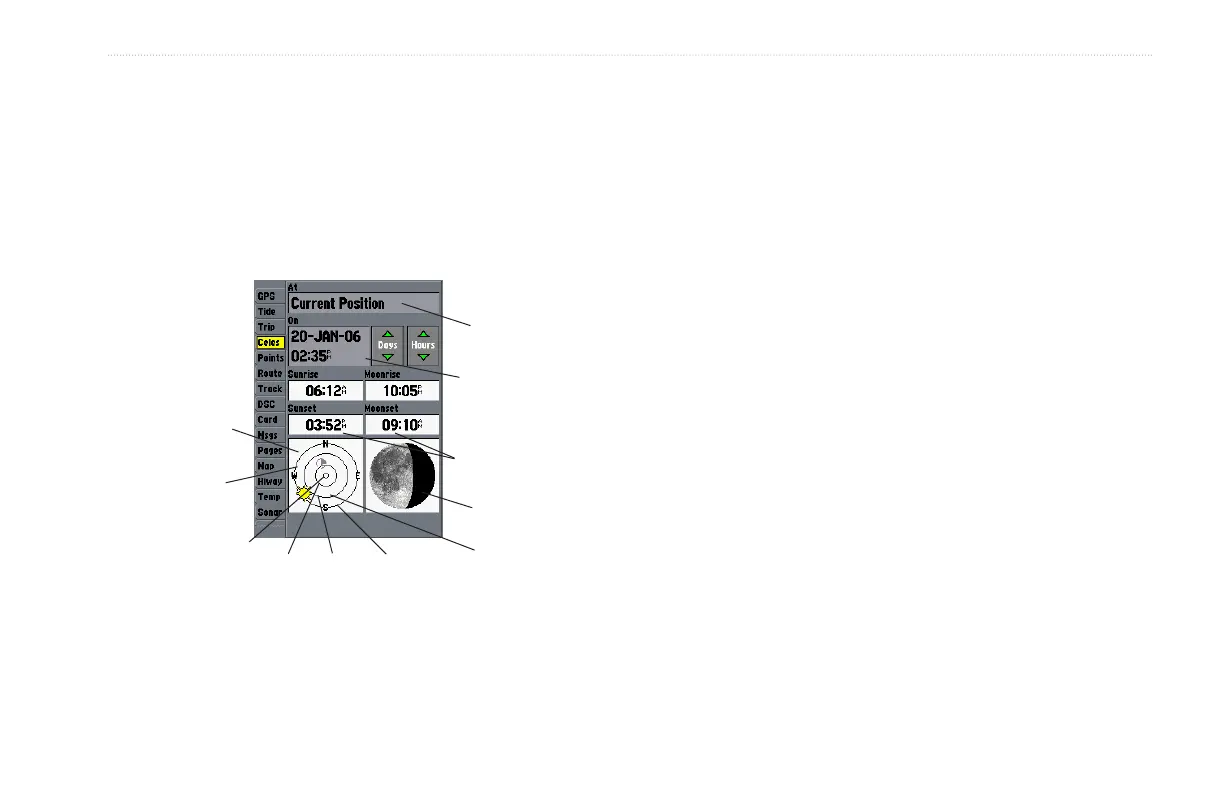
The Celestial tab shows celestial data for sun and moon rise/set,
moon phase, and approximate sky view location of the sun and
moon. The moon phase shows the current visible portion of the
moon as a light color. You can show this data for your present
location, a location from the map, or a Find item location. Use the
today’s data, or select a different date and time.
Date/Time
Position
Moon phase
Sun
position
Moon
position
Horizon
(0°)
45°
70°
Overhead
(90°)
Sky view
window
Sun/Moon
event times
To choose a position:
1. From the Celes tab, highlight the At field, and press
ENTER.
2. From the Find list highlight any category, and press ENTER.
If you want to reference a Find item, select from the Find
list, and press ENTER.
3. Select an item from the list or tab lists, and press ENTER.
For a location from the map, choose Map Position, press
ENTER, select a location on the map, and press ENTER.
4. From the Find item detail page, highlight OK, and press
ENTER.
The location the unit is using appears in the Date/Time/Position
field. The time tables shown are based on your current time zone.
When using a position from another location outside of your time
zone, you need to set the Time Zone for that location. See page 68
for more information on setting time zones.













 To Next Page