34 GPSMAP 292/298 Owner’s Manual
MAIN PAGES > 3D HIGHWAY PAGE
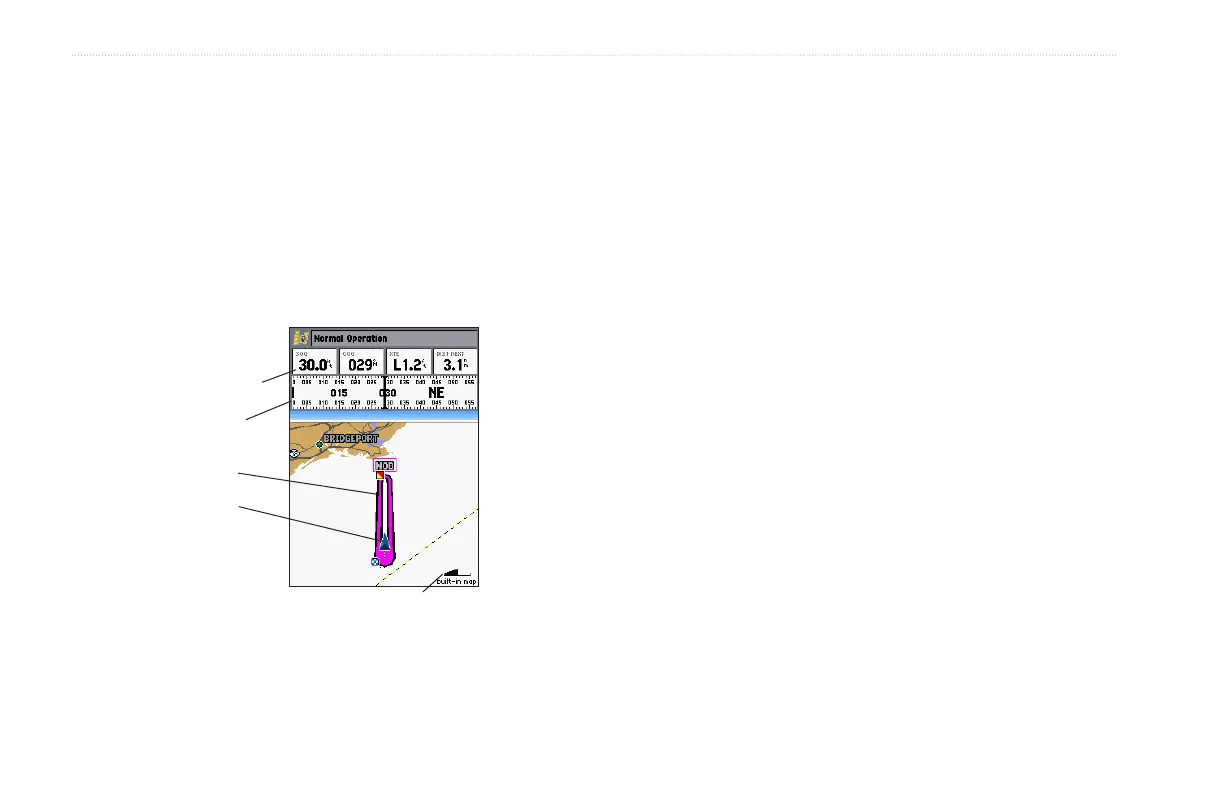
The four data fields at the top of the page provide additional user-
selectable guidance information. Additionally, a compass ribbon
shows your current heading along with a dark, vertical bar that
indicates the direct bearing to the navigation point. When the dark,
vertical indicator (or arrow) lines up with the lighter red bar in the
middle, you are heading directly to the navigation point. Use the
3D Highway Page as your primary navigation page in lieu of the
Compass Page when your main concern is following a defined
course.
Zoom
scale
Data fields
Course
Compass
tape
Present
location
Each data field at the top of the page can be configured to show
several data options. The data window layout can be configured to
show additional data fields and change the size of the data shown.
Refer to page 30 for more information.
To zoom in or out on the 3D Highway Page:
Press either the RANGE Down or RANGE Up key to
increase or decrease the zoom range.













 To Next Page